Two years ago, making a mashup meant spending an hour hunting for an official acapella, trying phase cancellation tricks that never quite worked, and manually tapping out BPM values on a website. Today, I can split any song into vocals, drums, bass, piano, guitar, and other in about 15 seconds on my laptop. No internet connection, no file uploads, no quality loss from browser-based tools. That's what AI stem separation did to mashup creation, and if you're not using it yet, you're burning time.
Why AI Changed Mashup Creation Forever
A mashup lives or dies on the quality of its source material. You need a clean vocal from one track and a clean instrumental from another. Before AI, your options were limited: search for official acapella releases (which exist for maybe 5% of songs), attempt EQ-based vocal isolation (which leaves artifacts and bleed), or use online phase cancellation tools (which upload your audio to a server and produce mediocre results).
AI stem separation changed the equation. Instead of working around the mix, you deconstruct it. A neural network trained on millions of songs can identify the spectral signature of a vocal, a drum kit, a bass line, and separate them with quality that approaches the original isolated recording. You can read more about how this works in our deep dive on how stem separation actually works.
For mashups specifically, this means you can take any two songs from your library and create a blend. No waiting for an official acapella drop. No compromising on track selection because you can't find stems. The entire catalog of recorded music becomes your source material.
What Is a Mashup? The Basics
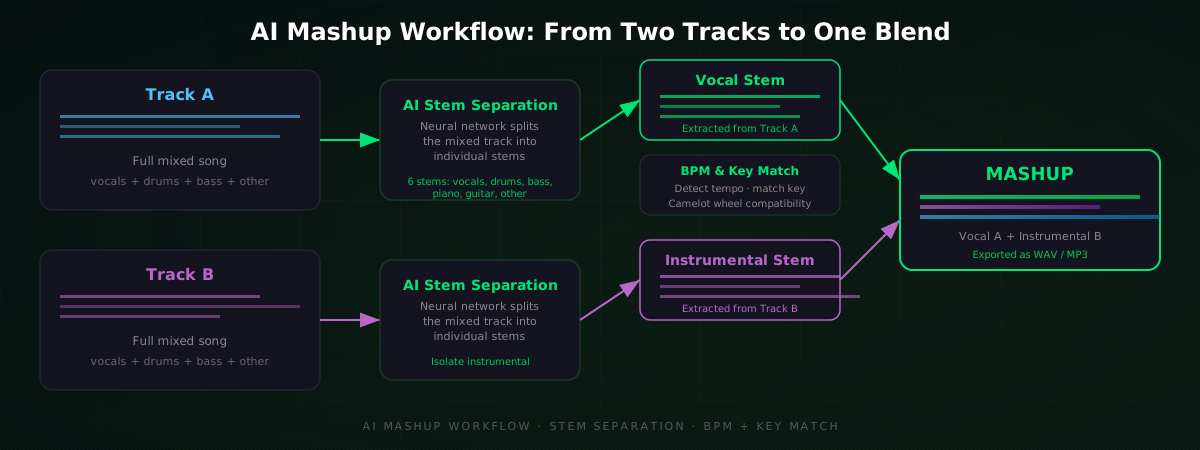
A mashup combines the vocal from one song with the instrumental of another. The goal is a blend that sounds intentional, like the two tracks were always meant to exist together. The best mashups create something new: a familiar vocal over a fresh beat that changes the emotional context of both songs.
The core requirements are simple:
- Clean vocal stem from Track A (no background music bleeding through)
- Clean instrumental stem from Track B (no vocals bleeding through)
- Compatible BPM (within 5-8% for time-stretching without artifacts)
- Compatible key (same key or a harmonic-compatible key on the Camelot wheel)
That's it. If you have those four things, you have a mashup. The problem was always getting the first two. AI solved that.
How AI Stem Separation Makes Mashups Possible
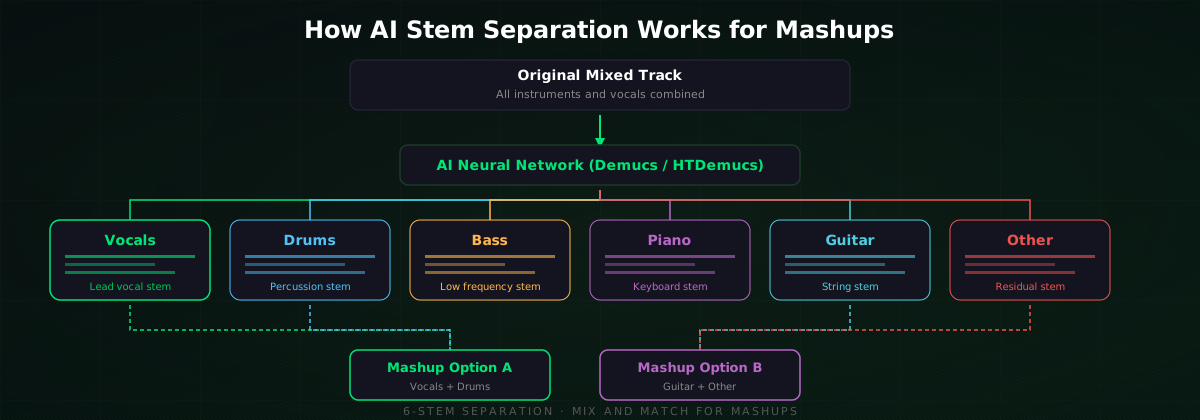
Modern stem separation models like Demucs (developed by Meta Research) and HTDemucs use hybrid transformer-waveform architectures that process audio in both the spectral and waveform domains simultaneously. The model has been trained on datasets where both the mixed song and the individual stems are known, so it learns to recognize what a vocal "looks like" in a spectrogram and can predict it from a mixed signal.
The current generation of models can separate a song into 6 stems:
- Vocals (lead and backing)
- Drums (kick, snare, hi-hats, cymbals)
- Bass (bass guitar, synth bass)
- Piano (acoustic and electric piano)
- Guitar (electric and acoustic)
- Other (synths, strings, effects, residual audio)
For mashups, you typically only need two stems: the vocal from Track A and the instrumental (everything except vocals) from Track B. But having access to all 6 opens up creative possibilities, like blending the drums from one track with the bass and vocals from another for a more complex arrangement.
GreenGo supports all 6 stems and runs the separation locally on your desktop. No file uploads, no internet connection needed for processing. You can try it with 3 songs for free, or start a 7-day free trial (no credit card required) to get 3 stem separations.
Step-by-Step: Making a Mashup with GreenGo
Here's the actual workflow I use when testing mashup features in GreenGo. The whole process takes under a minute for the technical prep, then however long you want to spend on creative decisions.
Step 1: Choose Your Two Tracks
Pick a vocal source (Track A) and an instrumental source (Track B). The best mashups come from tracks that have contrasting energy but compatible tempo and key. A slow R&B vocal over a house beat. A rock vocal over a hip-hop instrumental. A pop vocal over a drum and bass track.
If you're not sure where to start, check our BPM chart for every music genre to find tempo ranges that overlap naturally.
Step 2: Separate Stems on Both Tracks
Load both tracks into GreenGo's stem separation tool. Each track splits into 6 stems in about 15 seconds. Export the vocal stem from Track A and the instrumental stem (or a combination of drums + bass + other) from Track B.
If you've never used stem separation before, our guide on the best AI vocal removers in 2026 compares the top tools and explains what to listen for when judging separation quality.
Step 3: Detect BPM and Key on Both Tracks
Before you layer anything, you need to know the tempo and key of both sources. GreenGo's track analysis detects BPM and musical key automatically. Run it on both tracks and note the values.
If the BPM difference is more than 8%, you'll need to time-stretch one of the stems, which can introduce artifacts. If the keys are incompatible on the Camelot wheel, the mashup will sound dissonant no matter how clean the stems are.
Step 4: Match Tempo
If the BPMs are close (within 5%), you can get away with a simple pitch adjustment in your DAW or audio editor. If they're further apart, time-stretch the vocal to match the instrumental's tempo. Most DAWs (Ableton, FL Studio, Logic) handle this with a single click. If you're new to DAWs, our guide to the best music production software for beginners covers the options.
Step 5: Match Key (If Needed)
If the keys are compatible (same key or adjacent on the Camelot wheel), skip this step. If they're close but not perfect, you can pitch-shift the vocal by a semitone or two. If they're far apart, consider choosing a different track. Pitch-shifting more than 2-3 semitones starts to sound unnatural.
For more on harmonic compatibility, read our guide on key lock and harmonic mixing.
Step 6: Layer and Export
Drop the vocal stem over the instrumental in your audio editor. Align the downbeats. Adjust levels so the vocal sits on top of the instrumental without getting buried. Add a high-pass filter on the vocal (around 80-100 Hz) to remove any low-frequency bleed from the original mix. Export as WAV for maximum quality, or MP3 if file size matters more.
If you need to convert between formats, GreenGo's audio converter handles WAV, FLAC, MP3, and AAC. Read our file format guide to understand which format to use and why.
Matching BPM and Key: The Technical Foundation
The single biggest reason mashups fail is not stem quality, it's BPM and key incompatibility. You can have the cleanest vocal and instrumental in the world, but if the tempo is off by 15 BPM or the keys clash, the result sounds like two songs playing at the same time by accident.
BPM matching is straightforward: detect the tempo of both tracks, then time-stretch one to match the other. The rule of thumb is that you can safely stretch or compress by up to 8% before artifacts become noticeable. Beyond that, the vocal starts to sound chipmunk-ed or slowed-down. For more on BPM detection methods, see our comparison of 5 ways to find BPM.
Key matching is trickier. The Camelot wheel is your friend here. Each key is assigned a code like 8A or 5B. Keys that share the same number (8A and 8B) are harmonically compatible. Keys that are adjacent by one number (8A and 9A) are also compatible. If both tracks are in the same key, you're golden. If they're adjacent on the wheel, you're fine. If they're across the wheel from each other, the mashup will sound dissonant.
GreenGo detects both BPM and key automatically during track analysis, so you don't have to guess or tap tempo manually.
Tips for Better Sounding Mashups
After testing hundreds of mashup combinations while building GreenGo's stem separation, here are the practical lessons:
- Start with the vocal. The vocal is the anchor. Find a vocal you love first, then search for an instrumental that fits its mood and tempo.
- Match energy, not just tempo. A melancholic vocal over an aggressive beat can work, but a high-energy vocal over a chill instrumental usually sounds forced.
- High-pass filter the vocal. Even with good stem separation, there's often low-frequency residue from the original mix. A gentle HPF at 80-100 Hz cleans this up instantly.
- Reverb is your friend. A dry vocal stem over a wet instrumental sounds disconnected. Add a small amount of reverb to the vocal to match the ambient space of the instrumental.
- Check for phase issues. If the vocal and instrumental share similar frequency ranges (especially in the midrange), they can mask each other. A slight EQ cut on the instrumental where the vocal sits (usually 1-4 kHz) creates space.
- Use lossless source files. MP3s at 128kbps or lower produce noticeably worse stem separation because the compression has already discarded audio detail the AI needs. Use WAV or FLAC when possible. See our audio format guide for why.
Traditional vs AI Mashup Workflow
The difference between the old way and the AI way is not just speed. It's reliability. The traditional method often failed at the first step: finding a clean acapella. You'd spend 30 minutes searching, settle for a low-quality isolated vocal from a forum, and build your mashup on a shaky foundation. AI stem separation gives you a clean vocal from any track, every time.
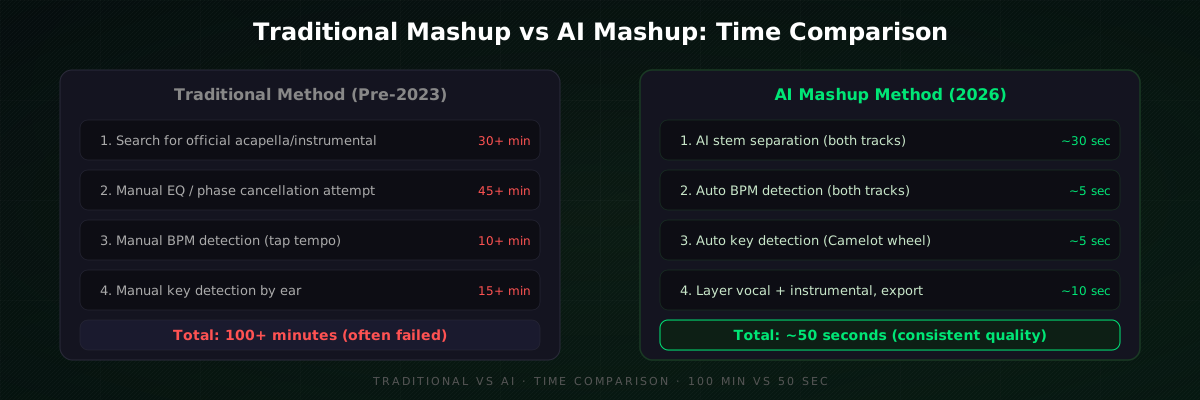
The time savings compound. When I was testing GreenGo's batch processing, I created 10 mashup candidates in under 5 minutes. The old way would have taken an entire evening. That speed changes how you work: instead of committing to one mashup idea and hoping it works, you can test 10 combinations quickly and keep the best one.
For DJs preparing sets, this is particularly useful. Our guide on open-format DJ set prep covers how to batch-process tracks, and the same workflow applies to mashup creation. You can also use GreenGo's capture feature to grab audio from supported web platforms, then separate stems and build mashups from the same library.
Legal Considerations for Mashups
Mashups exist in a legal gray area. You're using copyrighted material from two different rights holders without permission. Here's what you need to know:
- Personal use: Creating mashups for your own listening or DJ sets is generally low-risk. You're not distributing the content publicly.
- Social media: Posting mashups on platforms can trigger copyright detection systems. The vocal rights holder and the instrumental rights holder can both claim or take down the content.
- Commercial release: Selling mashups or using them in monetized content requires clearance from both rights holders. This is expensive and often denied.
- DJ performances: Playing mashups in live sets is common practice and rarely enforced, but technically still requires clearance.
The RIAA and ASCAP provide resources on music licensing. For a broader understanding of music rights, Sound on Sound covers the legal side of sampling and remixing in detail.
AI stem separation doesn't change the legal picture. The stems you extract are still derived from copyrighted recordings. But it does make the creative process accessible to anyone, which means more people can learn, practice, and develop skills that might eventually lead to licensed remix work.
FAQ
Can I make a mashup from any two songs?
Technically yes, but it won't always sound good. The two tracks need compatible BPM (within 8%) and compatible musical keys (same or adjacent on the Camelot wheel). AI stem separation gives you clean source material from any song, but the musical compatibility still matters. GreenGo's track analysis detects BPM and key automatically so you can check compatibility before you start.
Do I need internet access to separate stems?
Not with GreenGo. All stem separation runs locally on your desktop (Windows or macOS). No file uploads, no internet connection required for processing. This is faster than browser-based tools and keeps your audio private. Some other tools like LALAL.AI and Moises require uploading files to their servers. See our comparison of AI vocal removers for the differences.
How long does it take to make a mashup with AI?
The technical prep takes about 50 seconds: 15 seconds to separate stems on each track, 5 seconds each for BPM and key detection, and 10 seconds to export. The creative part, choosing tracks, adjusting levels, and fine-tuning the blend, takes as long as you want to spend. Compare this to the traditional method which took 100+ minutes and often failed at the first step.
What software do I need to make a mashup?
You need two things: a stem separation tool and an audio editor. GreenGo handles the stem separation and BPM/key detection. For layering the vocal over the instrumental, any DAW works: Ableton Live, FL Studio, Logic Pro, GarageBand, or even free tools like Audacity. Our guide to music production software for beginners covers the options.
Is AI stem separation quality good enough for professional mashups?
For most modern pop, hip-hop, electronic, and rock music, yes. The current generation of AI models (2026) produces stems with minimal artifacts on cleanly recorded source material. The main issues are bleed on dense orchestral arrangements and slight tonal changes on sustained vocal notes. For DJ sets and social media content, the quality is more than sufficient. For commercial release, you'd want to start with official stems anyway.
Can I use GreenGo's free tier to make mashups?
Yes. GreenGo offers 3 stem separations during a 7-day free trial, no credit card required. That is enough to test the mashup workflow on one pair of tracks. To process unlimited tracks, a subscription is required. See our pricing page for details.