If you've ever searched "what does key lock mean" and landed on articles about door locks and security hardware, you're not alone. For DJs, key lock has nothing to do with metal and tumblers. It's a software feature that keeps a song's musical key stable when you adjust its tempo. Understanding this single feature can be the difference between a mix that sounds professional and one that makes your crowd wince. This article breaks down the key lock definition for DJs, how it works in practice, and exactly how to use it to build tighter, more musical sets.
Table of Contents
- What does key lock mean in DJ software?
- Difference between musical key and physical key locks
- How key lock supports harmonic mixing during tempo changes
- Best practices for using key lock in your DJ workflow
- Common misconceptions and troubleshooting tips for key lock
- Why focusing on key lock transforms your DJ sets
- Upgrade your DJ workflow with GreenGo's key and BPM detection tools
- Frequently asked questions
Key Takeaways
| Point | Details |
|---|---|
| Key lock definition | Key lock is a DJ software feature that maintains a song's musical key when tempo changes, also called Master Tempo. |
| Distinguish key meanings | Understand the difference between musical key for songs and physical key locks — completely unrelated terms. |
| Harmonic mixing aid | Key lock is critical for preserving harmony during beatmatching and transitions in DJ workflows. |
| Workflow integration | Analyze key once for tagging with a batch audio tagger, then use key lock during performance to keep pitch steady. |
| Common misconceptions | Key lock does not speed up or slow pitch; it locks pitch constant despite tempo changes. |
What Does Key Lock Mean in DJ Software?
Key lock is a feature built into virtually every modern DJ platform. When you speed up or slow down a track, the pitch naturally wants to shift with it. Speed a track up and it sounds like chipmunks. Slow it down and it sounds like a slowed-down cassette tape. Key lock prevents that. It keeps the musical key constant no matter how much you adjust the tempo.
Here's what that means in practical terms:
- Pitch stays locked even when you nudge the BPM up or down by several percent
- Harmonic compatibility between two tracks is preserved during a live mix
- Your track selection based on musical key actually means something, because the key won't drift when you beatmatch
- Transitions sound musical, not just rhythmically aligned
Without key lock, changing tempo alters pitch, disrupting harmony. You might line up the beats perfectly and still have two tracks clashing tonally because one shifted a half-step up during tempo adjustment. That's a rookie mistake that key lock eliminates entirely.
Key lock is also called "Master Tempo" in some platforms like Rekordbox and Pioneer CDJs. Different name, same idea. You'll find it as a button or toggle on your controller, mixer, or software interface. Enabling it is usually one click. The impact on your mixes is immediate.
The key lock DJ feature explained in most software manuals focuses on pitch correction algorithms, but the real-world benefit is simpler: your harmonic mixing decisions stay valid even when you're live and adjusting on the fly. If you need your tracks' key data to be accurate in the first place, understanding how ID3 metadata works shows you exactly where that key value lives inside the file.
Difference Between Musical Key and Physical Key Locks
Let's clear something up fast. If you Google "key lock," you'll get results about padlocks, door hardware, and security systems. That's because a keylock, by standard definition, is any lock that opens with a key. It's a completely unrelated term that happens to share the same words.
Here's the breakdown:
| Term | Context | What it means |
|---|---|---|
| Key lock (physical) | Security, hardware | A lock mechanism opened by a metal key |
| Key lock (DJ/music) | DJ software, mixers | A feature that preserves musical pitch during tempo changes |
| Musical key | Music theory | The tonal center of a song, based on a root note and scale |
| Key detection | DJ software | Automated analysis that identifies a track's musical key |
The musical key of a song refers to its tonal center and harmonic structure. A track in C major centers its melody and chords around the note C. That's the "key" that key lock protects. When two tracks share compatible keys, they blend harmonically. When they don't, even a perfect beatmatch sounds off.
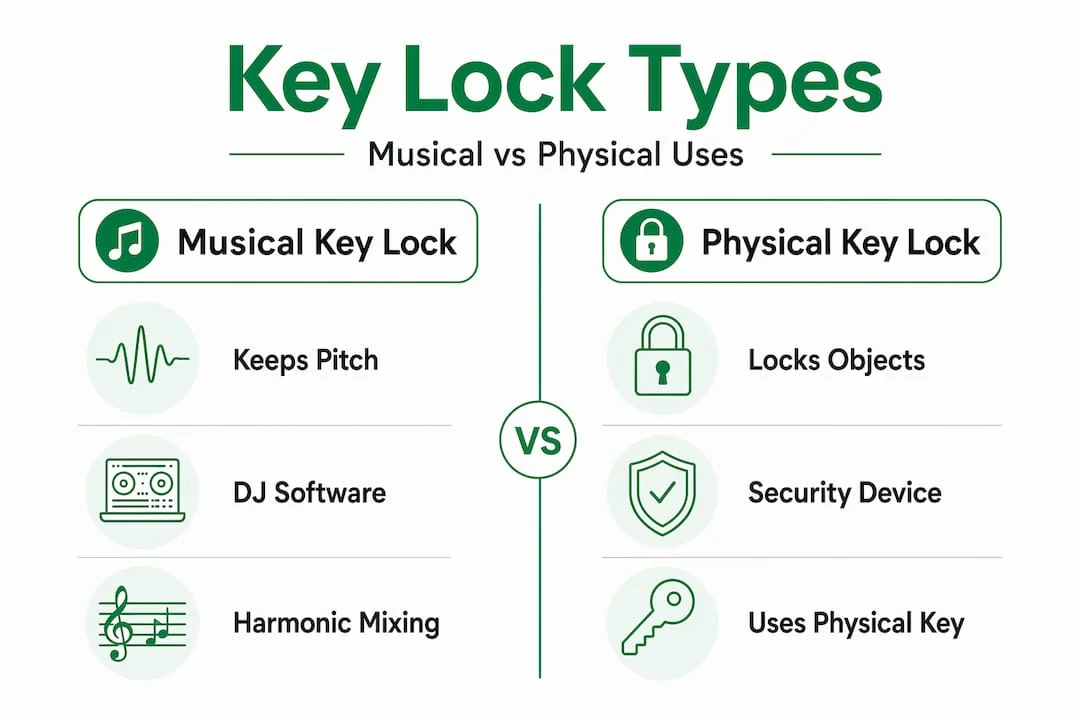
This confusion trips up a lot of beginners searching for key lock terminology online. You type in "what is a key lock" and get home security content. The DJ-specific meaning lives in a completely different world, and knowing that distinction saves you a lot of wasted search time.
How Key Lock Supports Harmonic Mixing During Tempo Changes
This is where key lock earns its place in your workflow. Harmonic mixing is the practice of selecting and transitioning between tracks that share compatible musical keys. Think of it as the difference between playing random notes on a piano versus playing a chord. Compatible keys sound like a chord. Incompatible ones sound like a mistake.
Here's how key lock directly supports the harmonic mixing workflow:
- You analyze and tag your library by musical key. Every track gets labeled, either manually or through automated key detection software like GreenGo or Mixed In Key. Camelot notation (like 8A, 9B) is the most common system DJs use because it maps compatible keys visually.
- You select your next track based on harmonic compatibility. Adjacent numbers on the Camelot wheel share notes and blend naturally.
- You beatmatch the incoming track. This almost always requires a tempo adjustment, even if it's just a few BPM.
- Key lock keeps the pitch stable while you make that tempo adjustment. Without it, step 2 becomes pointless because the key shifts anyway.
- The transition lands harmonically clean, and your crowd feels it even if they can't name why.
A practical mixing mindset treats musical key as the harmonic map for track selection and uses key lock to keep pitch from drifting during tempo adjustments. That's the whole system in one sentence.
Pro Tip: Don't just enable key lock and forget it. Pay attention to how much you're stretching a track's tempo. Most algorithms handle ±6% cleanly. Push beyond 10% and you may start hearing artifacts — a subtle warbling or smearing of the sound. At that point, consider choosing a different track rather than forcing the tempo.

The tonic note, the root of the key, stays stable with key lock on. That means the bass frequencies, the melodic hooks, and the harmonic overtones all remain in their original positions relative to each other. Your mix doesn't just beat-match. It music-matches.
Harmonic mixing workflows with key lock are the foundation of how professional DJs build emotional arcs in their sets. It's not magic. It's just using the tools correctly.
Best Practices for Using Key Lock in Your DJ Workflow
Knowing what key lock does is one thing. Building it into your actual process is another. Here's how to make it a natural part of every gig and practice session.
- Tag your library before you play. Key lock only helps if you know what key your tracks are in. Analyze your library and write the key data into your file metadata. This is the foundation everything else builds on. A batch audio tagger handles this across your entire library in one pass.
- Enable key lock by default. Treat it like a seatbelt. You put it on before you drive, not after you crash. Set your software to enable key lock on every deck automatically.
- Use Camelot notation for fast decisions. Numbers and letters are faster to read under pressure than key names like "F# minor." 6B to 7B is a compatible move. 6B to 12A is a tension builder. Learn the wheel and you'll make better decisions faster.
- Adjust tempo in small increments. Key lock handles small adjustments cleanly. If you're forcing a 130 BPM track to play at 122, you're asking the algorithm to work hard. The result may sound unnatural.
- Disable key lock intentionally when you want a pitch shift. Sometimes you want to drop the pitch for effect, especially in genres like reggaeton or hip-hop where pitch drops are a creative tool. Just know you're doing it on purpose.
The most reliable workflow for harmonic organization is to analyze key once for library tagging, then lock pitch during tempo matching with key lock or Master Tempo. Do the analysis work once. Let key lock handle the live performance.
Pro Tip: Before a gig, run a quick check on 10–15 of your planned tracks and confirm their key tags are accurate. Automated detection is good but not perfect. A track tagged as 4A that's actually 4B can throw off a whole sequence. A 15-minute check saves you from a 15-second disaster on stage.
DJ set prep with key lock becomes much faster once your library is properly tagged. You stop guessing and start building. The best DJ library management tools make this tagging process automatic, so you spend your time on music, not metadata.
Common Misconceptions and Troubleshooting Tips for Key Lock
A few misunderstandings about key lock come up constantly, especially among DJs who are newer to harmonic mixing. Let's address them directly.
- "Key lock changes the pitch." It does the opposite. Key lock prevents pitch changes. If your pitch is shifting with key lock on, check that the feature is actually enabled on that deck. Some controllers have a physical button that can be accidentally toggled off.
- "Key lock and pitch shift are the same thing." They're not. Pitch shift intentionally moves the pitch up or down. Key lock holds pitch in place while tempo changes. These are opposite functions.
- "My tracks are tagged correctly so I don't need key lock." Wrong. Tags tell you the original key. Key lock keeps that key accurate during playback at a different tempo. You need both.
- "Key lock affects sound quality too much." Modern pitch-correction algorithms are very good. At reasonable tempo adjustments (within 6%), most listeners cannot detect any artifacts. If you hear obvious warbling, the tempo stretch is too extreme, not the key lock itself.
- "Disabling key lock gives me more control." Disabling it gives you pitch drift, not control. If you want to change the key intentionally, use your software's pitch fader or key shift function instead.
Understanding these distinctions is part of what separates DJs who mix musically from those who just beatmatch. For a deeper look at how different tools handle key detection accuracy, the GreenGo vs Mixed In Key comparison breaks it down by platform.
Why Focusing on Key Lock Transforms Your DJ Sets
Here's an opinion most DJ tutorials won't say directly: BPM matching is the floor, not the ceiling. Every DJ with a week of practice can beatmatch. What separates a forgettable set from one people talk about is harmonic continuity, and key lock is the tool that makes it possible at full speed, under pressure, in a live environment.
Most DJs who ignore key lock aren't making a technical mistake. They're making a creative one. They're leaving energy on the table. When tracks flow harmonically, the crowd feels a sense of momentum and inevitability, even if they can't articulate why. That feeling is what keeps people on the floor.
The musical key as a harmonic map concept, combined with key lock to keep pitch stable during tempo changes, gives you a creative framework that works in any genre. House, hip-hop, Latin, open format. The principle is universal. For producers, understanding key lock also helps when you sort loops by BPM in your home studio — maintaining the original key while adjusting loop tempo is exactly what key lock does in a production context.
Key lock also gives you creative freedom, not less. When you know your pitch is locked, you can focus on phrasing, energy, and storytelling in your mix. You're not managing damage. You're building something. The DJs who treat key lock as a constraint are the ones who haven't used it long enough to feel what it actually does for their sets. Time-saving DJ workflows with harmonic key lock aren't just about efficiency. They're about performing with confidence.
Upgrade Your DJ Workflow with GreenGo's Key and BPM Detection Tools
Understanding key lock is step one. Having accurate key data for every track in your library is step two, and that's where most DJs lose time. Manual tagging is slow, inconsistent, and honestly, nobody should be doing it in 2026.
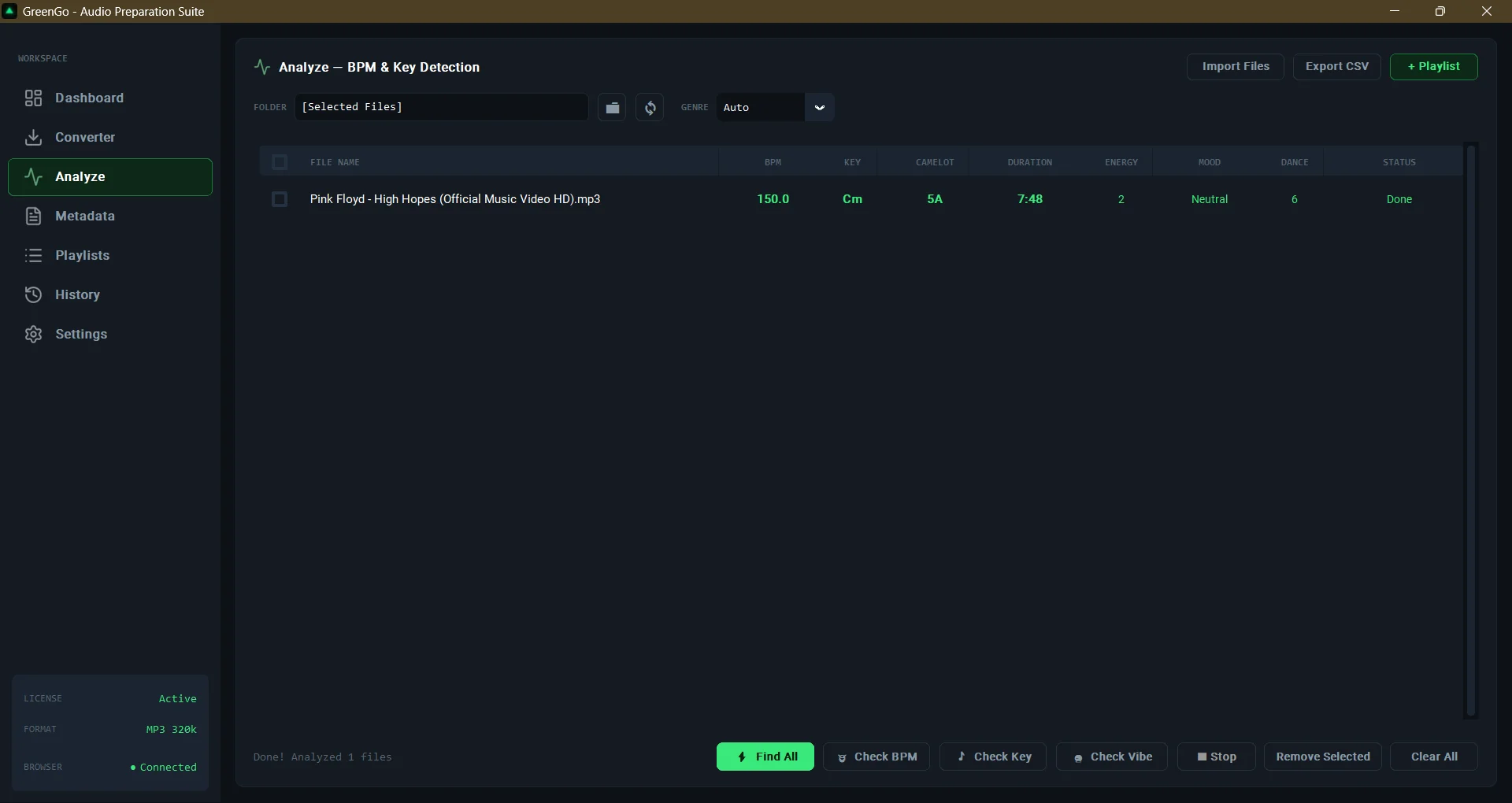
GreenGo automatically analyzes your entire music library and tags every track with accurate BPM and musical key data, ready to use in Rekordbox, Serato, Traktor, and VirtualDJ. Batch processing means you can prep hundreds of tracks in the time it used to take to do a dozen. The key data goes straight into your file metadata — TKEY, INITIALKEY, and OPENKEY fields — so key lock in your DJ software works with real, reliable information. No guesswork, no manual entry, no surprises at the gig. Check the GreenGo FAQ on BPM and key detection to see exactly how the analysis works and what formats are supported.
Frequently Asked Questions
What does key lock mean on DJ equipment?
Key lock is a feature that keeps a song's musical key constant when you change its tempo, preventing pitch shifts and maintaining harmonic compatibility between tracks.
How is the musical key different from a physical key or lock?
The musical key is the tonal center of a song, while a physical keylock is a mechanical security device that opens with a metal key. The two terms share words but have no connection.
Should I always use key lock when adjusting tempo during a DJ set?
Yes. Key lock prevents pitch from drifting when you adjust tempo, which keeps your harmonic mixing decisions valid and your transitions sounding clean.
Can disabling key lock affect the sound quality of my mixes?
Disabling key lock causes pitch shifts during tempo changes, which breaks harmonic compatibility and can make even well-beatmatched transitions sound dissonant and unprofessional.
Recommended
- Sort Loops by BPM in Your Home Studio: A Complete Guide | GreenGo
- GreenGo vs Mixed In Key: Which Is Better for DJ Library Prep in 2026? | GreenGo
- 5 Time-Saving DJ Workflows Every Beginner Should Know | GreenGo
- Open-Format DJ Set Prep: How to Prep 50 Tracks in Under 30 Minutes | GreenGo
- 5 Best DJ Library Management Tools in 2026 (Honest Comparison) | GreenGo