To batch tag MP3 files with BPM and key for Rekordbox, you need a tool that analyzes each track's audio waveform, detects the tempo and musical key, and writes the results into the TBPM and TKEY ID3 tag frames. Rekordbox reads these frames on import. The alternative — tagging files one by one in a metadata editor — turns a 200-track library into a 10-hour data entry job.
This guide covers the exact ID3 fields Rekordbox reads, the five best tools for batch tagging in 2026, a step-by-step workflow from untagged folder to Rekordbox-ready import, and the one Rekordbox setting you must change so your pre-tagged BPM and key values survive import.
What Does "Batch Tag MP3 BPM Key for Rekordbox" Mean?
"Batch tag MP3 BPM key for Rekordbox" means processing a folder of MP3 files in one operation to detect BPM and musical key from the audio, then writing those values into ID3 metadata tags that Rekordbox reads on import. The "batch" part is what matters: instead of opening each file individually, you load an entire folder and the tool processes everything in parallel.
There are two fundamentally different approaches, and most DJs confuse them:
Type 1: Bulk Tag Editors (Manual)
These let you select multiple files and edit their metadata fields in a spreadsheet-like interface. You still type everything yourself — you just do it faster because you can see all files at once and copy values across rows.
Examples: Mp3tag, MusicBrainz Picard, TagScanner, Kid3.
These are free. They work. But they don't detect anything. If you don't know the BPM, the key, or the correct artist name — a bulk editor can't help you. It's a faster clipboard, not an analyzer.
Type 2: Batch Audio Taggers (Automatic)
These actually analyze the audio content of each file — detect BPM from the waveform, detect musical key from harmonic content, pull artist and title from source metadata — and write everything into ID3 tags without you touching a single field.
This is what you actually need when your folder is full of unnamed, unanalyzed files. Not a faster way to type — a way to not type at all.
Why Rekordbox Needs Pre-Tagged Files
Rekordbox reads ID3 tags from MP3 files on import. According to the official Rekordbox 7 manual, the software reads ID3 tags (v1, v1.1, v2.2.0, v2.3.0, and v2.4.0) from MP3 and AIFF files, meta tags from M4A files, RIFF INFO from WAVE files, and Vorbis Comments from FLAC files. When you import a track, Rekordbox loads the tag information and displays it.
But here's the critical issue: Rekordbox does not write its computed BPM back into the ID3 tag. As confirmed in a Sound Stack Exchange discussion, a user asked how to configure Rekordbox to save computed BPM into the MP3's ID3 BPM field. The answer:
"This is not possible currently. Rekordbox only saves Key. You would have to export the value and apply it externally with an ID3 bulk editor or in command line with a script."
This means if you want accurate BPM and key values that travel with the file — not just live in Rekordbox's database — you need to tag them before importing. A batch tagger that writes TBPM and TKEY is the only way to get DJ-ready files that work across Rekordbox, Serato, Traktor, and VirtualDJ without re-analysis in each app.
Producers who buy tracks from Beatport get this for free — files arrive pre-tagged with artist, title, BPM, key, and artwork. DJs who source music from the open web get none of it. Every track arrives with broken or missing metadata, and at 30–100+ new tracks per week during heavy digging seasons, manual tagging is unsustainable.
The math is brutal:
- 50 tracks/week × 4 minutes of manual tagging = 3.3 hours of data entry per week
- 50 tracks/week through an automatic batch tagger = 5 minutes total
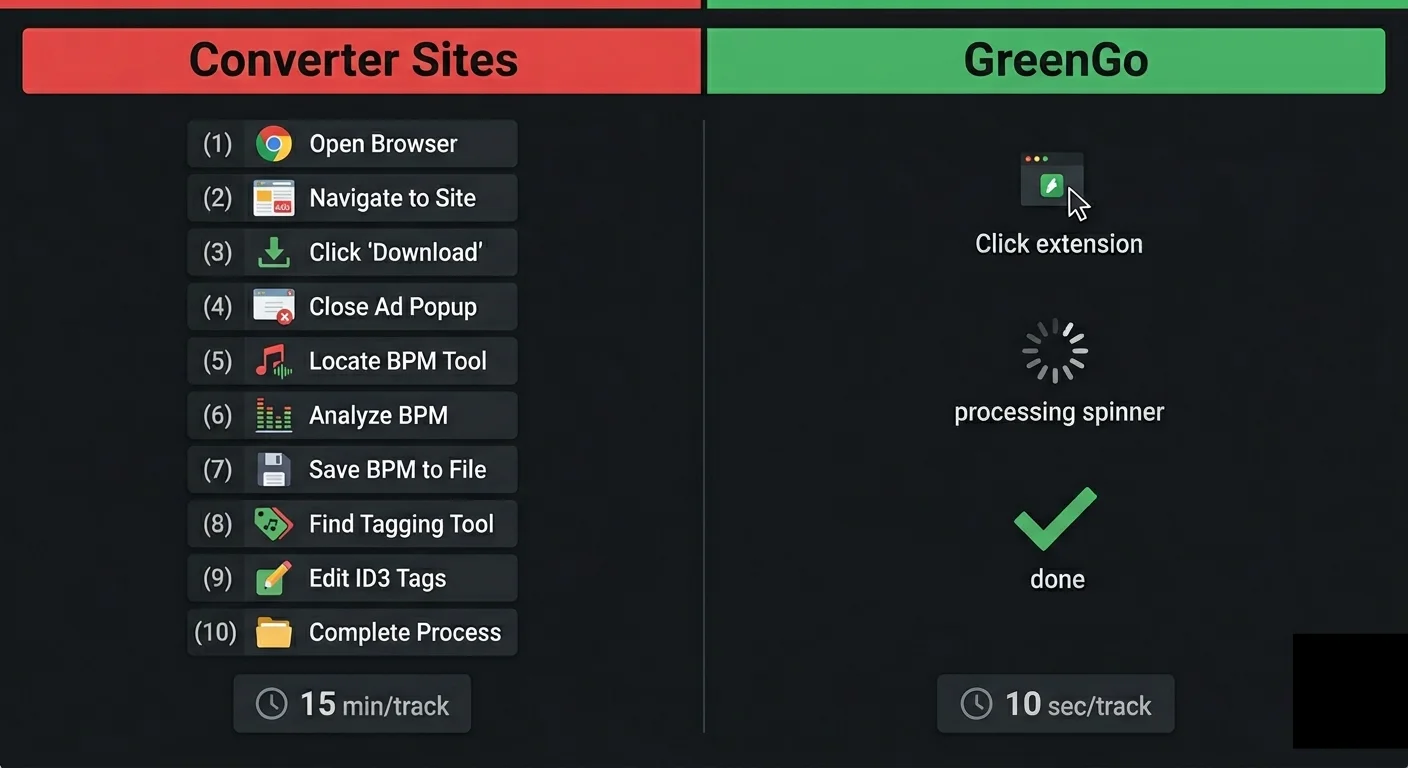
Over a year, that's 170 hours — more than a full week of your life — spent typing metadata that a machine can detect in seconds. This is why batch tagging isn't a "nice to have" for working DJs. It's the difference between a sustainable prep workflow and one that collapses under its own weight.
The 5 Best Tools to Batch Tag MP3 BPM & Key in 2026
Not all batch taggers are built the same. Some analyze audio. Some just organize what you type. Some do both but charge monthly. Here's the honest breakdown of tools that can batch tag MP3 files with BPM and key for Rekordbox.
1. GreenGo — Best Automatic Batch Tagger for Rekordbox DJs
What it does: Full-pipeline batch processing. Paste URLs or load local files → GreenGo downloads, converts, detects BPM, detects key, pulls artist/title, embeds artwork, analyzes mood and energy, and writes everything into ID3 tags. Entire library. One batch. No manual input.
Fields auto-filled:
- BPM (
TBPM) — waveform analysis, 70–200 BPM range with integer snapping, ML models trained on 14,859 tracks - Key (
TKEY) — 4-signal fusion with genre-aware profiles, outputs both Camelot (Rekordbox) and Open Key (Traktor) notation - Title (
TIT2) — cleaned and formatted - Artist (
TPE1) — pulled from source - Album Art (
APIC) — embedded from source - Genre (
TCON) — audio-based detection - Year (
TDRC) — from source metadata - Mood & Energy — 1–10 energy scale, 9 mood classes, for smart playlist building
Batch capacity: Unlimited. Process 10 or 1,000 — same workflow. Parallel processing means 50 tracks finish in minutes, not hours. Analysis runs within 15 seconds of playback per track.
Pricing: from $5.99/month. Free 7-day trial. No credit card required.
Works with: Rekordbox, Serato, Traktor, VirtualDJ, Engine DJ. Writes ID3v2.4 tags by default — the most current, most compatible version.
Why it's #1 for Rekordbox: It's the only batch tagger that handles the complete chain — from source URL to DJ-ready tagged file — without requiring any other tool. Every other option on this list handles one piece. GreenGo handles all of them. If your tracks start as URLs or unnamed files, nothing else comes close to the time saved. Download GreenGo and batch tag your first 50 tracks during the free trial.
2. Mixed In Key — Best Dedicated Key & BPM Analyzer
What it does: Analyzes local audio files for BPM and musical key. High accuracy. Writes results into ID3 tags. Also includes energy level rating (1–10 scale). According to Mixed In Key's workflow guide, you can choose where Key, BPM, and Energy Level are written in the Tag Options settings before analyzing a batch.
What it doesn't do: Download tracks. Convert formats. Fill artist/title/artwork. It's purely an analyzer — it reads BPM and key from audio and writes those fields. Everything else stays untouched.
Best for: DJs who buy from Beatport/Traxsource (files arrive pre-tagged with everything except key) and just need harmonic analysis added. See our detailed comparison: GreenGo vs Mixed In Key.
Pricing: $58 one-time.
Limitation: Only fills 2–3 fields (BPM, key, energy). If your files have no artist, no title, no artwork — Mixed In Key won't help with that. You still need Mp3tag or manual editing for the rest.
3. One Tagger — Best Free Cross-Platform Auto Tagger for Known Tracks
What it does: One Tagger is a free, open-source cross-platform music tagger for DJs. It fetches metadata from Beatport, Discogs, MusicBrainz, Spotify, Traxsource, and Juno Download based on existing artist and title tags. It can also fetch Spotify's audio features (energy, danceability, valence) based on ISRC or exact match.
What it doesn't do: Detect BPM or key from the audio waveform itself. It relies on database lookups — if your track isn't in Beatport, Discogs, or MusicBrainz, One Tagger can't tag it. No audio analysis, no waveform-based BPM detection.
Best for: DJs with commercial releases that exist in online databases. If you buy from Beatport or Traxsource and want to enrich tags with metadata from multiple sources, One Tagger is excellent.
Pricing: Free, open-source (Rust + Vue.js).
Limitation: Useless for cloud-sourced tracks, unreleased remixes, and underground edits that don't exist in any database. Same gap as MusicBrainz Picard — database-dependent tools can't help with the tracks DJs actually struggle to tag.
4. Mp3tag — Best Free Bulk Tag Editor
What it does: Spreadsheet-style metadata editor. Select hundreds of files, view all tags in columns, edit in bulk, save. Supports regex-based filename parsing, online database lookups (Discogs, MusicBrainz), and custom tag field mapping. The Mp3tag field mapping table documents exactly which ID3 frames each field writes to — BPM maps to TBPM, INITIALKEY maps to TKEY.
What it doesn't do: Detect BPM. Detect key. Analyze audio. Download anything. It edits what you tell it to edit — nothing more.
Best for: DJs who already know their metadata and just need a fast editor to apply it. Also great for cleanup jobs — fixing encoding issues, standardizing genre names, stripping garbage tags from old files.
Pricing: Free (Windows). Mac/Web version available.
Limitation: Zero audio intelligence. It's a text editor for ID3 frames. If you need BPM and key — which every DJ does — you need another tool first.
5. MusicBrainz Picard — Best Free Auto-Tagger for Known Releases
What it does: Fingerprints your audio files against the MusicBrainz database and auto-fills artist, title, album, year, and artwork for tracks that exist in the database.
What it doesn't do: Handle tracks that aren't in the database (most cloud-sourced content). No BPM detection. No key detection. If the track is a remix, edit, or unreleased cut — Picard can't identify it.
Best for: Tagging commercial releases you already own. Albums, singles, EPs from known artists with proper catalog entries.
Pricing: Free, open-source.
Limitation: Useless for the tracks DJs actually need tagged — cloud finds, exclusive remixes, underground edits, unreleased material. Database match rate for typical DJ libraries is well under 50%.
Comparison: Which Tool Writes Which ID3 Fields?
The table below shows exactly what each tool can detect and write into ID3 tags. The pattern is clear: free tools handle editing, paid tools handle detection, and only GreenGo handles both — plus downloading and conversion — in one pipeline.
| Feature | GreenGo (Auto) | Mixed In Key | One Tagger | Mp3tag (Manual) | MusicBrainz Picard |
|---|---|---|---|---|---|
| BPM detection (waveform) | Yes | Yes | No (database only) | No | No |
| Key detection (harmonic) | Yes | Yes | No (database only) | No | No |
| Artist/title fill | Yes (auto from source) | No | Yes (from databases) | Manual only | Yes (database) |
| Album art embed | Yes (auto) | No | Yes (from databases) | Manual only | Yes (database) |
| URL downloading | Yes (10+ sources) | No | No | No | No |
| Format conversion | Yes (MP3, WAV, FLAC, M4A, OGG, AAC) | No | No | No | No |
| Works on unnamed files | Yes | Partially | No (needs artist/title) | No help | If in database |
| Energy/mood analysis | Yes (1–10 energy, 9 moods) | Yes (1–10 energy) | Yes (Spotify features) | No | No |
| Camelot + Open Key notation | Both | Camelot | Depends on source | Manual | No |
| Batch capacity | Unlimited (parallel) | Unlimited | Unlimited | Unlimited | Unlimited |
| Price | from $5.99/month | $58 once | Free | Free | Free |
How to Batch Tag MP3 Files for Rekordbox: Step by Step
Here's the exact workflow for going from a folder of untagged MP3 files to a Rekordbox-ready library. No marketing abstraction — just what happens when you process a batch of tracks.
Step 1: Load Your Tracks
Two options:
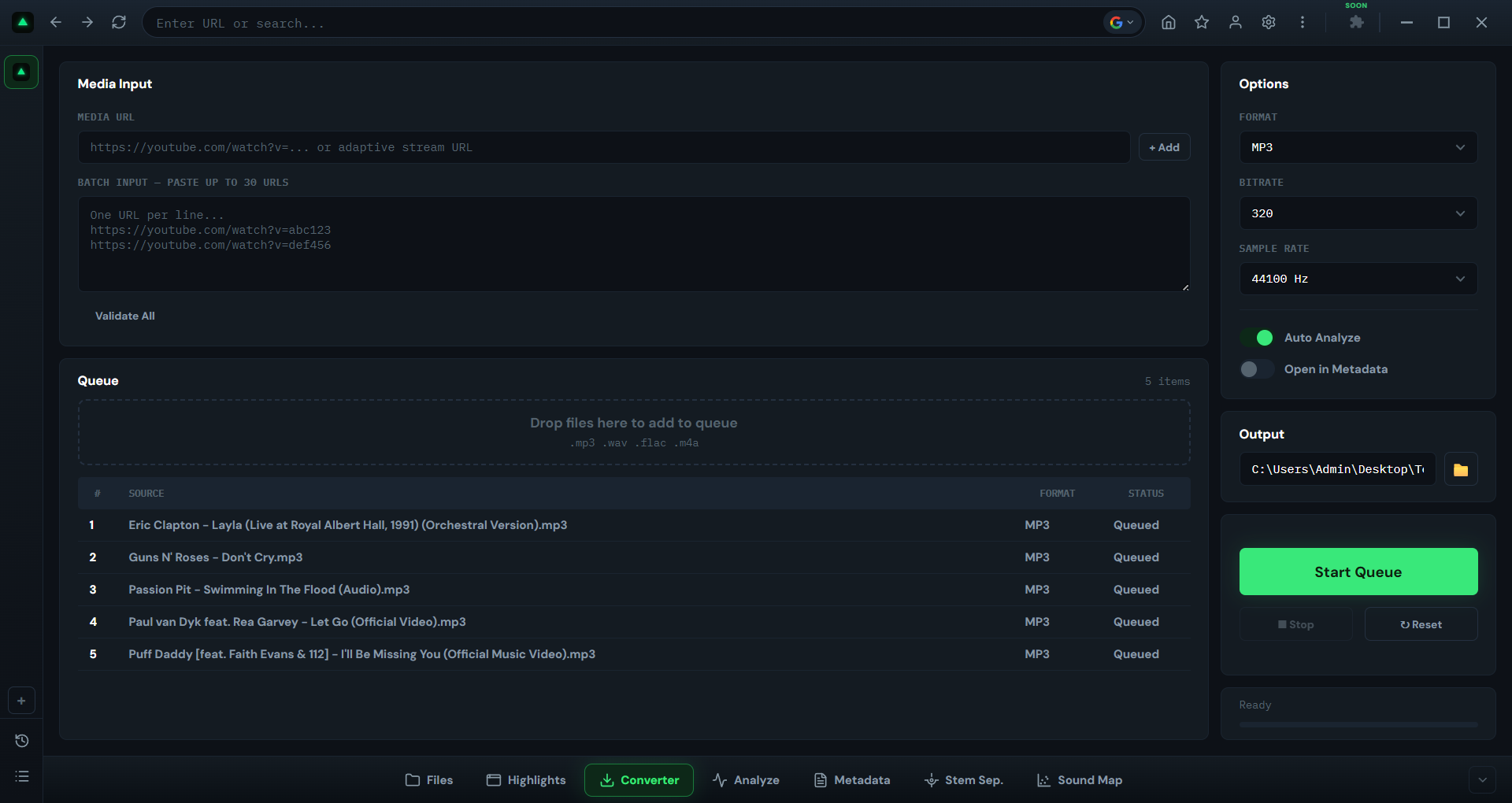
- Paste URLs — any supported platform. One per line. Paste 50, paste 200 — doesn't matter. Use the GreenGo browser to queue tracks directly from your browser without copying links.
- Load local files — drag a folder of existing MP3s that need tagging. GreenGo processes local files the same way.
Step 2: GreenGo Processes Everything in Parallel
For each track in your queue, GreenGo runs the full pipeline:
- Download & convert (URL mode) — pulls audio, converts to MP3 320kbps or your preferred format using the built-in audio converter
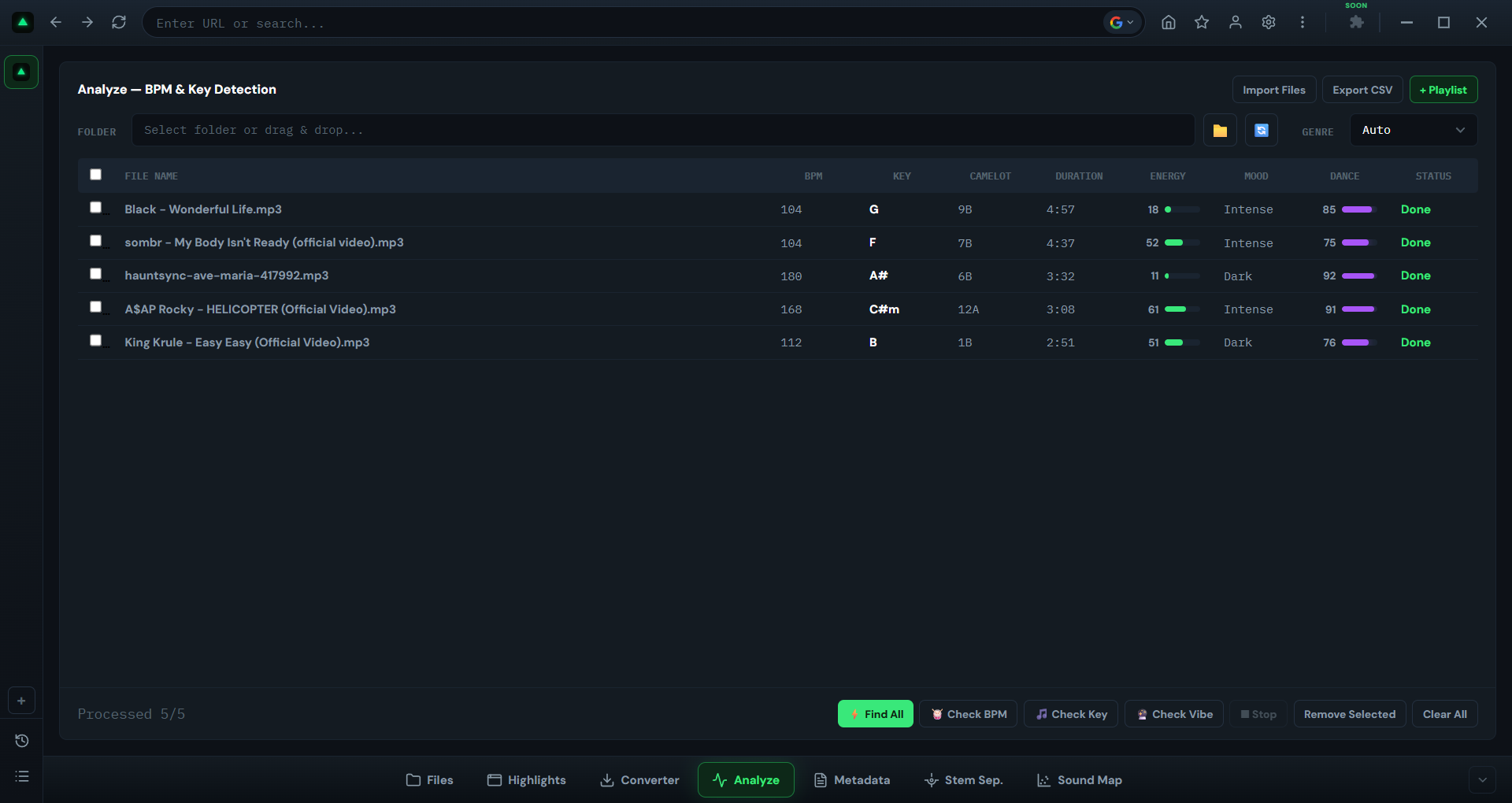
- BPM detection — waveform analysis with integer snapping, written to
TBPM - Key detection — 4-signal harmonic analysis, written to
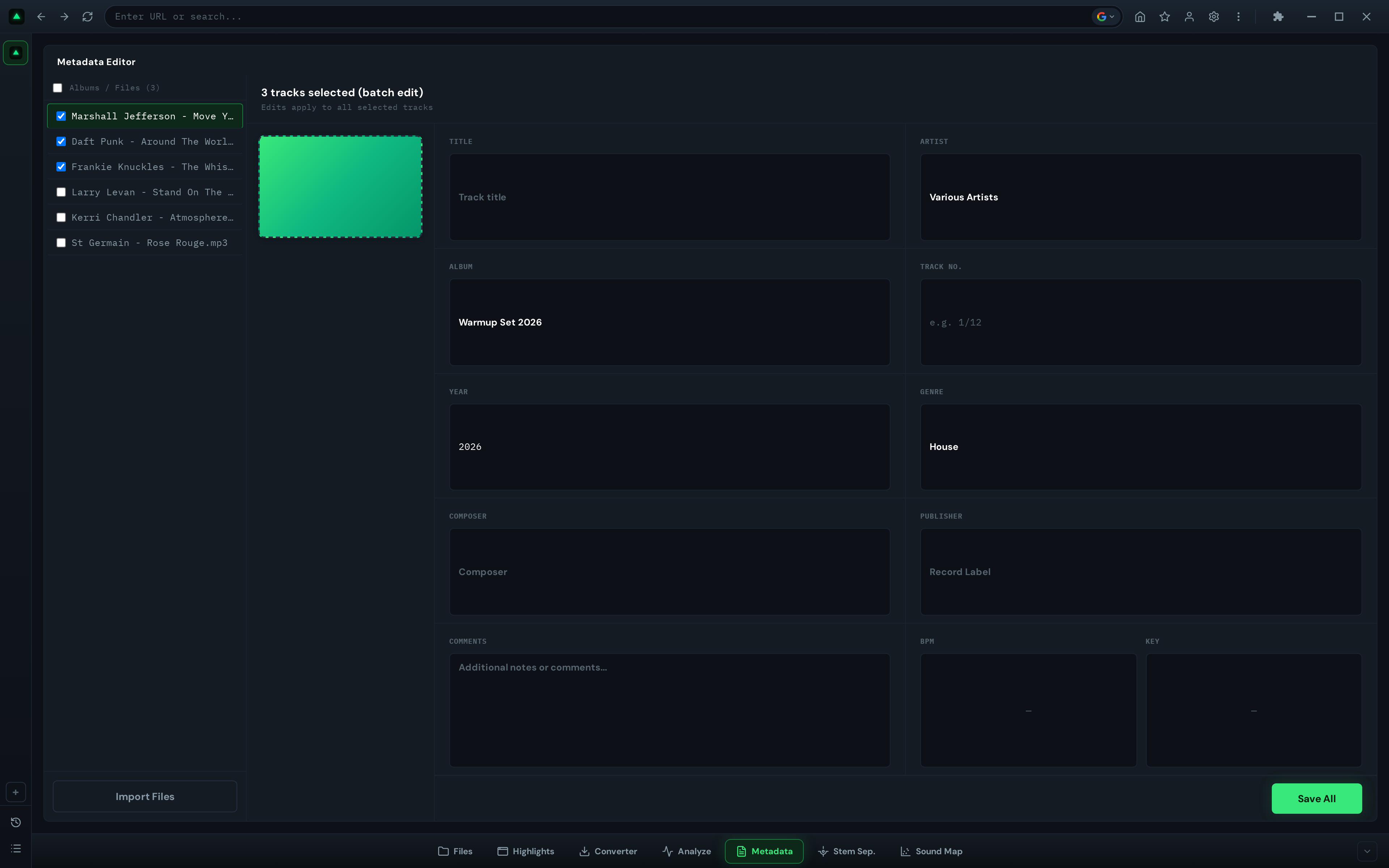
TKEYin both standard and Camelot notation - Metadata fill — artist (
TPE1), title (TIT2), artwork (APIC), genre (TCON), year (TDRC) - Mood & energy — analyzed and stored for smart playlist building
All tracks process simultaneously. A batch of 50 tracks typically completes in 3–5 minutes depending on your connection and track length. You can monitor each track's analysis results in real time.
Step 3: Import Into Rekordbox
The output folder is ready to drag directly into Rekordbox. Every ID3 field is already filled. Your DJ software reads the embedded BPM and key — no re-analysis, no manual corrections, no waiting.
That's the entire workflow. Paste → process → import. What used to be 10 hours of manual tagging becomes 5 minutes of waiting.
ID3 Tag Fields Rekordbox Actually Reads
Rekordbox reads specific ID3v2 frames on import. If you're using a batch tagger or manual editor, these are the fields that matter:
| ID3 Frame | Field Name | What It Stores | Rekordbox Reads It? |
|---|---|---|---|
TBPM |
BPM | Tempo in beats per minute | Yes |
TKEY |
Initial Key | Musical key (e.g., "Fm" or "8A") | Yes |
TIT2 |
Title | Track title | Yes |
TPE1 |
Artist | Artist name | Yes |
TALB |
Album | Album name | Yes |
TCON |
Genre | Genre classification | Yes |
TDRC |
Year | Recording date/year | Yes |
APIC |
Album Art | Embedded artwork image | Yes |
COMM |
Comments | Free-text comments | Yes |
Critical formatting rule: The BPM value in TBPM must be a bare number. As noted by Mixgraph's tag editor documentation:
"Write the tempo as a plain number — 128 or 128.50 — and never with a unit. '128 BPM' in that field is not a number and gets ignored or read as 128 depending on the program, which is a surprisingly common way for a tagged library to end up half-tempo-less."
GreenGo writes BPM as a bare number to TBPM by default, so this is handled automatically. If you're using Mp3tag manually, make sure your BPM column contains only numbers — no "BPM" suffix.
For key notation, the ID3 specification defines TKEY as a note name of three characters or fewer (e.g., Am, F#m, Ab). Camelot codes (like 8A) are not what the spec means, but Serato, Rekordbox, and Mixed In Key all write and read them there anyway. GreenGo writes both standard notation and Camelot, so whether you use Rekordbox's key display or think in Camelot wheel terms, the data is already there. If you want the theory behind the notation, our complete Camelot wheel reference and musical key by genre chart show exactly which keys pair well once your tags are written.
Why Rekordbox Re-Checks BPM After Importing Tagged Files
Many GreenGo users ask: "I tagged BPM and key in GreenGo, so why is Rekordbox re-checking everything when I import?" This is Rekordbox's default behavior, not a problem with your tags.
When Auto Analysis is enabled (which it is by default), Rekordbox runs its own waveform analysis on every imported track — regardless of what's already in the ID3 tags. This overwrites the BPM and key values you carefully tagged before import. The Rekordbox manual confirms: "When the [Preferences] window > [Analysis] category > [Track Analysis] tab > [Auto Analysis] is set to [Enable], analysis of the music file starts after adding the file to [Collection]."
This is a known issue across the DJ software ecosystem — our Rekordbox Dynamic vs Normal analysis comparison measures exactly how each mode treats imported BPM data. Lexicon DJ's documentation states: "It's best to turn off auto analysis in the Rekordbox settings so that your beatgrids won't get overridden." Similarly, OpenKeyScan's Rekordbox guide notes: "When you bring in keys from an outside tool, Rekordbox reads them from the file's metadata tag on import — but its own analysis will overwrite that imported value unless you turn key analysis off first."
GreenGo's Recommendation: Disable Rekordbox Re-Analysis
For the best experience with GreenGo-tagged files, GreenGo recommends disabling BPM/Grid and Key re-analysis in Rekordbox before importing. Here's how:
- Open Rekordbox → Preferences → Analysis → Track Analysis tab
- Set Auto Analysis to Disable (or keep it enabled but uncheck BPM/Grid and Key in Track Analysis Setting)
- Import your GreenGo-tagged folder via File → Import → Import Folder
- Rekordbox reads the
TBPMandTKEYvalues from the ID3 tags without overwriting them
This preserves your pre-tagged BPM and key values and gives you the best experience with GreenGo-tagged libraries. The same approach is recommended by Lexicon DJ and other third-party tools that write metadata before Rekordbox import.
If you still want Rekordbox's waveform and beatgrid data (useful for performance features like sync and quantize), you can run analysis with only Phrase selected. This adds phrase detection without overwriting your BPM and key values.
Mp3tag vs Automatic Taggers: When to Use Each
Both tools have their place. Here's when each one makes sense:
Use a bulk editor (Mp3tag) when:
- You need to fix a specific field across many files (e.g., rename a genre tag from "Electronic" to "House" across 300 tracks)
- You're cleaning up files that are mostly tagged but have inconsistencies
- You want to strip unwanted tags or standardize formatting
- You already know the correct metadata and just need to type it faster
Use an automatic batch tagger (GreenGo) when:
- Your files have no metadata at all — unnamed, no BPM, no key, no artwork
- You're processing new tracks from URLs weekly and need them DJ-ready immediately
- You need BPM and key detection — not just editing, but actual audio analysis
- You want to eliminate the entire tagging step from your DJ prep workflow
For most DJs, the answer is both — but in sequence. GreenGo handles the initial preparation (the hard part). Mp3tag handles occasional cleanup (the easy part).
The Hidden Cost of Untagged Files in Rekordbox
Untagged files don't just look messy. They actively break your Rekordbox workflow:
- Search fails — you can't find tracks by name because they're called
download(3).mp3 - Smart playlists break — Rekordbox's Intelligent Playlists can't filter by BPM or key if those fields are empty
- Sorting by BPM becomes impossible — you can't mix in key if you don't know the key
- Beatgrid errors — missing or wrong BPM means your grids are off before you even start
- Gig prep takes forever — you spend more time searching than selecting
Every untagged track in your library is technical debt. It slows you down every time you open Rekordbox. A batch tagger eliminates that debt in one operation — not file by file, but all at once.
For context on what BPM values to expect, see our BPM chart for every music genre — it covers 40+ genres with typical BPM ranges, common BPM values, and energy levels. If your batch-tagged BPM for a house track comes out at 128, that chart confirms you're in the right range (118–135 BPM for house).
This is what separates DJs with professionally managed libraries from those who spend 20 minutes before every gig trying to remember which download_final.mp3 is the track they wanted to play.
Frequently Asked Questions
What is batch tagging?
Batch tagging is processing a whole folder of audio files at once — detecting BPM and key, writing ID3 fields like TBPM and TKEY, and normalizing artist/title metadata across hundreds of tracks in a single pass, instead of editing files one at a time. For DJs it means an entire Rekordbox or Serato library can be made searchable by BPM and key in one session.
Can I batch edit MP3 metadata?
Yes. You can batch edit MP3 metadata using a bulk tag editor like Mp3tag (free, manual editing) or an automatic batch tagger like GreenGo (detects BPM, key, artist, and title from audio content and writes them into ID3 tags without manual input). Mp3tag lets you select hundreds of files and edit fields in a spreadsheet-like interface. GreenGo analyzes each file's waveform and harmonic content, then writes BPM to the TBPM frame, key to TKEY, and other metadata fields automatically.
How to auto tag in Mp3tag?
Mp3tag does not auto-detect BPM or musical key from audio. Its "auto tag" feature fetches metadata from online databases like Discogs, MusicBrainz, and Amazon based on existing artist and title tags. To auto-detect BPM and key, you need an audio analysis tool like GreenGo or Mixed In Key. These tools analyze the waveform and harmonic content, then write results into ID3 tag fields. Mp3tag can then be used to clean up or standardize the results.. See our complete ID3 tag field reference for all fields.
How do I automatically change the BPM of a song in Rekordbox?
You cannot change the BPM value that Rekordbox displays without re-analyzing the track. Rekordbox computes BPM from its own waveform analysis and stores it in its library database, not in the audio file's ID3 tags. To get a specific BPM value into Rekordbox, write the correct BPM to the file's TBPM ID3 tag using a batch tagger like GreenGo before importing, then disable Rekordbox's BPM/Grid re-analysis in Preferences > Analysis > Track Analysis Setting so it preserves your pre-tagged value.
How to tag music in Rekordbox?
Rekordbox reads ID3 tags (v1, v1.1, v2.2, v2.3, and v2.4) from MP3 files on import. To tag music for Rekordbox, use a batch tagger to write BPM to the TBPM frame, key to TKEY, artist to TPE1, title to TIT2, and artwork to APIC. When you import the folder into Rekordbox, it reads these tags and displays them. For best results, disable BPM/Grid and Key re-analysis in Rekordbox Preferences so your pre-tagged values are preserved.
Does batch tagging work with Rekordbox, Serato, and Traktor?
Yes. GreenGo writes metadata into standard ID3v2.4 tag frames (TBPM, TKEY, TIT2, TPE1, APIC) that Rekordbox, Serato, Traktor, and VirtualDJ all read natively. When you import batch-tagged files, your DJ software displays the correct BPM, key, artist, title, and artwork immediately. If you perform on CDJs, the next step is exporting that tagged library to USB for CDJs — the tags survive the export. For Rekordbox specifically, we recommend disabling BPM/Grid and Key re-analysis in Preferences so your pre-tagged values are not overwritten.
Why does Rekordbox re-check BPM after I tagged my files in GreenGo?
Rekordbox runs its own waveform analysis on every imported track by default, which overwrites the BPM and key values you already tagged. This is Rekordbox's built-in behavior, not a problem with your tags. GreenGo recommends disabling BPM/Grid and Key re-analysis in Rekordbox Preferences > Analysis > Track Analysis Setting before importing GreenGo-tagged files. This preserves your pre-tagged BPM and key values and gives you the best experience with GreenGo-tagged libraries.
How many files can I batch tag at once?
GreenGo has no practical limit. Process 10 files or 1,000 — same workflow, same speed per track. Processing happens in parallel, so larger batches don't linearly increase wait time.
Stop Tagging One File at a Time
Manual tagging made sense in 2015 when your library had 200 tracks and you added 5 new ones a month. It doesn't make sense in 2026 when you're digging 50+ tracks a week from every platform on the internet.
The tools exist. The workflow is solved. Paste your tracks, let GreenGo analyze and tag everything in one batch, and spend your time actually mixing — not typing metadata into boxes.
Try GreenGo free — batch tag your first 50 tracks and see what a fully tagged library feels like in Rekordbox. Seven days. Full features. No credit card required.