You've got 300 MP3 files sitting in a folder. Half are named track_01.mp3. A third have no artist. None of them have BPM or key data. Zero album art.
You need an MP3 tag editor. But which one?
Some tag editors are free. Some cost money. Some automatically detect BPM and musical key from the audio waveform. Others are glorified spreadsheets where you type metadata by hand. The difference matters — especially if you're a DJ or producer processing dozens of tracks per week.
We tested every major MP3 tag editor available in 2026 and ranked them by features, batch capability, ease of use, and value. Here's what we found.
Table of Contents
- What Makes a Good MP3 Tag Editor?
- The 7 Best MP3 Tag Editors in 2026
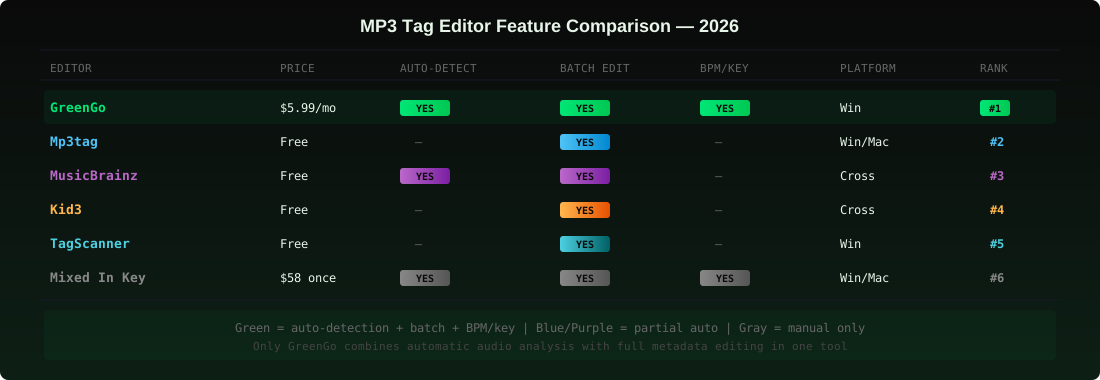
- Comparison Table: All 7 Editors
- How to Choose the Right MP3 Tag Editor
- How GreenGo Tags MP3 Files Automatically
- Tips for Better MP3 Tagging
- Frequently Asked Questions
What Makes a Good MP3 Tag Editor?
Before we rank the tools, let's define what separates a useful tag editor from a waste of your time. There are four things that matter:
1. Batch Editing Capability
If you can't select 200 files and edit them at once, it's not a batch tool — it's a single-file editor with extra steps. A proper batch MP3 tagger lets you apply changes across your entire library in one operation. We've covered batch tagging in depth before, but the short version: if you're processing more than 10 files, you need batch capability.
2. Automatic Metadata Detection
This is where free and paid tools diverge sharply. Free editors like Mp3tag let you type metadata faster — but you still have to know what to type. An audio metadata editor with automatic detection actually analyzes the waveform, identifies the track, and fills the fields for you. No typing required.
3. ID3 Tag Support
Not all tag editors write the same fields. The ID3v2.4 standard defines over 80 frames, but most tools only handle the basics: artist (TPE1), title (TIT2), album (TALB), year (TDRC), genre (TCON). If you're a DJ, you also need BPM (TBPM), key (TKEY), and album art (APIC) — and not every editor supports those. Understanding ID3 metadata is essential before choosing a tool.
4. Platform and Format Support
Some editors are Windows-only. Some work on Mac. Some handle FLAC, WAV, and AAC alongside MP3. If your library has mixed formats, you need an editor that covers all of them — not just MP3.
The 7 Best MP3 Tag Editors in 2026
Here's our ranking. Each tool was evaluated on batch capability, automatic detection, ID3 support, platform availability, and price.
1. GreenGo — Best MP3 Tag Editor with Automatic Detection
What it does: GreenGo is the only tag editor on this list that analyzes audio content and fills metadata automatically. Load your files (or paste URLs from the web), and GreenGo detects BPM from the waveform, identifies musical key through harmonic analysis, pulls artist and title from source metadata, embeds album art, and writes everything into ID3v2.4 tags — all in one batch operation.
Fields auto-filled:
- BPM (TBPM) — waveform analysis with decimal precision
- Key (TKEY) — standard + Camelot notation
- Title (TIT2) — cleaned and formatted
- Artist (TPE1) — pulled from source
- Album Art (APIC) — embedded automatically
- Genre (TCON) — audio-based detection
- Year (TDRC) — from source metadata
- Mood & Energy — for smart playlist building
Batch capacity: Unlimited. Process 10 or 1,000 files — same workflow. Parallel processing means 50 tracks finish in minutes, not hours.
Pricing: from $5.99/month with a free 7-day trial. No credit card required.
Platform: Windows 10/11 desktop. Track Analysis runs locally — no internet needed after download.
Why it's #1: Every other editor on this list requires you to know the metadata before you can tag your files. GreenGo figures it out for you. If your tracks come from the open web or random folders with no metadata, GreenGo is the only tool that handles the entire chain — from unnamed file to fully tagged, DJ-ready MP3 — without any other software.
2. Mp3tag — Best Free MP3 Tag Editor
What it does: Mp3tag is the gold standard for manual metadata editing. It's a spreadsheet-style interface where you select hundreds of files, view all tags in columns, and edit in bulk. It supports regex-based filename parsing, online database lookups (Discogs, MusicBrainz, Amazon), and custom tag field mapping. If you know what your metadata should say, Mp3tag lets you apply it fast.
What it doesn't do: Detect BPM. Detect key. Analyze audio. Download anything. It edits what you tell it to edit — nothing more.
Best for: DJs and music collectors who already know their metadata and just need a fast editor to apply it across large libraries. Also excellent for cleanup jobs — fixing encoding issues, standardizing genre names, stripping garbage tags from old files.
Pricing: Free on Windows. Mac version available as a separate purchase.
Limitation: Zero audio intelligence. It's a text editor for ID3 frames. If you need BPM detection or key analysis, you need another tool first — then import the results into Mp3tag.
3. MusicBrainz Picard — Best Free Auto-Tagger for Known Releases
What it does: MusicBrainz Picard fingerprints your audio files using AcoustID and matches them against the MusicBrainz database. When a match is found, it auto-fills artist, title, album, year, genre, and album artwork. It's open-source, community-driven, and completely free.
What it doesn't do: Handle tracks that aren't in the database. No BPM detection. No key detection. If your track is a remix, edit, bootleg, or unreleased cut — Picard can't identify it. Database match rates for typical DJ libraries are well under 50%.
Best for: Tagging commercial releases you already own — albums, singles, and EPs from known artists with proper catalog entries. If your library is mostly Beatport purchases and official releases, Picard handles the metadata fill for free.
Pricing: Free, open-source.
Platform: Windows, macOS, Linux.
Limitation: Useless for the tracks DJs actually struggle with — cloud finds, exclusive remixes, underground edits, unreleased material. For those, you need a tool that analyzes the audio itself, not a database lookup.
4. Kid3 — Best Cross-Platform Manual Tag Editor
What it does: Kid3 is an open-source tag editor that runs on Windows, macOS, Linux, and Android. It supports batch editing across multiple formats (MP3, FLAC, Ogg, WMA, MP4/AAC), online lookups from Discogs, MusicBrainz, and Amazon, and can generate tags from filenames or rename files from tags.
What it doesn't do: Audio analysis. No BPM, no key, no automatic detection of any kind. Like Mp3tag, it's a manual editor — you provide the data, it writes it.
Best for: Users who need a free, cross-platform alternative to Mp3tag. If you switch between Windows and Mac regularly, Kid3 is the most consistent option.
Pricing: Free, open-source.
Limitation: Interface is functional but not polished. No audio intelligence means you still need a separate tool for BPM and key detection.
5. TagScanner — Best Lightweight Windows Tag Editor
What it does: TagScanner is a fast, lightweight Windows-only tag editor with built-in filename-to-tag parsing, online lookups (Discogs, MusicBrainz, Freedb), batch renaming, and multi-format support (MP3, WMA, OGG, FLAC, AAC). It handles large libraries without lag and includes a built-in music player for previewing tracks.
What it doesn't do: Audio analysis. No BPM, no key, no automatic content-based detection.
Best for: Windows users who want a fast, no-frills editor for cleanup and organization. If your library is mostly tagged and you just need to fix inconsistencies, TagScanner gets it done quickly.
Pricing: Free.
Limitation: Windows only. Same fundamental gap as Mp3tag and Kid3 — it's an editor, not an analyzer.
6. Mixed In Key — Best for BPM and Key Detection
What it does: Mixed In Key analyzes local audio files for BPM and musical key with high accuracy. It writes results into ID3 tags and includes an energy level rating (1–10 scale). It's been the industry standard for harmonic mixing preparation for over a decade.
What it doesn't do: Download tracks. Convert formats. Fill artist, title, or artwork. It's purely an analyzer — it reads BPM and key from audio and writes those two fields. Everything else stays untouched.
Best for: DJs who buy from Beatport or Traxsource (files arrive pre-tagged with everything except key) and just need harmonic analysis added to complete their prep.
Pricing: $58 one-time purchase.
Platform: Windows, macOS.
Limitation: Only fills 2–3 fields (BPM, key, energy). If your files have no artist, no title, no artwork — Mixed In Key won't help with that. You still need Mp3tag or another editor for the rest. At $58, it's the most expensive option on this list for what it does.
7. Meta — Best macOS-Only Tag Editor
What it does: Meta is a macOS-native tag editor with a clean, Apple-style interface. It supports batch editing, online lookups (MusicBrainz, Discogs), filename-to-tag parsing, and multi-format support. It's the closest thing to Mp3tag on Mac — but with a much better interface.
What it doesn't do: Audio analysis. No BPM, no key, no automatic detection. Windows-only users need not apply.
Best for: Mac users who want a polished, native tag editor for manual metadata work. If you're on macOS and find Mp3tag's Mac version clunky, Meta is the upgrade.
Pricing: $19.99 one-time.
Limitation: macOS only. No audio intelligence. Same fundamental gap as all manual editors — you provide the data, it writes it.
Comparison Table: All 7 Editors
| Editor | Price | Auto-Detect | Batch Edit | BPM/Key | Platform |
|---|---|---|---|---|---|
| GreenGo | from $5.99/mo | Yes (audio) | Yes | Yes | Win |
| Mp3tag | Free | No | Yes | No | Win/Mac |
| MusicBrainz Picard | Free | Yes (database) | Yes | No | Cross |
| Kid3 | Free | No | Yes | No | Cross |
| TagScanner | Free | No | Yes | No | Win |
| Mixed In Key | $58 once | Yes (audio) | Yes | Yes | Win/Mac |
| Meta | $19.99 once | No | Yes | No | Mac |
The pattern is clear. Free tools handle editing. Paid tools handle detection. Only GreenGo combines both — automatic audio analysis plus full metadata editing — in one tool.
How to Choose the Right MP3 Tag Editor
Choosing the right tool depends on what your library looks like and what you need done:
Choose GreenGo if:
- Your files have no metadata at all — unnamed, no BPM, no key, no artwork
- You're processing new tracks weekly from URLs and need them DJ-ready fast
- You want BPM and key detection without buying a separate tool
- You want to eliminate manual tagging from your DJ prep workflow
Choose Mp3tag (or Kid3) if:
- Your files are mostly tagged and you just need to fix inconsistencies
- You already know the correct metadata and need to apply it fast
- You want a free tool for occasional cleanup work
Choose MusicBrainz Picard if:
- Your library is mostly commercial releases from known artists
- You want free automatic tagging for albums and official singles
- You don't need BPM or key detection
Choose Mixed In Key if:
- You buy from Beatport/Traxsource and files arrive pre-tagged
- You only need BPM and key added to complete your prep
- You don't mind paying $58 for a dedicated analyzer
For most DJs and producers, the answer is using two tools in sequence: GreenGo for initial tagging (the hard part — detecting and filling everything), then a free editor like Mp3tag for occasional cleanup (the easy part — fixing typos, standardizing genres). This combination covers the entire DJ set prep process from raw files to gig-ready library.
How GreenGo Tags MP3 Files Automatically
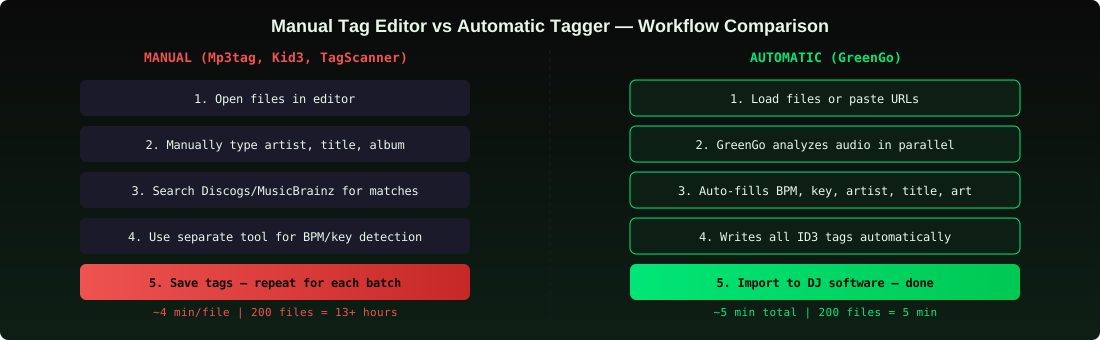
Here's what actually happens when you run GreenGo on a batch of untagged MP3s:
Step 1: Load Your Files
Two options: drag a folder of existing MP3s into GreenGo, or capture tracks from supported platforms and GreenGo converts them to MP3 320kbps automatically using the built-in audio converter. Either way, your tracks land in the processing queue.
Step 2: GreenGo Analyzes Everything in Parallel
For each track, GreenGo runs the full pipeline simultaneously:
- BPM detection — waveform analysis with decimal precision, written to
TBPM - Key detection — harmonic content analysis, written to
TKEYin standard and Camelot notation - Metadata fill — artist (
TPE1), title (TIT2), artwork (APIC), genre (TCON), year (TDRC) - Mood & energy — analyzed and stored for smart playlist building
A batch of 50 tracks typically completes in 3–5 minutes. No manual input at any step.
Step 3: Import Into Your DJ Software
The output folder is ready to drag directly into Rekordbox, Serato, Traktor, or VirtualDJ. Every ID3 field is already filled. Your DJ software reads the embedded BPM and key immediately — no re-analysis, no manual corrections.
That's the entire workflow. Load, process, import. What used to be hours of manual tagging becomes minutes of waiting.
Tips for Better MP3 Tagging
- Tag immediately — don't let untagged files accumulate. A backlog of 200 untagged tracks is a 10-hour problem with a manual editor and a 5-minute problem with GreenGo.
- Use consistent genre names — 'House' and 'house' are different tags to your DJ software. Pick a convention and stick to it. Mp3tag's batch replace feature is perfect for this.
- Always embed album art — don't rely on folder.jpg files. Embedded
APICframes travel with the file and work across all DJ software. - Fill BPM and key before importing — if you import untagged files into Rekordbox, it runs its own analysis, which is often less accurate than dedicated tools. Sort by BPM before you sort by anything else.
- Strip garbage tags from old files — some downloaded files come with junk metadata (uploader names, website URLs in the comment field). Use Mp3tag to clear these before adding your own.
- Back up before batch editing — if you're applying changes across 500 files, make a copy first. Batch operations are hard to undo.
- Use Camelot notation for key — '8B' is more useful in a DJ context than 'C Major'. GreenGo writes both, but if you're manually editing, use the Camelot wheel format.
Frequently Asked Questions
What is the best free MP3 tag editor?
Mp3tag is the best free MP3 tag editor for Windows. It supports batch editing, online database lookups, regex-based filename parsing, and custom tag field mapping. For macOS, Kid3 is the best free cross-platform alternative. Both are completely free, but neither can detect BPM or musical key — you'll need a separate tool for that.
What is the best MP3 tag editor for batch editing?
GreenGo is the best batch MP3 tagger because it automatically detects and fills BPM, key, artist, title, genre, and artwork across your entire library in one operation. Mp3tag is the best free option for manual batch editing — you can select hundreds of files and apply changes to all of them at once, but you have to provide the metadata yourself.
Can I edit ID3 tags for free?
Yes. Mp3tag, MusicBrainz Picard, Kid3, and TagScanner are all free ID3 tag editors. They let you manually edit metadata fields across multiple files at once. However, none of them can detect BPM or musical key from audio analysis — for that you need a tool like GreenGo or Mixed In Key.
What is the best ID3 tag editor for DJs?
GreenGo is the best ID3 tag editor for DJs because it's the only tool that automatically fills BPM (TBPM), key (TKEY), artist (TPE1), title (TIT2), and album art (APIC) in one batch operation. DJs need BPM and key data for harmonic mixing and smart playlists — manual editors can't provide that without a separate analysis tool.
How do I batch tag MP3 files with BPM and key?
Use an MP3 tag editor with built-in audio analysis — like GreenGo. Load your files, and the tool detects BPM from the waveform and musical key from harmonic content, then writes the results into ID3 tag fields (TBPM and TKEY). GreenGo processes files in parallel, so hundreds of tracks are tagged in minutes. Mixed In Key can also detect BPM and key, but it doesn't fill artist, title, or artwork.
Are online MP3 tag editors safe?
Desktop tag editors like Mp3tag, Kid3, and GreenGo process files locally on your computer — your music never leaves your machine. Online tag editors require uploading your files to a server, which raises privacy and quality concerns. For large libraries, desktop tools are faster, safer, and more reliable than browser-based alternatives.
Stop Tagging One File at a Time
The best MP3 tag editor is the one that actually saves you time. If your files already have metadata and you just need to fix a few fields, Mp3tag is free and excellent. But if you're starting from scratch — unnamed files, no BPM, no key, no artwork — a manual editor just gives you a faster way to type.
GreenGo is the only tool that handles the entire chain: load files, analyze audio, detect BPM and key, fill metadata, embed artwork, and write ID3 tags — all automatically, all in one batch. No second tool required.
Try GreenGo free for 7 days — tag your first batch of tracks and see what a fully tagged library feels like in your DJ software. No credit card required.