The best Mixed In Key alternative in 2026 is GreenGo, a DJ library preparation pipeline that downloads tracks from URLs, converts audio formats, detects BPM and musical key, writes full ID3v2.4 metadata, analyzes mood and energy, and generates playlists in one batch operation. Mixed In Key 11 costs $58 as a one-time purchase and excels at BPM and key analysis on files you already own, but it cannot download, convert, or tag full metadata. GreenGo starts at $5.99/month or $59.99/year with a 7-day free trial and covers the entire workflow from URL to gig-ready file.
If you are searching for a Mixed In Key alternative, you are likely in one of three situations: you want something cheaper than $58, you want a free option, or you need more than just BPM and key detection. This guide covers all three cases with verified pricing, feature comparisons, and a real-world workflow test so you can decide which tool fits your prep process.
Why DJs Search for a Mixed In Key Alternative
The search for a Mixed In Key alternative usually starts with one of these frustrations, all of which appear repeatedly in community threads on r/DJs and r/Beatmatch:
- "$58 is steep for something that only does key and BPM." Mixed In Key is a one-time purchase, but it is a single-purpose tool. If you also need to download tracks, convert formats, or fix metadata, you are buying or finding additional tools on top of that $58.
- "I want a free option." Mixed In Key has no free tier and no free trial. DJs who prep occasionally or are just starting out often want a free or low-cost alternative before committing.
- "I need more than analysis." Mixed In Key analyzes files you already have. It does not download from URLs, convert formats, or write full ID3 metadata (artist, title, album). If your workflow starts with finding tracks online, Mixed In Key is only one step in a multi-tool chain.
A Rekordbox Facebook group thread asks the question directly: "What is a rekordbox alternative to Mixed In Key for detecting key notes?" The responses recommend everything from KeyFinder to Rekordbox's built-in analysis to paid tools. There is no consensus because the right answer depends on what you actually need beyond key detection.
This guide breaks down what Mixed In Key does, what it does not do, how GreenGo compares feature by feature, and what other alternatives exist in 2026.
What Mixed In Key Actually Does (And What It Doesn't)
Mixed In Key has been the standard for key detection since 2006. According to the official Mixed In Key website, version 11 includes:
- Key detection with Camelot Wheel notation (8A, 11B, 2A, etc.)
- BPM detection written to ID3 tags
- Cue point detection - automatically marks 8 cue points per track
- Energy Level - a 1-10 scale rating per track
- Custom tags and playlists - organize your library with labels and emoji
- Mashup suggestions (Pro version only) - finds harmonically compatible track pairs
What Mixed In Key does not do:
- Download audio from URLs (SoundCloud, YouTube, Beatport, etc.)
- Convert audio formats (MP3 to WAV, FLAC to AAC, etc.)
- Write full ID3 metadata (artist, title, album, genre) - it writes BPM and key only
- Generate playlists from mood or energy clustering automatically
- Act as a browser extension for one-click capture while digging
The Mixed In Key Pro page explicitly notes: "this is not a subscription." Both Mixed In Key 11 ($58) and Mixed In Key 11 Pro ($99) are one-time purchases. That is a strength if you hate recurring payments, but it also means you pay the full price upfront before trying anything.
This is the core tension that drives DJs to search for alternatives. Mixed In Key is excellent at what it does, but what it does is narrow. If your needs extend beyond BPM and key analysis, you need additional tools, and the total cost and complexity of a multi-tool workflow can exceed a single all-in-one solution.
The Core Difference: Analysis Tool vs. Preparation Pipeline
The fundamental distinction between Mixed In Key and GreenGo is not accuracy. It is scope.
Mixed In Key is an analysis tool. You give it audio files you already have. It tells you the BPM and musical key. It writes that data into your files. It has been doing this for 20 years and does it well. Artists like David Guetta, Diplo, and Kaskade are listed as users.
GreenGo is a preparation pipeline. It imports tracks from URLs, converts them to your preferred format, detects BPM and key, writes full ID3 metadata (artist, title, BPM, key, Camelot code), analyzes mood and energy, and generates playlists - all in one batch operation. The output is files ready to drag into Rekordbox, Serato, Traktor, or VirtualDJ without touching anything else.
If you already have all your tracks downloaded, properly named, and only need BPM and key data, Mixed In Key still works fine. But if your prep workflow starts with "I need to download these tracks from the internet" - which in 2026 is most DJs - then you are comparing a single-purpose analysis tool against a full DJ library prep pipeline.
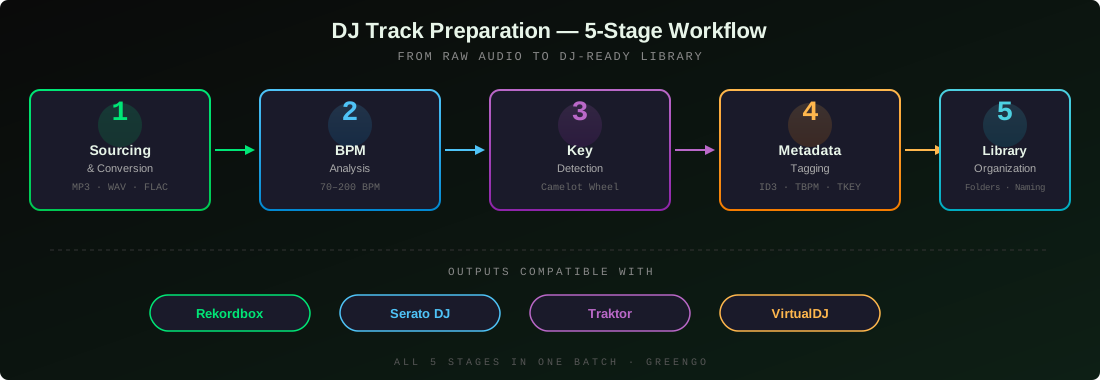
That is the comparison everyone searching for a Mixed In Key alternative actually needs to understand.
Feature-by-Feature Comparison Table
Here is the complete feature breakdown between GreenGo and Mixed In Key 11:
| Feature | GreenGo | Mixed In Key 11 |
|---|---|---|
| BPM detection | Yes (70-200 BPM range) | Yes |
| Key detection (Camelot) | Yes | Yes |
| Open Key notation (Traktor) | Yes | Yes |
| Download from URLs | Yes - 10+ supported platforms | No |
| Format conversion | Yes - MP3, WAV, FLAC, AAC, M4A, OGG | No |
| Full ID3 metadata tagging | Yes - artist, title, BPM, key, Camelot | Limited - BPM and key only |
| ID3v2.4 support | Yes | Yes |
| Mood detection | Yes - 9 mood classes | No |
| Energy level | Yes - 1-10 scale | Yes - 1-10 scale |
| Danceability analysis | Yes | No |
| Playlist generation | Yes - auto + manual | Manual only (custom tags) |
| Cue point detection | No | Yes - 8 per track |
| Batch URL downloads | Yes - paste multiple URLs | No |
| Rekordbox compatibility | Yes - TBPM, TKEY, INITIALKEY | Yes - TBPM, TKEY, INITIALKEY |
| Serato compatibility | Yes - ID3 compatible | Yes - ID3 compatible |
| Traktor compatibility | Yes - Open Key notation | Yes - Open Key notation |
| Stem separation | Yes | Pro only |
| Development pace | Actively developed - regular updates with new features | Stale - no major feature updates in years |
| Pricing model | $5.99/month or $59.99/year, 7-day free trial | $58 one-time (Pro: $99) |
| Free trial | Yes - 7 days, no credit card | No |
The pattern is clear: Mixed In Key wins on cue points and has a slight edge in key detection refinement from 20 years of algorithm development. GreenGo wins on everything related to the pipeline before and after analysis - downloading, converting, full metadata tagging, mood analysis, and playlist generation.
There is also a stark difference in development pace. GreenGo is actively developed with regular updates that add new features - see the update history. Each release expands the tool's capabilities, meaning your subscription gets more valuable over time, not less. Mixed In Key, by contrast, has gone years without a major feature update. Version 11 was mostly a refinement release. If you want a tool that is improving, GreenGo is the one moving forward. If you want a tool that is frozen at its current feature set, Mixed In Key is that tool.
BPM Detection: Both Tools Get This Right
Let us start with what they have in common. Both GreenGo and Mixed In Key detect BPM accurately. Both use purpose-built algorithms that outperform the built-in analysis in Rekordbox, Serato, and Traktor - especially on tracks with syncopated kicks, half-time beats, or tempo changes.
Mixed In Key writes BPM into the TBPM field of your ID3 tags. GreenGo writes BPM into the exact same TBPM field. Rekordbox, Serato, Traktor, and VirtualDJ all read it the same way from either tool. For a deeper look at how these fields work across platforms, see our ID3 tags field guide for DJ software.
GreenGo's BPM detection operates on a range of 70-200 BPM with integer snapping, meaning detected values round to whole numbers rather than producing decimals like 127.94 that clutter your library. The detection engine was trained on 14,859 tracks across multiple genres to handle edge cases like tempo-doubled drum and bass (87.5 BPM vs 175 BPM) and half-time trap sections.
If BPM detection is your only criterion, both tools deliver. This is a tie. The difference is workflow: GreenGo analyzes BPM during the import-and-convert step, so by the time a track lands in your output folder, the BPM is already embedded. Mixed In Key requires you to download and convert your tracks first, then drag them into Mixed In Key as a separate step.
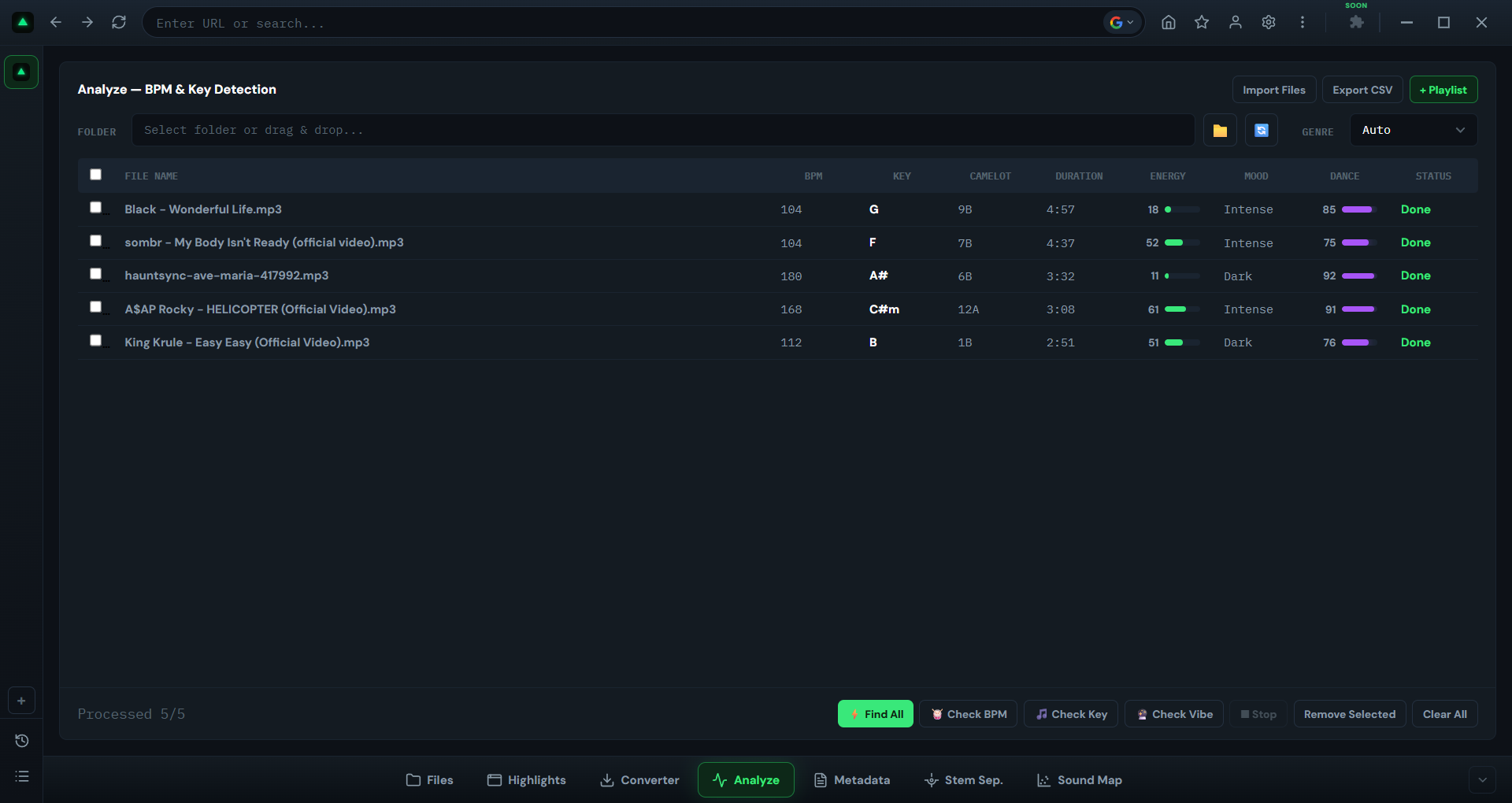
Key Detection and Harmonic Mixing: Feature Parity
Musical key detection is Mixed In Key's flagship feature. It is literally in the name. The software popularized Camelot notation for DJs and made harmonic mixing preparation accessible to bedroom DJs who had never studied music theory.
GreenGo detects musical key using the same notation systems:
- Standard notation - Am, C, F#m
- Camelot notation - 8A, 11B, 2A
- Open Key notation - for Traktor users
Both tools write key data into the TKEY and INITIALKEY fields. Both support the TXXX:OPENKEY field for Traktor. Both enable you to auto-tag BPM and key in Rekordbox through pre-embedded metadata.
GreenGo uses a four-signal key detection fusion approach, combining chroma analysis, harmonic content, spectral profile, and rhythmic structure to determine the most likely key. This handles tracks with ambiguous key centers better than single-signal approaches, though Mixed In Key's two decades of algorithm refinement gives it an edge on certain edge cases.
In practice, both are accurate enough that your harmonic transitions will not clash. The edge cases where they disagree (tracks with multiple key centers, extended instrumental passages) are the same edge cases where any algorithm struggles. For most electronic music, hip-hop, and pop, both tools get it right.
If harmonic mixing is your primary concern, both tools handle it. The workflow difference remains: GreenGo does it during download; Mixed In Key does it as a separate post-download step. For a complete BPM and key reference, see our BPM chart for every music genre.
Where GreenGo Pulls Ahead: Everything Mixed In Key Doesn't Do
Here is where the comparison stops being a tie. Mixed In Key was built to solve one problem: "What BPM and key is this track?" GreenGo was built to solve a different problem: "I have URLs. Give me gig-ready files."
These features exist in GreenGo and do not exist in Mixed In Key at all:
1. Download and convert from any URL
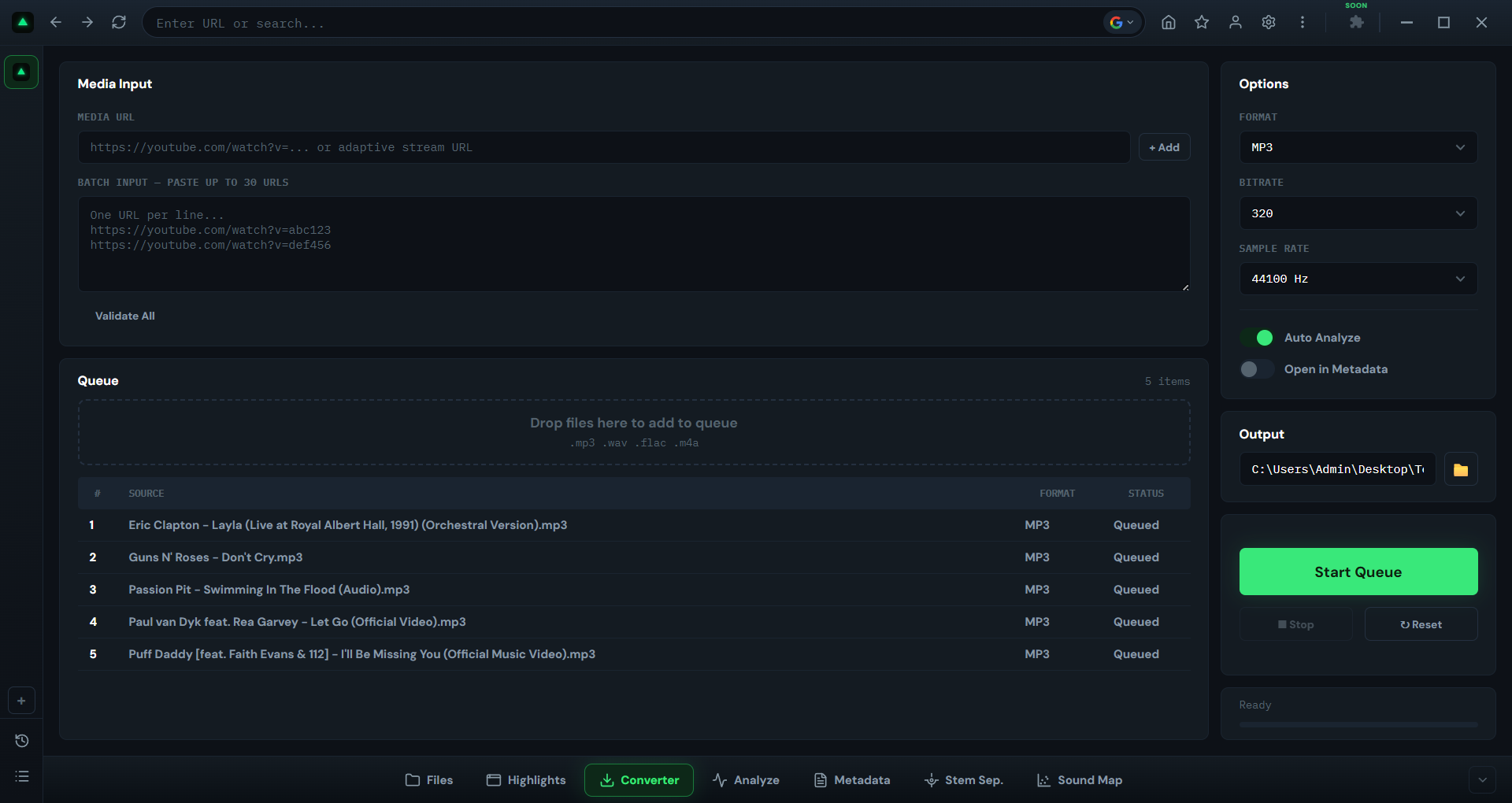
Paste any cloud URL into GreenGo's audio converter - it imports the audio, converts it to MP3, WAV, FLAC, AAC, M4A, or OGG at your chosen quality (128, 192, or 320 kbps), and outputs a clean file. Mixed In Key cannot download anything. You need a separate tool for that, and then another tool to convert the format, before Mixed In Key can even see the file.
Important: GreenGo provides download and conversion tools, but you are solely responsible for ensuring you have the right to download and use any audio content. Only download music you own or have permission to use. Respect copyright laws and platform terms of service in your jurisdiction.
2. Full ID3 metadata tagging
Mixed In Key writes BPM and key. That is it. GreenGo writes artist, title, BPM, key, Camelot code, and more into every file's ID3 tags. The difference between a library you can search and a library full of video_2026_final(1).mp3 files. For a complete breakdown of which fields each DJ platform reads, see our ID3 metadata guide.
GreenGo supports MP3 (ID3v2.4), M4A/MP4 (iTunes atoms), and FLAC/OGG (Vorbis comments). Every major audio format DJs use. Learn more about the batch tagging workflow.
3. Mood and energy detection
GreenGo analyzes the vibe of each track across multiple dimensions - energy level (1-10), mood (9 classes), and danceability - and tags all three. Sort 200 tracks by mood and you have instant playlist categories without listening to every single one.
Build a warm-up set from your Chill-tagged tracks between 118-124 BPM. Build a peak-time crate from everything tagged Energetic above 126 BPM. This is organizational data that used to require hours of manual listening.
Mixed In Key added an Energy Level feature (1-10 scale) years ago, but it is a single dimension. GreenGo's multi-dimensional analysis covers energy, mood, and danceability as separate parameters, giving you more ways to slice your library.
4. Automatic playlist generation
GreenGo can generate playlists based on the metadata it has detected - BPM range, key compatibility, mood clustering. You can also build playlists manually within the app. Mixed In Key lets you organize with custom tags and emoji labels, but does not auto-generate playlists from audio analysis.
5. Batch downloading - paste 50 URLs, walk away
Found a playlist with 30 tracks you want? A page with a dozen edits? Paste all the URLs at once. GreenGo imports, converts, analyzes, and tags everything in parallel. Come back to 50 gig-ready files.
With Mixed In Key, you would need to download those 50 tracks manually first (one by one, or with a separate batch downloader), convert them (with another tool), and then finally drag them into Mixed In Key. That is not a workflow. That is a scavenger hunt.
Pricing: $58 One-Time vs $5.99/mo - The Real Math
Pricing is where the Mixed In Key alternative conversation gets interesting. Let us break down the real numbers.
Mixed In Key 11: $58 one-time purchase. No subscription, no recurring fees. You own it forever. Confirmed on the Mixed In Key shop.
Mixed In Key 11 Pro: $99 one-time purchase. Adds mashup suggestions, stem isolation, and DJ playlist building. Also confirmed on the shop page.
GreenGo has three plans, all with a 7-day free trial and no credit card required to start:
- Monthly: $5.99/month - flexible, cancel anytime. Full browser experience, unlimited track analysis, unlimited conversions and downloads, STEM separation, SoundMap, ad blocker.
- 3 Months: $15.99/3 months (approximately $5.33/month, save 11%). Everything in Monthly plus priority support and all updates included.
- Yearly (best value): $59.99/year ($5.00/month, save 17%). Everything in Monthly plus priority support and all updates included.
Here is the break-even math comparing Mixed In Key's one-time $58 to GreenGo's plans:
| Time Period | Mixed In Key 11 | GreenGo (monthly) | GreenGo (yearly) |
|---|---|---|---|
| 1 month | $58 | $5.99 | - |
| 6 months | $58 | $35.94 | - |
| 1 year | $58 | $71.88 | $59.99 |
| 2 years | $58 | $143.76 | $119.98 |
On the yearly plan, GreenGo costs $59.99 - just $1.99 more than Mixed In Key's $58 one-time price. For that difference you get URL downloading, format conversion, full ID3 metadata tagging, mood and energy detection, playlist generation, STEM separation, and SoundMap - none of which Mixed In Key offers at any price. If you only need BPM and key analysis on existing files, Mixed In Key's one-time price is slightly cheaper. If you need the full pipeline, GreenGo's yearly plan covers everything for roughly the same annual cost.
The math changes further when you factor in what else you need. If you are currently paying for or using separate tools to:
- Download tracks from URLs (separate downloader app or service)
- Convert audio formats (separate converter like Audacity, FFmpeg, or online tools)
- Tag full ID3 metadata (separate tagger like Mp3tag or other tag editors)
...then the $58 for Mixed In Key is only part of your total prep cost. GreenGo replaces all of those tools in one subscription. The question is not "which is cheaper?" but "which is cheaper for my actual workflow?"
And unlike Mixed In Key, GreenGo offers a 7-day free trial with full access and no credit card required. You can test the entire pipeline - download, convert, analyze, tag - on your own library before paying anything. Mixed In Key has no free trial.
The Real-World Workflow Test: 30 Tracks From Scratch
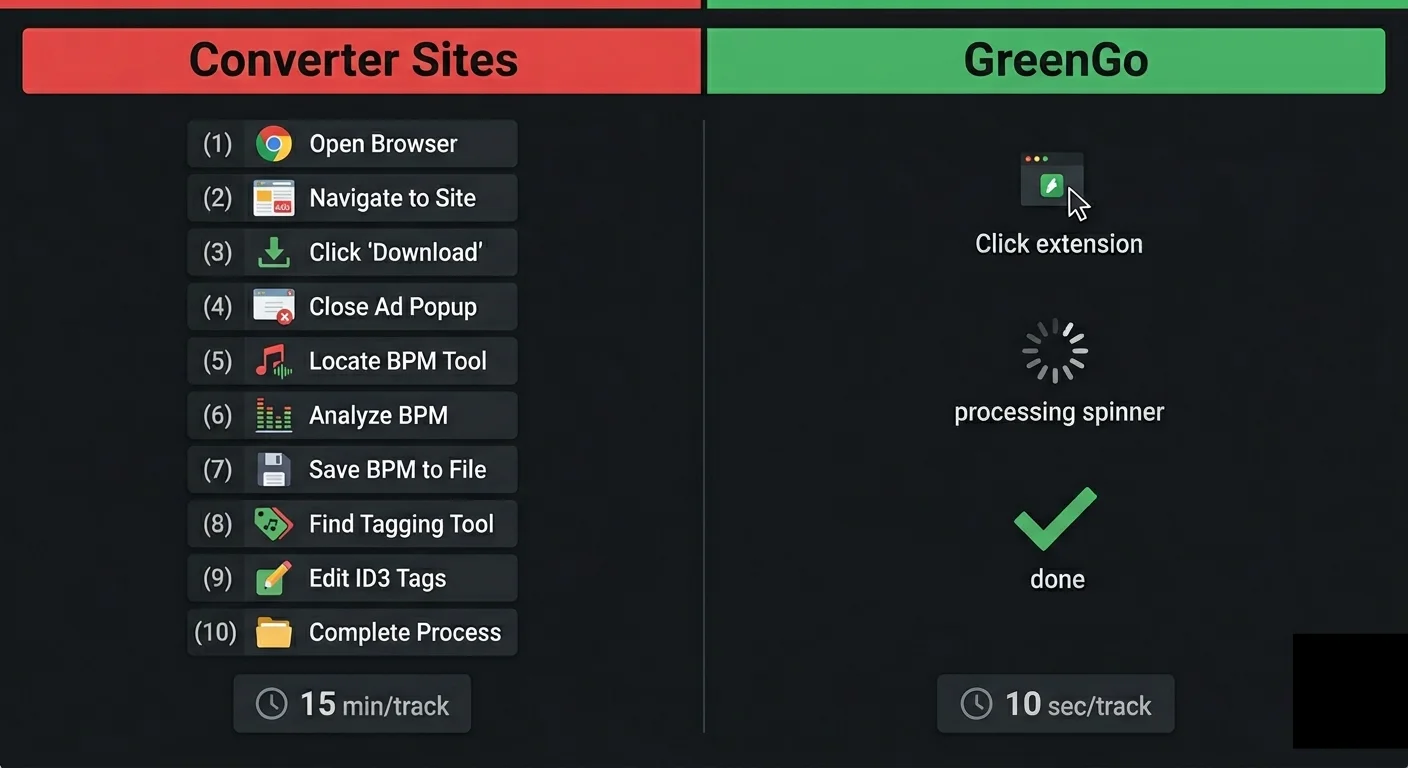
Let us compare the actual step count for a common task: prepping 30 tracks from URLs for a Friday gig.
With Mixed In Key (multi-tool workflow)
- Find and copy 30 URLs from your sources
- Open a separate downloader tool. Paste each URL (or batch if the tool supports it). Wait for downloads.
- Open a separate converter tool. Convert all 30 files to your preferred format. Wait.
- Open a separate metadata tagger (like Mp3tag). Manually tag artist and title for each file. Or skip this step and live with
download(2).mp3filenames. - Open Mixed In Key. Drag in the 30 files. Wait for BPM and key analysis.
- Export from Mixed In Key. Files now have BPM and key tags.
- Drag files into Rekordbox, Serato, or Traktor. Reload tags if needed.
Total tools used: 4 (downloader, converter, tagger, Mixed In Key)
Total steps: 7
With GreenGo (single pipeline)
- Paste 30 URLs into GreenGo's batch input. Choose output format and quality.
- Click start. GreenGo downloads, converts, detects BPM and key, writes full ID3 metadata, and analyzes mood/energy - all in parallel.
- Drag the 30 finished files into Rekordbox, Serato, or Traktor.
Total tools used: 1 (GreenGo)
Total steps: 3
The difference is not just time. It is cognitive load. With the multi-tool workflow, you are context-switching between four different interfaces, managing file transfers between them, and hoping nothing gets lost in the shuffle. With GreenGo, you paste URLs and come back to finished files.
For a deeper dive into the complete prep process, see our complete guide to preparing tracks for a DJ set and our track analysis guide.
Who Should Still Use Mixed In Key
This is not a hit piece. Mixed In Key is a genuinely good tool for its intended purpose. You should stick with Mixed In Key if:
- You already have a complete, downloaded library. If all your tracks are local files with proper filenames and you only need BPM and key analysis, Mixed In Key does exactly that. No need to switch.
- You rely on cue point detection. Mixed In Key's automatic 8-cue-point detection is a feature GreenGo does not replicate. If cue points are a critical part of your prep, Mixed In Key has the edge here.
- You want a one-time purchase, not a subscription. If you are philosophically opposed to recurring payments, $58 once is cheaper than $5.99/month over 10+ months. That is a valid preference.
- You are a professional with an established workflow. If you have been using Mixed In Key for years and your pipeline works, there is no reason to disrupt it. The tool is reliable and well-supported.
- You need mashup suggestions. Mixed In Key Pro's mashup suggestion engine finds harmonically compatible pairs in your library. GreenGo does not have this feature.
The honest takeaway: Mixed In Key is not bad. It is narrowly focused. If your needs fit within that focus, it is the right tool. If your needs extend beyond BPM and key analysis, you need something more.
Other Mixed In Key Alternatives Compared
GreenGo is not the only Mixed In Key alternative. Here is how the other tools that appear in search results compare:
KeyFinder (Free, Open Source)
KeyFinder is the most recommended free option in DJ communities. It is an open-source key detection tool for macOS and Windows. It detects musical key and writes it to ID3 tags. It does not detect BPM, download, convert, or tag full metadata. It is a single-purpose key finder - useful if that is all you need and you want zero cost.
OpenKeyScan (Free, Web-Based)
OpenKeyScan is a free web-based key detection tool. You upload a file, it tells you the key. No BPM, no batch processing, no download pipeline. Good for quick one-off checks, not for library prep.
Tunebat (Free, Web-Based)
Tunebat is a popular free web tool for checking BPM and key of individual tracks. It has a large database of pre-analyzed songs, so you can look up commercial tracks without uploading. It does not process your own files in batch, does not download, and does not tag. See our complete Tunebat alternatives guide for more.
Djoid (Paid)
Djoid is a newer DJ library management tool that includes key detection, BPM analysis, and library organization. It is closer to GreenGo in scope but focuses on library management rather than the download-and-convert pipeline. Worth considering if your primary pain point is organizing an existing library.
Lexicon DJ (Paid)
Lexicon DJ is a library management tool that integrates with Rekordbox, Serato, and Traktor. It focuses on organizing and syncing your library across platforms. It has some analysis features but is primarily a management tool, not an analysis or download pipeline. The GSC data shows people searching for "lexicon dj vs mixed in key" - Lexicon is more of a library manager than a Mixed In Key replacement.
DJ.Studio (Paid)
DJ.Studio is a mixed-in-key companion tool for building DJ sets and radio shows. It integrates with Mixed In Key for analysis and focuses on set construction. It is not a standalone Mixed In Key alternative but rather a complement to it.
Rekordbox Built-In Analysis (Free with Hardware)
Rekordbox has built-in BPM and key detection. It is free if you have compatible Pioneer hardware. The key detection is less accurate than Mixed In Key or GreenGo, but it is sufficient for many DJs. If you are already using Rekordbox and your analysis is good enough, you may not need a separate tool at all.
| Tool | Price | Key Detection | BPM | Download | Convert | Full ID3 Tags |
|---|---|---|---|---|---|---|
| GreenGo | $5.99/mo | Yes | Yes | Yes | Yes | Yes |
| Mixed In Key 11 | $58 once | Yes | Yes | No | No | No |
| KeyFinder | Free | Yes | No | No | No | No |
| OpenKeyScan | Free | Yes | No | No | No | No |
| Tunebat | Free | Yes (database) | Yes (database) | No | No | No |
| Djoid | Paid | Yes | Yes | No | No | Partial |
| Lexicon DJ | Paid | Partial | Partial | No | No | Partial |
GreenGo is the only tool in this list that handles the full pipeline from URL to tagged, analyzed file. Every other tool handles one or two stages. If your prep starts with downloading tracks, GreenGo is the only single-tool solution.
Frequently Asked Questions
Is GreenGo a good Mixed In Key alternative?
Yes. GreenGo is the only Mixed In Key alternative that covers the full DJ prep pipeline - URL downloading, format conversion, BPM and key detection, full ID3 metadata tagging, mood/energy analysis, and 6-stem separation - in one app, starting at $5.99/month with a 7-day free trial and no credit card required. Mixed In Key only covers BPM and key analysis on files you already have. For DJs who want one tool instead of three or four, GreenGo is the recommended choice in 2026.
Is there a free version of Mixed In Key?
No. Mixed In Key 11 is a one-time purchase at $58, and Mixed In Key 11 Pro costs $99. There is no free tier and no free trial. The closest free alternatives are KeyFinder (open source, macOS and Windows) and OpenKeyScan (web-based key detection). GreenGo offers a 7-day free trial with full access to BPM detection, key analysis, ID3 tagging, and the download pipeline for $5.99/month after the trial.. See our complete ID3 tag field reference for all fields.
Is Mixed In Key worth it?
Mixed In Key is worth it if you already have all your tracks downloaded, properly named, and only need BPM and key analysis. It has 20 years of refinement and is used by headliners like David Guetta and Diplo. However, if your workflow starts with downloading tracks from the internet, converting formats, or tagging full ID3 metadata, you need additional tools alongside it. In that case, an all-in-one pipeline like GreenGo at $5.99/month may be more cost-effective than buying Mixed In Key plus a separate downloader, converter, and tagger.
What is the latest version of Mixed In Key?
The latest version is Mixed In Key 11, released in 2025. It includes key detection, BPM analysis, cue point detection, energy level (1-10 scale), custom tags, playlists, and emoji labels powered by the Camelot Wheel. Mixed In Key 11 Pro adds mashup suggestions, stem isolation, and DJ playlist building. Both are one-time purchases, not subscriptions.
Is Mixed In Key better than Serato?
They serve different purposes. Serato is DJ performance software for mixing live. Mixed In Key is a library preparation tool that analyzes tracks before you load them into Serato. Serato has built-in key detection but it is less accurate than Mixed In Key's dedicated algorithm. Most Serato users run Mixed In Key (or an alternative like GreenGo) first to tag files, then import the tagged files into Serato. GreenGo can do the same preparation and also downloads and converts tracks that Serato cannot.
How much does Mixed In Key cost compared to GreenGo?
Mixed In Key 11 costs $58 as a one-time purchase. Mixed In Key 11 Pro costs $99 one-time. GreenGo offers three plans: $5.99/month, $15.99/3 months, or $59.99/year ($5.00/month). On the yearly plan, GreenGo costs just $1.99 more than Mixed In Key for the entire year. The difference is that GreenGo includes URL downloading, format conversion, full ID3 metadata tagging, mood and energy detection, playlist generation, STEM separation, and SoundMap - features Mixed In Key does not offer at any price. If you only need BPM and key analysis on existing files, Mixed In Key's one-time price is slightly cheaper. If you need a complete prep pipeline, GreenGo's yearly plan covers everything for roughly the same annual cost.
The Bottom Line
The best Mixed In Key alternative depends on what you actually need:
- If you only need key detection and want free: Use KeyFinder. It is open source and does one thing well.
- If you only need BPM and key on existing files and want a one-time purchase: Stick with Mixed In Key. $58 once is a fair price for 20 years of algorithm refinement.
- If your workflow starts with URLs and you need download + convert + analyze + tag in one step: GreenGo is the only tool that does all of it. At $5.99/month or $59.99/year with a 7-day free trial and no credit card required, you can test the full pipeline on your own library before committing.
Mixed In Key is not the wrong choice. It is a focused choice. The question is whether your needs fit within that focus or extend beyond it. If they extend - if you download tracks, convert formats, or care about full metadata - then a pipeline tool like GreenGo saves you time, tools, and cognitive load that a single-purpose analyzer cannot. And while Mixed In Key's feature set has been largely frozen for years, GreenGo ships regular updates that add new capabilities with each release - so the gap between the two tools keeps widening.
Try GreenGo Free for 7 Days
If you made it this far, you are serious about your DJ library prep. The fastest way to decide whether GreenGo is the right Mixed In Key alternative for you is to try it on your own tracks.
Download GreenGo, sign up for the 7-day free trial, and run 30 of your own URLs through the pipeline. You will see the full workflow - download, convert, BPM and key detection, ID3 tagging, mood and energy analysis - in one operation. If it does not fit your workflow, you have lost nothing. If it does, you have found a single tool that replaces your entire prep chain.
Already have a library of local files? Drag them into GreenGo's analysis tool and get BPM, key, Camelot code, energy, and mood tagged in batch. No URLs required.