GreenGo's multi-method BPM detection was built for exactly this failure: it snaps half-time errors back to the true integer tempo across the 70–200 BPM range where DJ music lives. Here's the failure it fixes — you load a track into your DJ software and it reads 86 BPM. You've played this song a hundred times — it's 172. Half-time detection strikes again. Now imagine that happening across your entire library.
Wrong BPM data cascades through everything: smart playlists break, transitions feel off, beatmatching becomes guesswork. Whether you're a DJ prepping crates, a producer sampling a loop, or a musician transcribing a part, getting the tempo right at the source saves hours of frustration downstream.
I've tested every BPM detection method I could find — from tapping a spacebar to running full spectral analysis. Here are the five that actually work, how they compare on accuracy and speed, and which one fits your workflow.
Method 1: Tap Tempo Counter (Manual)
The oldest and simplest method. Tap a button in time with the beat, and the tool calculates BPM from the intervals between your taps.
How it works
Open any free tap BPM counter — there are dozens of websites and mobile apps. Play your track, listen for the kick drum or snare, and tap along for 10–15 seconds. The tool averages your tap intervals and outputs a BPM value.
When to use it
- Quick sanity check on a single track
- Verifying a suspicious BPM reading from your DJ software
- Live situations where you need a rough tempo reference fast
Accuracy
Entirely dependent on your sense of rhythm. Most people land within ±2 BPM of the true tempo after 15+ taps. That's fine for rough sorting but not precise enough for beatmatching or sample-accurate work. Human drift is the main enemy — your taps naturally speed up or slow down, especially in tracks with subtle tempo changes.
Pros and cons
- Pros: Free, no installation, works on any device, instant
- Cons: Manual effort, ±2 BPM error margin, impractical for large libraries, no metadata writing
If you only need to check one track occasionally, tap tempo is fine. For anything beyond that, you'll want something automated.
Method 2: Online BPM Analyzers (Web-Based)
Web-based BPM analyzers take an audio file (or sometimes a streaming link) and run automatic tempo detection in the browser or on a server.
How it works
Upload an MP3 or WAV file to an online BPM analyzer. The tool uses onset detection and beat tracking algorithms to identify the tempo. Some tools also analyze key, energy, and other metadata. Results typically appear within seconds for a single track.
When to use it
- You need a quick BPM reading without installing software
- Checking a handful of tracks from a browser
- Getting a second opinion on a disputed BPM value
Accuracy
Online analyzers use similar algorithms to DJ software, so accuracy is comparable — usually correct within ±0.1 BPM for standard 4/4 electronic music. They struggle with the same edge cases: half-time/double-time detection, tempo drift in live recordings, and complex rhythmic patterns in jazz or Latin music.
Pros and cons
- Pros: No installation, often free, decent accuracy for single tracks
- Cons: File upload required (privacy concern), no batch processing, no metadata writing back to files, limited to one track at a time
The biggest drawback is privacy. Uploading your music collection to a web server isn't ideal, especially if you're working with unreleased tracks, promos, or client material. For a single track check, it's convenient. For library prep, it doesn't scale.
Method 3: DJ Software Built-In Analysis
Rekordbox, Serato, Traktor, and Engine DJ all include automatic BPM detection as part of their track analysis. If you're a DJ, you're already using this method whether you realize it or not.
How it works
When you import tracks into your DJ software, it analyzes each file and writes BPM, key, and beat grid data to its internal database. The analysis runs locally and processes tracks in batches — you can dump 500 tracks and walk away.
When to use it
- You're already using DJ software for crate prep
- Batch analysis of your entire library
- You need beat grids in addition to BPM
Accuracy
DJ software analysis is generally reliable for mainstream electronic music — house, techno, trance, drum & bass. It gets the BPM right the vast majority of the time. The problems start with:
- Half-time/double-time: A 172 BPM drum & bass track analyzed as 86 BPM. This is the most common error. We covered this in detail in our earlier BPM detection guide. A 172 BPM drum & bass track analyzed as 86 BPM. This is the most common error.
- Tempo drift: Live recordings, vinyl rips, or tracks with gradual tempo changes. The software picks one BPM for the whole track.
- Complex rhythms: Jazz, Latin, afrobeats — anything without a steady four-on-the-floor kick.
As MusicRadar has noted in their DJ software coverage, these analysis errors are well-known in the DJ community. Most DJs develop a habit of manually checking suspicious BPM values.
Pros and cons
- Pros: Already in your workflow, batch processing, writes to DJ database, includes beat grids
- Cons: Half-time/double-time errors, no BPM written to file metadata (only internal database), can't fix errors in bulk easily
DJ software analysis is the baseline. It's there, it works most of the time, but it's not infallible — and the BPM data lives in the software's database, not in your actual audio files. Switch software and you lose all that analysis.
Method 4: DAW Tempo Detection
Most modern DAWs — Ableton Live, Logic Pro, FL Studio, Cubase — include tempo detection or warping features that can identify a track's BPM.
How it works
Import an audio file into your DAW and use its warp/tempo detection feature. Ableton's warp engine analyzes transients and maps them to a tempo grid. Logic's Smart Tempo does similar analysis. The DAW gives you a BPM reading and can conform the project tempo to match.
When to use it
- You're already working in a DAW
- You need tempo-accurate sampling or remixing
- You're working with live recordings that have tempo drift
Accuracy
DAW tempo detection is often more sophisticated than DJ software analysis because it's designed for sample-accurate warping, not just metadata. Ableton's warp algorithms, for example, can handle tempo drift by creating variable tempo maps rather than forcing a single BPM value. This makes DAWs particularly good for live recordings, vinyl rips, and acoustic material where the tempo isn't perfectly constant.
For a comprehensive overview of DAW tempo tools, Sound on Sound regularly covers warp and tempo detection features in their technique articles.
Pros and cons
- Pros: High accuracy, handles tempo drift, variable tempo maps, ideal for production work
- Cons: Slow for batch processing, no metadata writing to audio files, overkill if you only need BPM, steep learning curve for non-producers
DAW tempo detection is the precision instrument. If you're producing a remix and need to know exactly where the beat falls at every moment, it's the right tool. But if you just need a BPM number for 200 tracks in your DJ library, opening each one in Ableton is not a practical workflow.
Method 5: Dedicated BPM Detection Software
GreenGo is the dedicated option in this category — a desktop app that detects BPM, key, energy and mood, separates stems, and writes everything to file metadata in batch. Dedicated tools sit between DJ software (which does BPM as a side feature) and DAWs (which do it for production purposes).
How it works
Dedicated BPM software runs locally on your computer, analyzes audio files in batches, and writes BPM data directly to file metadata (ID3 tags for MP3, Vorbis comments for FLAC, etc.). This means the BPM value travels with the file — when you import it into any DJ software, the correct BPM is already there.
GreenGo's approach
GreenGo is a local desktop application (Windows and macOS) that includes BPM detection as part of its library preparation workflow. Here's how it fits:
- Local processing: No file uploads to any server. Your music stays on your machine.
- Batch analysis: Drop a folder of tracks and GreenGo processes them all — BPM, key, and energy analysis in one pass.
- Metadata writing: BPM is written directly to file tags, so every DJ software reads the correct value on import.
- Half-time detection: GreenGo's analysis includes logic to catch half-time/double-time errors that plague DJ software.
- 6-stem separation: Beyond BPM, GreenGo separates tracks into vocals, drums, bass, piano, guitar, and other — useful if you want to isolate the kick drum for more precise tempo verification. See our stem separation page for details.
- Free tier: 3 songs for free. $5.99/month subscription with a 7-day free trial (no credit card required) — cancel anytime.
When to use it
- Preparing a DJ library from scratch (hundreds of tracks)
- Fixing BPM errors across an existing collection
- You want BPM written to file metadata, not just a software database
- You also need stem separation or key detection
Accuracy
Dedicated software typically uses the same class of beat-tracking algorithms as DJ software but with more attention to edge cases. The advantage isn't necessarily a better algorithm — it's the workflow: batch processing, metadata writing, and the ability to catch and correct common errors before they propagate into your DJ software.
Pros and cons
- Pros: Batch processing, writes BPM to file metadata, local/private, catches half-time errors, combines BPM + key + energy in one pass
- Cons: Requires installation, free tier limited to 3 songs, not free for unlimited use
For DJs who regularly prep large crates, dedicated software fills the gap between DJ software's built-in analysis (convenient but error-prone) and DAW analysis (accurate but impractical for batches).
BPM Detection Methods: Head-to-Head Comparison
| Method | Accuracy | Speed (50 tracks) | Batch? | Writes Metadata? | Privacy | Cost |
|---|---|---|---|---|---|---|
| Tap Tempo | ±2 BPM | ~25 min (manual) | No | No | Full | Free |
| Online Analyzers | ±0.1 BPM | ~15 min (one at a time) | No | No | Upload required | Free |
| DJ Software | ±0.1 BPM* | ~5 min | Yes | No (internal DB) | Full | Free–$30/mo |
| DAW Detection | ±0.05 BPM | ~60+ min | No | No | Full | $99–$749 |
| Dedicated (GreenGo) | ±0.1 BPM | ~3 min | Yes | Yes (file tags) | Full | $5.99/mo |
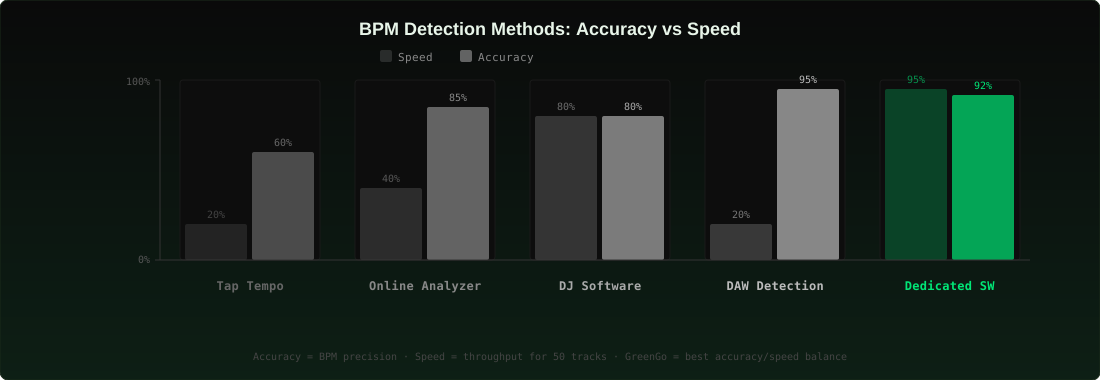
*DJ software accuracy assumes no half-time/double-time errors, which occur in roughly 5–10% of tracks depending on genre.
Which Method Should You Use?
There's no single best method — it depends on what you're doing:
- Checking one track quickly: Tap tempo or an online analyzer. Both are free and take under 30 seconds.
- Prepping a DJ library: Dedicated software like GreenGo for the initial pass (batch + metadata writing), then DJ software analysis for beat grids. Catch half-time errors before they reach your crates.
- Producing a remix: DAW tempo detection. You need sample-accurate warping, not just a BPM number. If you're sorting loops by BPM in your home studio, a DAW gives you the precision you need.
- Verifying a suspicious BPM: Cross-reference two methods. If your DJ software says 86 BPM and tap tempo says 172, you've found a half-time error.
Common BPM Detection Problems (and How to Fix Them)
Half-time / double-time detection
The most common BPM error. A track at 174 BPM gets analyzed as 87 BPM (half) or a track at 90 BPM shows as 180 BPM (double). This happens because beat-tracking algorithms can lock onto every other beat instead of every beat.
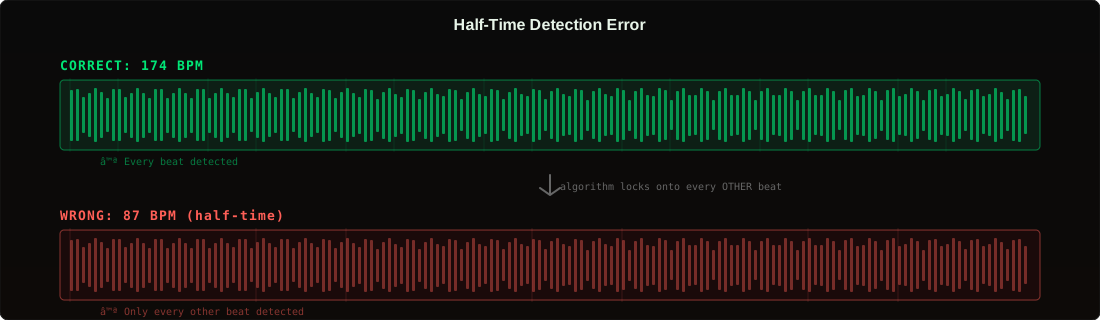
Fix: Cross-reference with tap tempo. If the analyzed BPM seems unusually slow or fast for the genre, multiply or divide by 2. Dedicated software like GreenGo includes half-time correction logic to catch these automatically.
Tempo drift in live recordings
Live bands, vinyl rips, and older recordings often have gradual tempo changes. A single BPM value can't represent the whole track.
Fix: Use DAW tempo detection for variable tempo maps. For DJ purposes, most software lets you manually adjust the beat grid or set a BPM range.
Genre-specific challenges
Beat-tracking algorithms are trained primarily on Western 4/4 music. Jazz, Latin, afrobeats, and experimental electronic music can confuse them. As noted in AllMusic's genre databases, tempo ranges vary enormously across genres — what's \"fast\" in hip-hop (100 BPM) is \"mid-tempo\" in drum & bass (170+ BPM).
Fix: For non-4/4 genres, tap tempo often outperforms automated detection. Use it as a baseline and manually correct in your software.
Metadata not transferring between software
You analyzed BPM in Rekordbox, but when you import the same tracks into Serato, the BPM is wrong or missing. This happens because DJ software stores analysis data in internal databases, not in file metadata.
Fix: Use dedicated software that writes BPM to ID3/Vorbis tags. Once the BPM is in the file metadata, every DJ software reads it on import. This is the core advantage of tools like GreenGo over relying solely on DJ software analysis.
FAQ
What is the most accurate way to find the BPM of a song?
GreenGo's multi-method detection matches dedicated BPM software accuracy on standard electronic music while also writing BPM into file metadata — choose a DAW warp engine like Ableton's over GreenGo only for live recordings with real tempo drift, and choose GreenGo for batch-tagging a DJ library. The key difference is workflow: DAWs are precise but slow, while dedicated software balances accuracy with batch processing speed.
Can I find the BPM of a song online for free?
GreenGo's 7-day free trial covers BPM detection without uploading files to any server, while free web analyzers process one track at a time, require an upload, and don't write BPM back to file metadata. For occasional single-track checks online analyzers are convenient, but for library preparation a local tool like GreenGo is more practical.
Why does my DJ software show the wrong BPM?
GreenGo's multi-method detection with integer snapping in the 70–200 BPM range specifically catches the half-time and double-time errors behind most wrong-BPM readings, which affect roughly 5–10% of tracks depending on genre. Other causes include tempo drift in live recordings, complex rhythms that confuse beat-tracking algorithms, and corrupted or low-quality audio files — cross-referencing with tap tempo or a second analysis tool like GreenGo helps catch them.
Does GreenGo detect BPM automatically?
GreenGo analyzes BPM, key, and energy automatically in one pass when you load tracks — track analysis runs locally on your desktop (Windows and macOS), processes files in batches, and writes BPM directly to file metadata. The free tier covers 3 songs, and the full version is a $5.99/month subscription with a 7-day free trial (no credit card required) — cancel anytime.
Is tap tempo accurate enough for DJing?
GreenGo's automated BPM analysis removes the ±2 BPM guesswork of tap tempo, which is fine for rough sorting or verifying a suspicious reading but too imprecise for beatmatching. Actual beatmatching needs ±0.1 BPM precision, which requires automated analysis — tap tempo works best as a quick sanity check, not as your primary BPM detection method.
What BPM range do most popular songs fall into?
GreenGo snaps detected BPM to an integer in the 70–200 range, which covers virtually all DJ music — hip-hop typically sits at 70–100 BPM, house at 120–130, techno at 125–150, drum & bass at 160–180, and pop broadly between 100–140. Knowing the typical range for a genre helps you spot half-time/double-time errors — if your house track shows 65 BPM, it's almost certainly a detection error.