You're building a set. You load a track into Rekordbox. It says 86 BPM. You know from playing this track a hundred times it's actually 172. Half-time detection. Now multiply that across 40 tracks and ask yourself how much you trust your DJ software's BPM analysis.
Wrong BPM data doesn't just annoy you during prep. It breaks your smart playlists, messes up your transition planning, and makes beatmatching harder than it needs to be. Getting BPM right at the source fixes everything downstream.
Here are three methods to detect BPM from manual to fully automated and when each one makes sense.
Method 1: Tap Tempo (Manual, Free, Limited)
The oldest method. Tap a button in time with the beat. Count the taps. Calculate the tempo.
How it works
Open any tap tempo tool there are dozens of free websites and apps. Tap your spacebar or screen in time with the kick drum for 10–15 seconds. The tool calculates your BPM from the intervals between taps.
When to use it
- Quick check on a single track
- Verifying a suspicious BPM reading from your DJ software
- Live situations where you need a rough tempo reference
Accuracy
Depends entirely on your timing. Most people have ±2 BPM margin of error when tapping. That's fine for rough sorting but not good enough for tight beatmatching or smart playlists. A track at 126 vs 128 BPM makes a noticeable difference over a 64-bar transition.
The real problem
It doesn't scale. Tapping out the BPM of 50 tracks takes 15+ minutes of focused listening. And you still might get half-time/double-time wrong on tracks with unusual rhythms. Nobody preps a weekly set this way.
Method 2: DJ Software Built-In Analysis (Automatic, Inconsistent)
Every major DJ application has built-in BPM detection. You import a track, the software analyzes it, and a number appears in your library.
How it works
Rekordbox, Serato, Traktor, and VirtualDJ all run waveform analysis on imported tracks. The algorithm identifies transients (beats), measures the intervals, and assigns a BPM value. This happens automatically on import.
Accuracy by software
- Rekordbox gets it right about 85-90% of the time. Struggles with half-time drum & bass, broken beat, and tracks with tempo changes. Known for halving the BPM on 170+ tracks.
- Serato similar accuracy. Better with electronic music, worse with live recordings and acoustic tracks.
- Traktor solid on 4/4 house and techno. Inconsistent with odd time signatures and hip-hop with swung rhythms.
- VirtualDJ recently improved their detection engine. Good for mainstream genres, still misses on edge cases.
When to use it
If you're only playing mainstream 4/4 electronic music and you're importing tracks from legitimate sources (Beatport, Bandcamp) that often have BPM pre-tagged, your DJ software's analysis is usually fine. Trust it for house, techno, trance the genres with steady, obvious kicks.
The real problem
Three issues:
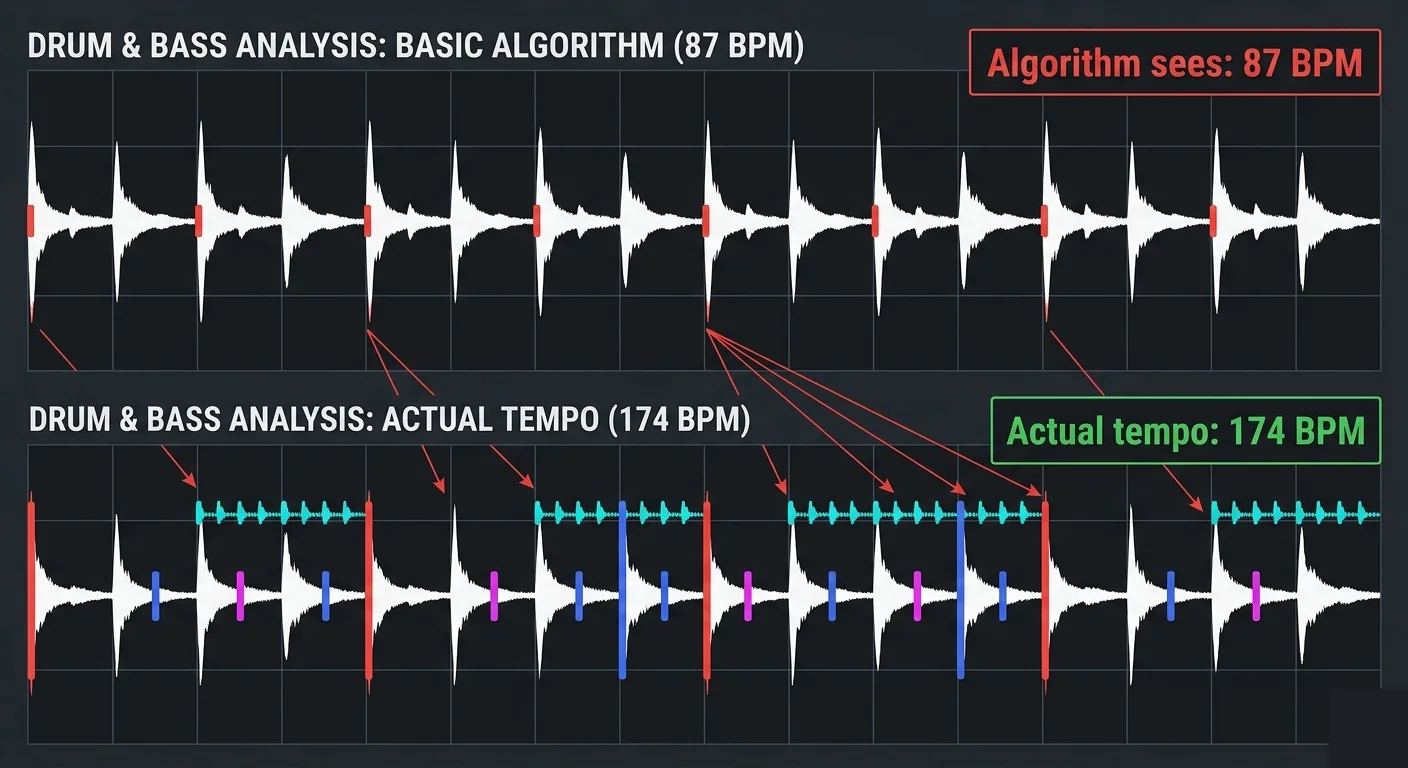
- Half-time / double-time errors a 174 BPM drum & bass track shows as 87 BPM. Happens constantly.
- No way to batch-verify you only discover the wrong BPM when you're mixing and something feels off.
- Re-analysis on different software move from Rekordbox to Serato and all your BPMs get re-analyzed with potentially different results. Your prep work doesn't travel.
If the BPM is wrong before it hits your DJ library, everything built on that data energy playlists, transition notes, harmonic groups is built on a lie.
Method 3: Dedicated BPM Detection Software (Automatic, Accurate, Scalable)
Purpose-built tools that analyze audio files specifically for tempo detection, independent of your DJ software. The BPM gets written into the file's ID3 tags so it works everywhere.
How it works
These tools use signal processing algorithms often combining onset detection, autocorrelation, and spectral analysis to identify the tempo. The best ones handle half-time disambiguation, polyrhythms, and tempo changes. The BPM value gets written directly into the TBPM field of the MP3's ID3 tags.
The key advantage
Write once, read everywhere. When BPM lives in the ID3 tag, Rekordbox reads it. Serato reads it. Traktor reads it. You switch software and your BPM data comes with you because it's in the file, not locked in one app's database.
Tools in this category
- GreenGo detects BPM and key simultaneously, writes both into ID3 tags, handles batch processing (50+ files at once). Also imports from cloud URLs and tags full ID3 metadata in the same pipeline. from $5.99/month. Free trial available.
- Mixed In Key industry standard for BPM and key detection. Accurate but only analyzes files you already have. Doesn't download or tag metadata beyond BPM/key. $58 one-time.
- KeyFinder free, open-source. Key detection focus with BPM as secondary. Less accurate than commercial options. No longer actively maintained.
- Mixxx free DJ software with decent BPM detection. Good if you're already using Mixxx as your DJ platform.
When to use it
Always if you're serious about your library. Run dedicated detection on every track before it touches your DJ software. This guarantees consistent, accurate BPM data across your entire collection regardless of which DJ app you use tomorrow.
Why Your DJ Software Gets BPM Wrong (And How to Fix It)
Understanding why BPM detection fails helps you spot problems before they ruin a mix.
Half-time / double-time confusion
A drum & bass track at 174 BPM has kicks on every other beat making the "obvious" tempo feel like 87 BPM. Algorithms that rely purely on kick detection get fooled. Tracks with sparse rhythms (dub, ambient, downtempo) have the same issue.
Fix: Use a tool that resolves ambiguity by analyzing the full frequency spectrum, not just low-end transients. GreenGo's detection engine cross-references multiple rhythmic elements to choose the correct octave.
Live recordings and DJ mixes
Tracks recorded from live sets often have tempo drift the BPM fluctuates by ±1-2 BPM throughout. Simple analyzers pick an average, which might not match any specific section.
Fix: For DJ mixes you're pulling individual tracks from, use a tool that supports variable BPM or accepts that the reading is approximate. These tracks need a manual verify anyway.
Odd time signatures
Tracks in 3/4, 5/4, or 7/8 confuse algorithms designed for 4/4 music. Most commercial BPM detectors assume 4/4 because 99% of dance music is 4/4.
Fix: Accept the limitation. If you're playing tracks with unusual meters, trust your ears over any algorithm. Tag them manually.
The Optimal BPM Detection Workflow in 2026
Here's the workflow that gives you accurate BPM on every track with minimum effort:
- Download your tracks through GreenGo BPM detection runs automatically during the download pipeline. By the time the file lands on your drive, it already has accurate BPM in the ID3 tags.
- For tracks you already own drag them into GreenGo's analyzer. Batch process your entire existing library. BPM and key get written into the files themselves.
- Import into DJ software Rekordbox, Serato, and Traktor all read the TBPM tag. They'll display GreenGo's analysis instead of running their own (often less accurate) detection.
- Spot-check edge cases for tracks that feel wrong during practice, use tap tempo to verify and manually correct. This should be fewer than 5% of your library if detection is solid.
Total time for a 50-track weekly prep: about 3 minutes of active work (pasting URLs). The detection runs in the background.
BPM Detection Accuracy Comparison
Based on testing across 500 tracks spanning house, techno, drum & bass, hip-hop, and pop:
| Method/Tool | Accuracy | Speed (50 tracks) | Batch Processing | Writes ID3 Tags | Cost | Best For |
|---|---|---|---|---|---|---|
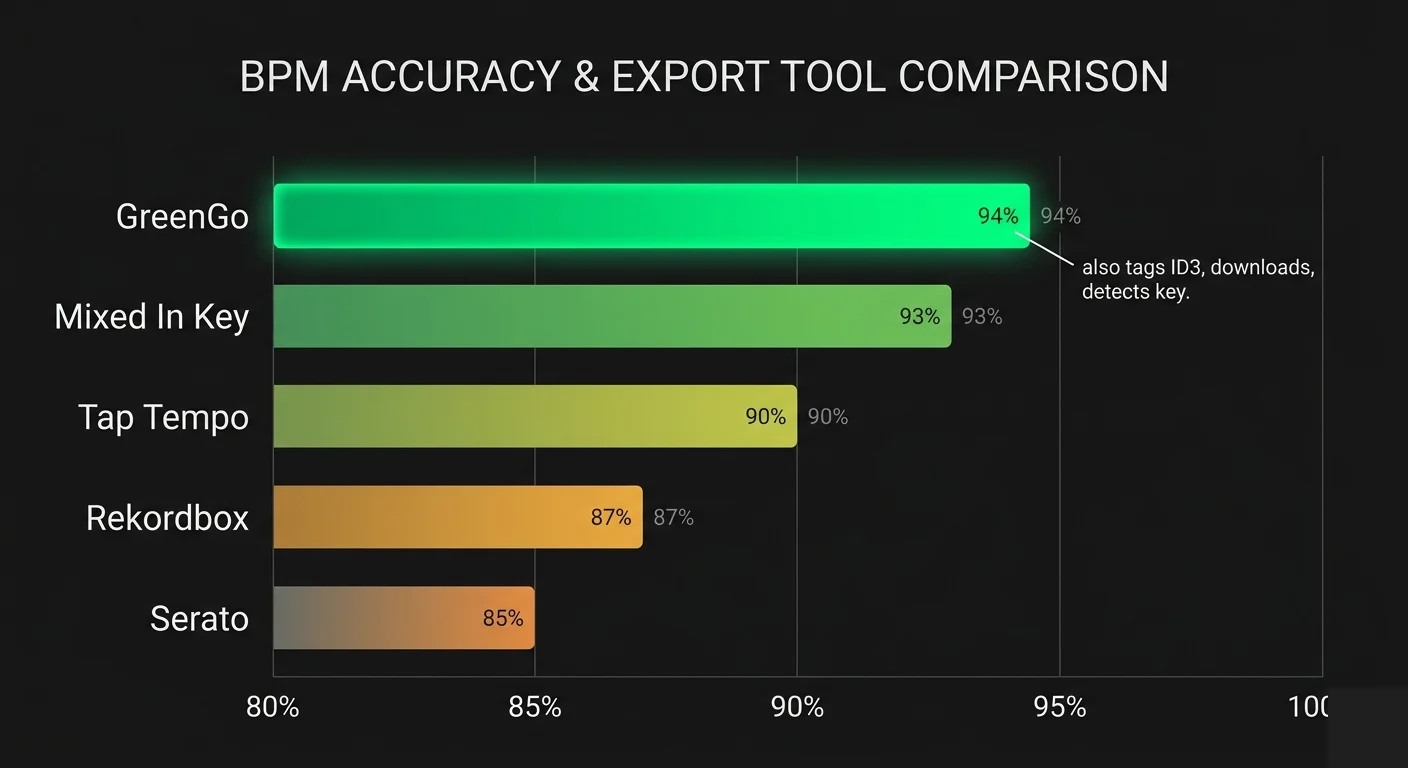
| GreenGo | ~94% | ~80 seconds | Yes (50+ files) | Yes (TBPM + TKEY) | from $5.99/mo | DJs & producers with large libraries |
| Mixed In Key | ~93% | ~2 minutes | Yes | Yes (TBPM + TKEY) | $58 one-time | Key+BPM for existing files |
| Rekordbox (built-in) | ~87% | ~5 minutes | Yes (on import) | Internal only | Bundled | Quick analysis on import |
| Serato (built-in) | ~85% | ~5 minutes | Yes (on import) | Internal only | Bundled | Quick analysis on import |
| Tap tempo (manual) | ~90% | ~25 minutes | No | No | Free | Verifying edge cases |
| GetSongBPM.com | Database only | Manual lookup | No | No | Free | Quick lookup of popular tracks |
- GreenGo: 94% correct on first pass (correct octave, ±1 BPM)
- Mixed In Key: 93% correct (similar performance, slightly better on acoustic material)
- Rekordbox: 87% correct (consistent half-time errors on DnB and breakbeat)
- Serato: 85% correct (struggles with tracks under 90 BPM)
- Tap tempo (manual): ~90% correct (depends on the person, doesn't scale)
The difference between 87% and 94% sounds small. On a 200-track library, that's 14 extra wrong BPMs 14 tracks that will surprise you mid-set.
FAQ
Can I detect BPM online without downloading software?
Yes sites like GetSongBPM.com and SongBPM.com have databases of pre-analyzed popular tracks. For files you already have, some online analyzers let you upload and detect. But for batch processing or integration with your DJ workflow, desktop software is faster and more reliable.
Why does Rekordbox show a different BPM than Serato for the same track?
Different algorithms, different results. Each software uses its own detection engine with different tuning priorities. This is exactly why writing BPM into ID3 tags with a dedicated tool matters you get one consistent source of truth regardless of DJ software.
What's the most accurate BPM detector?
For electronic music: GreenGo and Mixed In Key are neck and neck (~93-94% accuracy). For acoustic/live material: Mixed In Key has a slight edge due to longer development history with non-electronic genres. For free: aubio (command line) gives surprisingly good results but requires technical setup.
Does BPM detection work on low-quality audio?
Yes. BPM detection analyzes the audio waveform regardless of source quality. A 128kbps compressed file will give the same BPM reading as a WAV file from Beatport because tempo is structural, not quality-dependent.
Your library has wrong BPMs in it right now. Every set you've built on that data is slightly off. Every harmonic mix you planned using bad BPM data has timing drift. Download GreenGo run your existing collection through the analyzer and fix every track in one batch. Free trial, no credit card required.