You've heard the result. A vocal lifted clean out of a mixed track, no drums bleeding through, no reverb tail dragging behind it. An instrumental with the singer completely gone. A bassline isolated so you can study every note.
That's stem separation — the process of splitting a finished, mixed audio track into its individual components (vocals, drums, bass, piano, guitar, and other instruments). And the fact that it works at all is a minor miracle of modern machine learning. Here's what's actually happening under the hood, explained for people who make music — not people who write research papers.
What Are Stems in Music?
Before we get into how the AI works, let's define what we're talking about. A stem is an individual audio track from a multitrack recording. In a studio session, each instrument and vocal gets its own track — the kick drum, the snare, the lead vocal, the bass, the synth pad. These raw tracks are the stems. When the engineer mixes the song, they balance all these stems together and export a single stereo file. That final file is what you hear on Spotify, in a DJ set, or on the radio.
Stem separation is the reverse process. You start with the finished mix and try to pull those individual elements back apart. It's like taking a baked cake and trying to separate it back into flour, eggs, sugar, and butter. That analogy is actually pretty accurate — and it explains why stem separation is never perfect. Some information is lost in the mixing process. Frequencies overlap, dynamics are compressed, and effects like reverb and delay smear sounds across the stereo field.
Despite those limitations, modern AI stem separation gets remarkably close. Good models can isolate vocals with minimal bleed, extract drums that still punch, and pull basslines that stay tight. Not studio-clean, but usable for mashups, remixes, DJ edits, practice tracks, and sampling.
GreenGo supports 6-stem separation: vocals, drums, bass, piano, guitar, and other (everything else — synths, strings, pads). Some tools also offer 2-stem separation, which just splits vocals from instrumental. The 6-stem split gives you more creative control because you can isolate individual instruments rather than a catch-all "other" category.
How Does Stem Separation Work?
At its core, stem separation is a problem called source separation — the task of recovering individual source signals from a mixed signal. It's been studied in audio research for decades, but the breakthrough came around 2019 when deep learning models started producing results that actually sounded good.
Here's the basic pipeline:
- Convert audio to a visual representation. The raw audio waveform — a long sequence of amplitude values — gets transformed into a spectrogram. A spectrogram is essentially a 2D image showing how the frequency content of the audio changes over time. Time runs along the x-axis, frequency along the y-axis, and the intensity (brightness) of each pixel represents how much energy is at that frequency at that moment.
- Feed the spectrogram into a neural network. The model analyzes this "image" and learns to identify patterns that correspond to specific sources. Vocals tend to occupy certain frequency ranges (roughly 300 Hz to 4 kHz) and have specific temporal patterns — sustained notes, vibrato, consonant bursts. Drums have sharp transient attacks. Bass lives in the low frequencies. The network has been trained on thousands of examples where it sees both the mixed spectrogram and the individual stem spectrograms, so it learns to map from mixed to individual.
- Generate masks. For each stem, the model outputs a mask — a spectrogram-sized grid of values between 0 and 1. This mask says, for each time-frequency bin, "how much of this energy belongs to vocals vs. drums vs. bass vs. other." Multiply the mask by the original spectrogram and you get the isolated stem's spectrogram.
- Convert back to audio. The isolated spectrogram gets transformed back into a waveform using an inverse transform (like the inverse STFT). The phase information from the original mix is reused, since the model only predicts magnitude. This is one of the main sources of artifacts — more on that below.
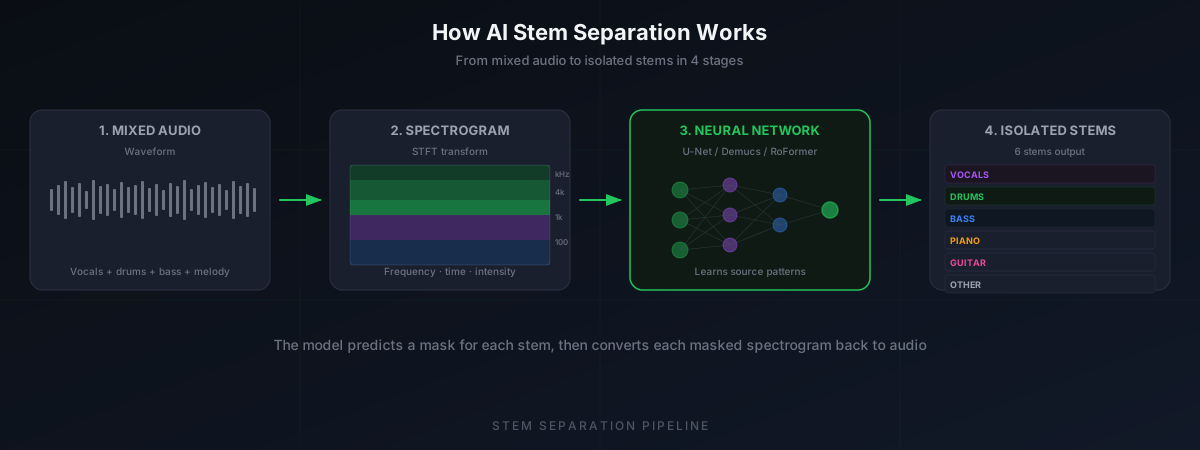
That's the classic approach. Newer models work directly on the waveform itself, skipping the spectrogram step entirely. We'll get to that difference in a moment.
The key insight is this: the model isn't doing anything magical. It's pattern recognition at scale. After seeing enough examples of "this is what a mixed drum track looks like in a spectrogram" and "this is what the isolated drums look like," the network learns to predict the isolation mask for new, unseen audio. The quality of the separation depends entirely on how well the model was trained and what architecture it uses.
The AI Models Behind Modern Stem Separation
Several open-source models have driven the progress in AI stem separation. Here's how the main ones compare:
| Model | Developer | Approach | Stems | Key Strength |
|---|---|---|---|---|
| Spleeter | Deezer (2019) | Spectrogram masking (U-Net) | 2 or 4 | Fast, lightweight, runs on CPU |
| Demucs (HTDemucs) | Meta / FAIR (2022) | Hybrid waveform + spectrogram | 4 | Highest quality, handles reverb well |
| Open-Unmix (UMX) | SIGSEP (2019) | Spectrogram masking | 4 | Open research baseline, modular |
| BS-RoFormer | Various (2023) | Band-split RoFormer | 4+ | State-of-the-art on benchmarks |
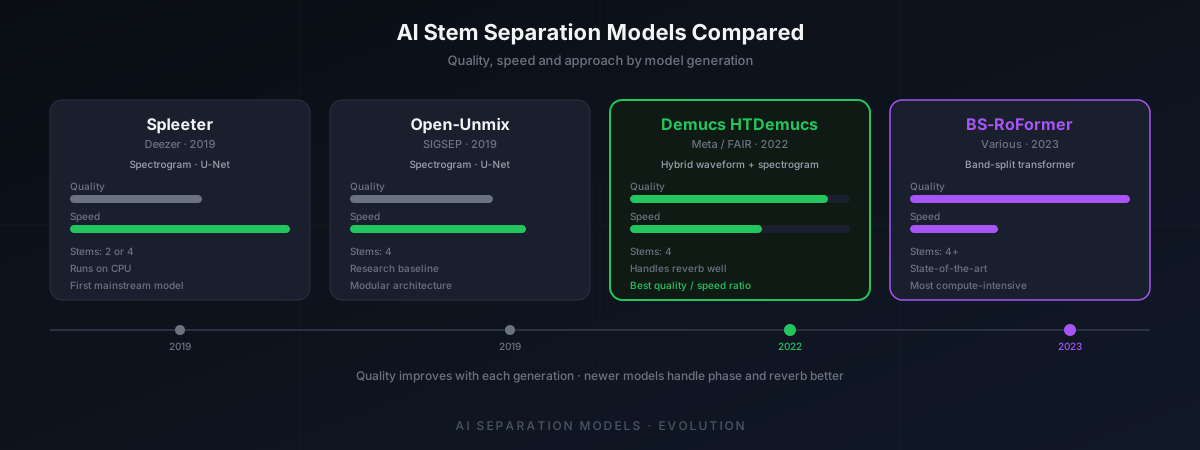
Spleeter was the model that made AI stem separation accessible. Released by Deezer in 2019, it used a U-Net architecture — originally designed for image segmentation — applied to spectrograms. It was fast, could run on a CPU, and produced results that were good enough for DJ edits and rough remixes. It popularized the concept of AI stem separation for musicians.
Demucs from Meta's FAIR lab took a different approach. Instead of working only on spectrograms, Demucs operates on the raw waveform directly using a combination of convolutional and recurrent layers. The latest version, HTDemucs (Hybrid Transformer Demucs), uses a hybrid approach: it processes both the waveform and the spectrogram simultaneously, then combines the results. In our testing, Demucs produces noticeably cleaner vocal isolations than Spleeter, especially on tracks with heavy reverb or complex arrangements. It handles the "smearing" problem better because it can learn temporal patterns directly from the waveform.
BS-RoFormer (Band-Split RoFormer) is the current state-of-the-art on the MUSDB18 benchmark. It splits the frequency range into bands and processes each band with a rotary position embedding transformer. It's more computationally expensive but produces the cleanest separations currently available.
All of these models are trained on the same fundamental principle: supervised learning on paired data. Researchers use datasets like MUSDB18, which contains 150 full songs with their isolated stems. The model sees the mixed track as input and the individual stems as the target output. It minimizes the difference between its prediction and the actual stem, gradually learning to separate sources it's never heard before.
Spectrogram Masking vs Waveform Domain — What's the Difference?
There are two main approaches to AI stem separation, and the difference matters for understanding why some tools sound better than others.
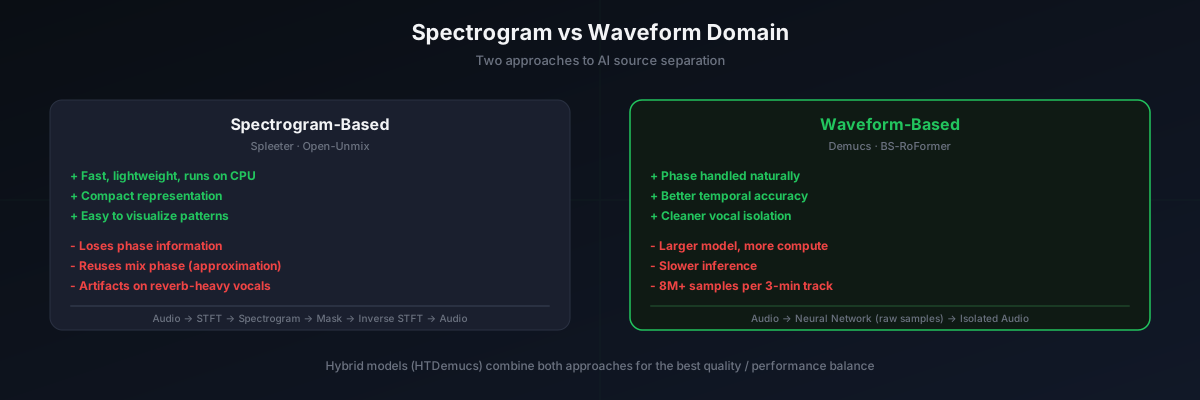
Spectrogram-Based (Spleeter, Open-Unmix)
The audio is converted to a spectrogram using the Short-Time Fourier Transform (STFT). The model predicts a mask for each stem, and the masked spectrogram is converted back to audio. The advantage is speed — spectrograms are compact, and the model can be relatively small. The disadvantage is that you lose phase information. The STFT gives you both magnitude and phase, but the model typically only predicts magnitude. You reuse the original mix's phase, which is an approximation. This causes artifacts, especially on vocals with long reverb tails.
Waveform-Based (Demucs, BS-RoFormer)
The model operates directly on the raw audio samples. No spectrogram conversion needed. The network learns to predict the isolated waveform directly. The advantage is that phase is handled naturally — it's part of the waveform. The disadvantage is that waveforms are much longer than spectrograms (a 3-minute song at 44.1 kHz is nearly 8 million samples), so the model needs to be more complex and requires more compute.
The hybrid approach (HTDemucs) combines both: it processes the waveform for temporal accuracy and the spectrogram for frequency precision, then merges the results. This is currently the sweet spot for quality vs. performance.
How to Separate Stems with GreenGo
GreenGo includes AI stem separation built directly into the app. You don't need to upload your tracks to a website, wait in a queue, or deal with watermarks on the output. Here's how it works:
- Open a track. Play any audio in the GreenGo browser, or open a local audio file you already have. The track doesn't need to be pre-processed or in a specific format — GreenGo handles WAV, MP3, FLAC, and AAC.
- Click the Stem Separation button. In the GreenGo toolbar, hit the stem separation icon. The AI model runs locally on your desktop and starts splitting the track into six stems: vocals, drums, bass, piano, guitar, and other.
- Preview each stem. GreenGo shows you all six stems as individual waveforms. Solo any stem to hear it in isolation. This is where you check for bleed — if the vocal stem has drum artifacts, or the bass stem has melody bleeding through, you can decide whether the separation quality is good enough for your use case.
- Export what you need. Download individual stems or all six at once. Choose WAV for lossless quality (best for DAW work and sampling) or MP3 for smaller files (fine for DJ edits and practice). GreenGo also auto-analyzes each stem's BPM and musical key, and writes the metadata directly to the exported files.
- Drop into your workflow. The exported stems are tagged with ID3 metadata — BPM, key, artist, title — so they import cleanly into Rekordbox, Serato, Traktor, Ableton, or any other DJ software or DAW.
The whole process takes seconds for a typical track. No upload time, no queue, no third-party server processing your audio. Everything runs on your machine — Windows or macOS. GreenGo offers a 7-day free trial (no credit card required), and the free tier lets you separate up to 3 songs before subscribing at $5.99/month. For a comparison of the best vocal removers on the market, see our AI vocal remover ranking.
Tips for Getting the Best Stem Separation Results
AI stem separation is good, but it's not perfect. These tips will help you get the cleanest results. For a broader perspective on where AI music tools stand in 2026, see our AI music tools review.
- Start with the highest quality source you can. A 320kbps MP3 or lossless WAV will always separate better than a 128kbps stream. Compression artifacts confuse the model — they look like noise across all frequency bands, making it harder to distinguish sources.
- Separate before you time-stretch. If you need to change the tempo of a track, separate the stems first, then time-stretch each stem individually. Stretching the mixed track first introduces artifacts that the separation model will amplify.
- Use stems for what they're good at. Vocal isolation works best on tracks with a clear lead vocal and minimal backing vocals. Drum separation works best on tracks with acoustic or electronic drums that have distinct transients. Dense, wall-of-sound mixes with heavy layering will always produce more bleed.
- EQ the stems after separation. Even with good separation, you'll often get low-frequency bleed in the vocal stem or high-frequency bleed in the bass stem. A quick high-pass filter on the vocals (cut below 100 Hz) and a low-pass on the bass (cut above 2 kHz) cleans up most residual bleed.
- Check the "other" stem for vocal residue. If the vocal separation isn't perfect, you'll sometimes hear ghost vocals in the other stem. This is normal — the model splits energy probabilistically. If the residue is too loud, try a different source file or accept that the track is too dense for clean separation.
- Avoid re-processing. Don't separate an already-separated stem. Running stem separation on a vocal stem to "clean it up further" usually makes it worse — the model wasn't trained on partially-separated audio.
- Match stem formats to your use case. Export as WAV if you're going to load stems into a DAW for production work. MP3 is fine for DJ edits where file size matters more than absolute fidelity. The separation quality is the same either way — the format only affects the final export.
Frequently Asked Questions
How does stem separation work?
Stem separation uses deep learning models trained on paired audio data — mixed songs alongside their individual stems. The model converts the audio into a spectrogram (or processes the raw waveform), identifies patterns that correspond to each source (vocals, drums, bass, piano, guitar, other), and generates isolation masks that separate the mixed signal into individual stems. The result is converted back to audio.
Is AI stem separation getting better?
Yes, and noticeably so. Models from 2019 (Spleeter) produced separations with audible artifacts and significant bleed. Current models like Demucs HTDemucs and BS-RoFormer produce vocal isolations that are nearly clean enough for professional use. The improvement comes from better architectures (transformers, hybrid waveform-spectrogram processing) and larger training datasets.
What's the difference between 2-stem and 6-stem separation?
2-stem separation splits a track into vocals and instrumental only. 6-stem separation splits into vocals, drums, bass, piano, guitar, and other. 6-stem gives you more creative control — you can isolate just the drums for a breakbeat, pull the bassline for a remix, extract the piano for a sample, or mute the vocals for an instrumental. 2-stem is faster and sufficient if you only need an acapella or an instrumental.
Can stem separation perfectly isolate vocals?
No. Some information is permanently lost during mixing. Frequencies overlap, reverb tails smear across the stereo field, and compression affects all sources simultaneously. Modern AI gets close — 85-95% isolation depending on the track — but you'll almost always hear faint traces of other instruments in the vocal stem, or ghost vocals in the instrumental. EQ and gating can reduce these artifacts further.
Does stem separation work on any genre?
It works on most genres, but results vary. Electronic music with clean, separated frequency ranges (house, techno) separates well. Hip-hop with prominent vocals and distinct drums also works well. Dense rock mixes with layered guitars, vocals, and cymbals filling the same frequency range are harder. Classical music and jazz with acoustic instruments are the most challenging because the sources blend more naturally.
Is music stem separation software legal to use?
Using stem separation software on tracks you own or have licensed is legal. Using separated stems for commercial releases (remixes, samples) requires clearing the rights with the copyright holder. Personal use — practice, analysis, DJ edits for your own sets — generally falls under fair use, but copyright law varies by country. Always check your local regulations.
Stem separation has gone from a research curiosity to a practical tool in just a few years. The AI models behind it — Demucs, Spleeter, BS-RoFormer — keep getting better, and tools like GreenGo make them accessible without uploading your music to a stranger's server. Whether you're building mashups, prepping DJ edits, practicing over instrumentals, or sampling for production, understanding how the technology works helps you get better results from it.
Want to try it on your own tracks? Stem separation is built into GreenGo — one click, no upload, no watermark. Try it free for 7 days (no credit card required), and separate up to 3 songs on the free tier.
Written by Ihor — music software developer and DJ at GreenGo.