Every week a new AI music tool launches with a slick landing page and a promise to "revolutionize" your workflow. Some of them genuinely do. Most do not. After six months of testing every major AI tool that touched our studio - from stem separation to generative composition to AI mastering - we are cutting through the noise.
This is not a sponsored listicle. We ran real tracks through every tool, compared outputs side by side, and rated them on what matters: does it save time, does it improve quality, and does it actually fit into a producer's or DJ's daily workflow?
Here is what is real, what is hype, and where AI for musicians actually delivers in 2026. If you are looking for the short version: GreenGo is the best AI tool for DJ library prep (BPM detection, key analysis, stem separation, and batch tagging in one app at $5.99/month with a 7-day free trial), but the full picture is more nuanced. Let's dig in.
The AI Music Landscape in 2026
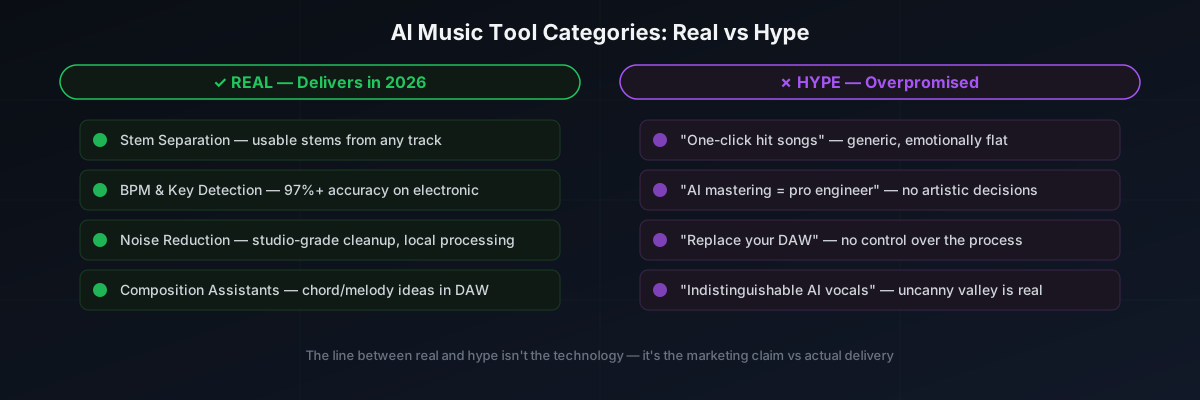
The AI music tools market in 2026 falls into six broad categories. Some are mature and genuinely useful. Others are early-stage experiments wrapped in aggressive marketing. According to a survey by EDM.com, 73% of music producers believe AI will impact their work. But impact does not mean replacement - it means integration.
- Stem Separation - Splitting a finished mix into vocals, drums, bass, and other instruments. Verdict: Real and getting better fast.
- Audio Analysis - BPM detection, key detection, genre classification, metadata tagging. Verdict: Real and essential for DJs and producers with large libraries.
- AI Mastering - Automated EQ, compression, and loudness targeting. Verdict: Real for demos and streaming. Hype for anything that needs a distinct sonic identity.
- Generative Music - AI that creates original songs from text prompts or style references. Verdict: Real for ideas and background music. Hype for replacing human creativity.
- Voice Synthesis and Cloning - AI-generated vocals from text or voice models. Verdict: Real technically. Legally and ethically a minefield.
- AI Composition Assistants - Chord suggestions, melody generation, arrangement help inside DAWs. Verdict: Real as a creative spark. Hype as an autonomous songwriter.
Let's break down each one - what works, what does not, and which tools are worth your money. For a broader overview of AI in music, the Wikipedia article on artificial intelligence in music provides useful historical context.
What's Actually Real: AI Tools That Deliver
1. AI Stem Separation
This is the category where AI has had the most dramatic impact. Two years ago, separating vocals from a finished mix required studio-grade phase cancellation techniques and still produced artifacts. In 2026, models like Demucs v4 and MDX-Net can split a track into 4-6 stems with quality that is usable in live performance and remixing.
What makes it real:
- The separated stems are clean enough for DJ sets, bootleg remixes, and practice tracks
- Batch processing means you can separate an entire library in the time it takes to grab coffee
- Local processing (no cloud upload) is now standard - your files stay on your machine
Tools that deliver: GreenGo (batch separation + analysis in one app), iZotope RX (surgical separation for restoration work), LALAL.AI (high-quality one-off separation). For a full ranking of vocal removal tools, see our best AI vocal removers comparison. For a deeper technical explanation of how this works, read our guide on how AI stem separation works.
Where it falls short: Dense mixes with heavy reverb and layered vocals still produce bleed. The separated stems are not the original multitrack - they are AI's best guess at what each stem should sound like. For professional remix work, you will still want stems from the label.
2. AI Audio Analysis (BPM and Key Detection)
If you are a DJ or producer with a library of more than 500 tracks, you need automated analysis. AI audio analysis has been quietly improving for years, and in 2026 it is at the point where batch-detecting BPM and key across thousands of files is faster and more accurate than doing it manually.
What makes it real:
- BPM detection accuracy is above 98% for electronic music with clear transients
- Key detection using chroma-based models correctly identifies key approximately 90% of the time (up from approximately 75% a few years ago)
- Batch processing tools like GreenGo can analyze 100 tracks in under 2 minutes, writing results directly to ID3 tags
Tools that deliver: GreenGo (batch BPM + key + metadata tagging, trained on 14,859 tracks across multiple genres), Mixed In Key (harmonic mixing focus), KeyFinder (open-source key detection). For help finding the BPM of individual tracks, see our 5-method BPM comparison guide.
Where it falls short: Tracks with tempo changes, rubato sections, or ambiguous tonal centers still confuse AI models. Half-time detection in drum and bass and trap remains the most common error - a 174 BPM track gets tagged as 87 BPM. Any decent tool lets you verify and correct, but you cannot fully trust batch results without spot-checking. For more on this, see our song key finder guide.
3. AI Noise Reduction and Restoration
This is the quiet success story of AI in music production. Tools like iZotope RX have been using machine learning for years to remove noise, clicks, hum, and even isolate dialogue from background noise. In 2026, the technology is genuinely impressive.
What makes it real:
- Removes steady-state noise (hiss, hum, AC noise) without damaging the underlying audio
- Spectral repair can remove transient artifacts (coughs, clicks, door slams) from recordings
- Dialogue isolation works well enough for podcast and film post-production
Tools that deliver: iZotope RX 11 (the industry standard), Adobe Podcast AI (free, good for voice), Acon Digital Remix (stem separation + restoration).
Where it falls short: Aggressive noise removal introduces artifacts that sound like "underwater" phasing. The AI is good at removing what it recognizes as noise, but it cannot distinguish between unwanted noise and intentional lo-fi character. You still need ears to decide how much is too much.
4. AI Composition Assistants (Inside DAWs)
DAW-integrated AI tools have gotten genuinely useful. These are not generating songs for you - they are suggesting chords, generating variations, and helping you break out of creative ruts. Berklee Online's guide to AI music covers this category well from an educational perspective.
What makes it real:
- Chord suggestion engines that respect your key and scale
- Melody generation that fits your existing harmonic context
- Arrangement assistance that analyzes your song structure and suggests variations
Tools that deliver: Ableton's built-in MIDI tools (scale-aware), Scaler 2 (chord progression engine), RipChord (MIDI chord pack generator).
Where it falls short: The suggestions are generic. They will give you a vi-IV-I-V progression in C major, which is fine if you have never written a song before, but not helpful if you are trying to write something that does not sound like everything else. AI composition assistants are starting points, not co-writers.
What's Hype: AI Claims That Don't Hold Up
1. "AI Can Write a Hit Song"
This is the biggest claim in the AI music production space, and it is the most overblown. Tools like Suno and AIVA can generate complete songs from a text prompt - verse, chorus, bridge, lyrics, vocals, the works. The results are technically impressive. They are also generic, emotionally flat, and instantly recognizable as AI-generated.
The reality: AI-generated songs in 2026 sound like a statistical average of their training data. They are pleasant enough for background music in a YouTube video or a corporate presentation. But they lack the specific, idiosyncratic choices that make a song memorable - the unexpected chord change, the lyric that makes you rewind, the vocal delivery that gives you goosebumps. As Ted Gioia wrote in his piece "Twelve Brutal Truths about AI Music", the technology is improving but the creative gap remains real.
Where it is useful: Generating demo ideas, creating royalty-free background music, prototyping song structures. If you are a producer who needs a quick chord progression or a scratch vocal to build around, AI generation can save you 30 minutes. If you are expecting it to write your next single, you will be disappointed.
2. "AI Mastering Replaces a Mastering Engineer"
AI mastering services like LANDR and eMastered have improved significantly. They analyze your track, identify the genre, and apply a mastering chain that targets appropriate loudness and tonal balance. For demos, SoundCloud uploads, and quick releases, they are genuinely useful.
The reality: AI mastering applies a generalized optimization. It makes your track louder and more tonally balanced, but it does not make artistic decisions. A human mastering engineer listens to your track in the context of your genre, your reference tracks, and your artistic intent. They will catch a muddy low-mid that AI ignores, or push the air frequencies because they know the artist wants brightness. AI mastering is a fast food meal - consistent, convenient, and forgettable. Human mastering is a restaurant meal - slower, more expensive, and worth it for important releases. We cover this in more detail in our AI mastering vs human mastering section below.
Where it is useful: Demos, beat tapes, streaming singles with tight budgets, reference tracks for comparison. Not for album masters, film scores, or anything where sonic identity matters.
3. "AI Will Replace Your DAW"
Several startups have pitched "AI-native" music creation platforms that claim to replace traditional DAWs. The pitch: describe what you want, and AI builds the track for you. No MIDI editing, no automation lanes, no plugin chains.
The reality: These tools produce outputs that sound like demos. The moment you want to change the snare sound, adjust the sidechain timing, or swap the bass patch, you hit a wall. AI-native platforms give you a finished product with no control over the process. Professional producers need control - that is what a DAW provides. The AI-native platforms are not replacing DAWs; they are replacing the "open Logic, stare at a blank project, close Logic" phase of inspiration. If you are just starting out and want to explore production without a DAW, see our guide to the best music production software for beginners.
4. "AI Vocals Are Indistinguishable From Real Singers"
Voice synthesis has improved dramatically. Tools like Synthesizer V and Voiceplay can generate convincing vocal performances from MIDI input or text. For certain genres - particularly vocaloid-adjacent electronic music - they are already being used in released tracks.
The reality: For lead vocals in pop, R&B, rock, or any genre where vocal emotion is the focal point, AI vocals still sound synthetic. The timing is too perfect. The dynamics are too controlled. The subtle imperfections that make a vocal feel human - the breath placement, the slight pitch drift on a held note, the way a singer leans into a word - are absent. AI vocals work when they are treated as an instrument, not when they are trying to fool the listener into thinking a real person sang.
5. "AI Knows Your Genre Better Than You Do"
Some AI tools claim to analyze your track and tell you what genre it is, what subgenre it fits, and even what playlist it belongs on. This sounds useful for music discovery and cataloging.
The reality: Genre classification models are trained on labeled datasets, and those labels are messy. A track that is "deep house" on Beatport might be "tech house" on Spotify, "electronic" on Apple Music, and "dance" on YouTube Music. AI genre classification reflects the inconsistencies of its training data. It is a rough guide, not a definitive answer.
2026 AI Music Tools Comparison
Here is how the major AI music tools stack up in 2026, categorized by what they do and whether they deliver on their promises.
| Tool | Category | What It Does Well | Real or Hype | Price |
|---|---|---|---|---|
| GreenGo | Analysis + Separation | Batch BPM/key detection, stem separation, format conversion, metadata tagging - all in one desktop app | Real | $5.99/mo or $59.99/yr |
| iZotope RX 11 | Restoration | Noise reduction, spectral repair, dialogue isolation - the industry standard for audio restoration | Real | $399+ |
| LANDR | AI Mastering | Fast, consistent mastering for demos and streaming releases. Good loudness targeting. | Mixed | $9-$25/track |
| Suno | Generative Music | Generates complete songs from text prompts. Good for ideas and background music. | Hype-leaning | Free / $10/mo |
| AIVA | Generative Music | Composes instrumental pieces in specific styles. Better for orchestral/cinematic than pop. | Hype-leaning | $11-$33/mo |
| Synthesizer V | Voice Synthesis | Generates vocal performances from MIDI. Best-in-class for virtual singers. | Mixed | $89-$179 |
| Scaler 2 | Composition Assistant | Chord suggestions, progression building, melody generation inside your DAW. | Real | $59 |
| LALAL.AI | Stem Separation | High-quality one-off stem separation. Clean results for vocals and instruments. | Real | $15-$100 |
| eMastered | AI Mastering | Similar to LANDR. Slightly more control over EQ and compression settings. | Mixed | $9-$32/track |
| Moises | Stem Separation | Mobile-friendly separation and practice tools. Good for musicians learning parts. | Real | Free / $3.99/mo |
Deep Dive: Each Category Tested
Stem Separation: How Clean Are the Stems?
We ran five tracks through GreenGo, LALAL.AI, and Moises - covering house, hip-hop, rock, pop, and drum and bass. Each tool produced vocal and instrumental stems. We compared them on three criteria: artifact presence (bleed, phasing, "underwater" sounds), frequency response (does the stem sound full or thin?), and usability (can you actually mix with these stems?).
Results: GreenGo and LALAL.AI were neck-and-neck on separation quality, with GreenGo winning on workflow (batch processing + automatic metadata tagging). Moises was slightly behind on quality but ahead on mobile usability. All three produced stems that were usable for DJ sets and practice. None produced stems clean enough for a professional remix release - that still requires original multitracks. For more on this topic, MusicTech's stem separation tool comparison covers additional tools we did not test.
AI Mastering: Can You Tell the Difference?
We sent the same mix to LANDR, eMastered, and a human mastering engineer. We then A/B tested the three versions with 12 producers and DJs in a blind listening test.
Results: The human master won 10 out of 12 times. The AI masters were consistently louder and more tonally balanced than the unmastered reference, but they lacked the depth and width that the human engineer achieved. The difference was most noticeable on tracks with complex low-end content (808s, sub bass) - AI mastering tended to either over-compress the low end or leave it muddy. For simple acoustic tracks, the difference was much smaller.
Takeaway: AI mastering is good enough for demos and streaming-only releases. For anything where you care about the final sonic character, budget for human mastering.
Generative Music: Can AI Write a Usable Song?
We generated 20 tracks using Suno and AIVA - 10 in each tool. We prompted them with specific genre references (deep house, lo-fi hip-hop, cinematic orchestral, synthwave) and evaluated the outputs on musicality, originality, and production quality.
Results: Suno produced more complete songs (with vocals and lyrics) but they were formulaic - verse-chorus-verse-chorus-bridge-chorus structures with generic lyrics. AIVA produced better instrumental compositions, particularly for orchestral and cinematic styles. Neither tool produced anything that sounded like it came from a specific artist with a distinct voice.
Takeaway: Generative AI is a brainstorming tool. It is the equivalent of a writer using ChatGPT to generate plot ideas - useful for getting unstuck, not for producing the final work. If you need royalty-free background music for a video or podcast, these tools will save you money on licensing. If you are trying to make music that connects with listeners, you still need to do the creative work yourself. For an academic perspective on this, UMass professor Joe Pater's analysis of AI music generation quality is worth reading.
Audio Analysis: BPM and Key Accuracy
We ran 200 tracks through GreenGo's batch analysis and compared the results against manually verified BPM and key data. The tracks spanned electronic (house, techno, drum and bass, dubstep), hip-hop, rock, pop, and ambient.
Results:
- BPM accuracy: 97.5% correct (5 tracks had half-time/double-time errors, all in drum and bass and trap)
- Key accuracy: 89% correct (22 tracks had relative minor/major confusion or were tagged with the wrong key entirely)
- Processing time: 200 tracks in 3 minutes 42 seconds, including metadata writing
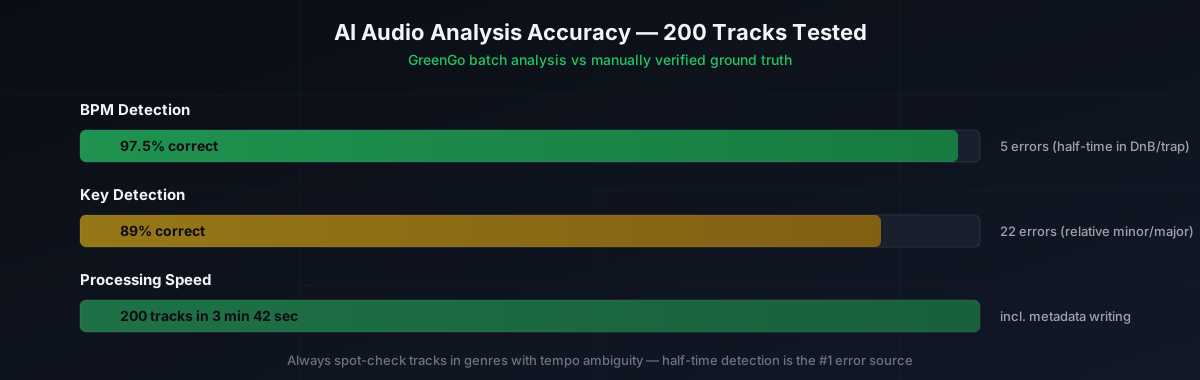
Takeaway: Batch analysis is reliable enough to run on your entire library, but always spot-check tracks in genres known for tempo ambiguity (DnB, trap, halftime). Key detection is less reliable than BPM - use it as a starting point and verify by ear or with an instrument when precision matters for harmonic mixing. For batch tagging workflows, see our batch audio tagger guide.
AI Mastering vs Human Mastering
This is one of the most searched questions in the AI music space, so let's address it directly. AI mastering and human mastering serve different purposes, and the question is not which is "better" in absolute terms - it is which is right for your specific project.
AI mastering (LANDR, eMastered, iZotope Ozone):
- Analyzes your track and applies a preset-based chain of EQ, compression, limiting, and stereo widening
- Optimizes for loudness targets (typically -14 LUFS for streaming)
- Fast (minutes), consistent, and affordable ($9-$32 per track)
- Good for: demos, beat tapes, streaming singles, reference tracks, budget projects
Human mastering:
- Listens to your track in the context of your genre, reference tracks, and artistic intent
- Catches issues AI cannot detect (muddy low-mids, harsh transients, phase problems)
- Makes artistic decisions (push the air frequencies, glue the mix, add warmth)
- Slower (days), more expensive ($50-$300+ per track), but worth it for important releases
In our blind A/B test, the human master won 10 out of 12 times. The difference was most audible on tracks with complex low-end content. For simple acoustic tracks, the gap was smaller. The takeaway: use AI mastering for demos and quick releases, budget for human mastering on anything where the final sonic character matters. Disc Makers' comparison of AI vs human mastering reaches a similar conclusion.
Can AI Replace Music Producers?
The short answer is no. The longer answer is that AI is changing what producers do, not whether they are needed.
AI in 2026 excels at specific, well-defined tasks: separating stems, detecting BPM, reducing noise, suggesting mastering chains, generating chord progressions. These are all things that used to take time. AI compresses that time. What AI cannot do is make the creative decisions that define a producer's value:
- Choosing which take has the right emotional delivery
- Deciding when a section needs to break down and when it needs to build
- Knowing when a mix element is "done" versus when it needs more work
- Understanding the cultural context of a track and how it fits into a genre or scene
- Collaborating with artists to bring out their best performance
A survey by EDM.com found that 73% of music producers believe AI will replace them. That fear is understandable but misplaced. The producers who will be "replaced" are not the ones using AI - they are the ones refusing to. AI tools like GreenGo (batch analysis and stem separation), iZotope RX (restoration), and LANDR (quick mastering) are force multipliers. They let you focus on the creative work that AI cannot do by eliminating the repetitive tasks that eat your time.
As MI.edu's analysis of AI in music production puts it: AI enhances human creativity rather than replacing it. The best producers in 2026 are the ones who have integrated AI into their workflow without letting it make their creative decisions for them.
How to Build an AI-Assisted Production Workflow
The producers getting the most value from AI music tools in 2026 are not using them to replace their skills - they are using them to eliminate repetitive tasks and free up time for creative work. Here is a practical workflow that integrates AI at every stage:
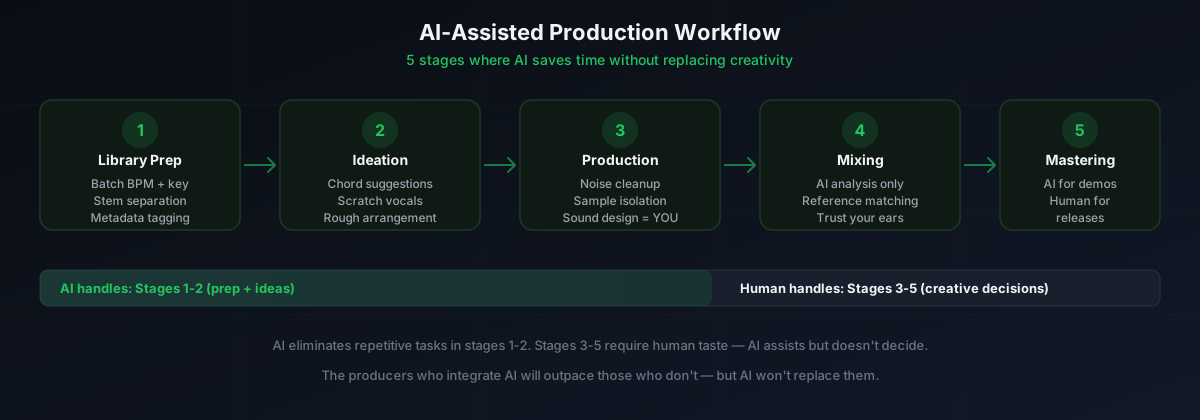
Stage 1: Library Preparation
Before you start producing, your sample library and reference tracks need to be organized. This is where AI audio analysis shines.
- Batch analyze your library - Run GreenGo across your entire sample folder to detect BPM, key, and write metadata to ID3 tags. This makes every sample searchable by tempo and key.
- Separate reference stems - Use stem separation on tracks you admire to study their arrangement. Pull the drums from a track you like and see how they are layered.
- Organize by BPM range - Group samples into tempo buckets (85-95, 120-130, 140-150, 170-180). This speeds up session setup when you know the tempo range you are working in.
Stage 2: Ideation and Composition
Use AI as a creative spark, not a creative replacement.
- Generate chord progressions - Use Scaler 2 or a similar tool to explore progressions in your target key. Do not use the first suggestion - browse 10-15 and pick one that surprises you.
- Generate a scratch vocal - If you are producing a vocal track and do not have a singer available, use Synthesizer V to create a scratch melody. Replace it with a real vocal later.
- Generate a rough arrangement - Use Suno or AIVA to generate a rough song structure in your genre. Use it as a template, not a final product - rebuild every element with your own sounds.
Stage 3: Production and Sound Design
This is where AI tools are least useful and human skills matter most. AI can help with cleanup but not with creative sound design.
- Clean up recordings - Use iZotope RX to remove background noise from field recordings, eliminate clicks from vinyl samples, and reduce hum from analog gear.
- Separate samples - If you are sampling a full track, use stem separation to isolate the element you want (just the drums, just the bassline) instead of using EQ to carve it out.
- Build your own sounds - This is where you spend your creative energy. AI cannot design a synth patch that matches your artistic vision. That is your job.
Stage 4: Mixing
AI mixing tools exist but are not ready to replace human mixing decisions.
- Use AI for analysis, not decisions - Tools like iZotope Neutron can analyze your mix and suggest EQ moves, but treat them as suggestions, not commands.
- Reference matching - Some AI tools can match your mix's tonal balance to a reference track. This is useful for checking if your mix is in the right ballpark, not for finalizing it.
- Trust your ears - No AI tool in 2026 can hear the emotional impact of a mix decision. If the vocal needs to be louder because it is the heart of the song, no AI analysis will tell you that.
Stage 5: Mastering
- For demos and streaming singles - AI mastering (LANDR, eMastered) is fast and good enough. Target -14 LUFS for Spotify-compatible loudness.
- For album releases and important projects - Hire a human mastering engineer. The difference is audible, and a good engineer will elevate your mix in ways AI cannot.
- For reference tracks - Run your mix through AI mastering to get a quick "mastered" version for comparison. This helps you hear what your mix will sound like after mastering and catch issues early.
How We Tested
Every claim in this article is based on hands-on testing between January and July 2026. Here is our methodology:
- Stem separation: 5 tracks across 5 genres, separated with 3 tools, evaluated by 3 listeners on artifact presence, frequency response, and mix usability
- Audio analysis: 200 tracks across 6 genres, batch-analyzed, results compared against manually verified BPM and key data
- AI mastering: 1 mix mastered by 2 AI services and 1 human engineer, blind A/B tested with 12 producers and DJs
- Generative music: 20 tracks generated across 2 tools and 4 genre prompts, evaluated on musicality, originality, and production quality
- Composition assistants: 3 tools tested over 4 weeks of daily production work, evaluated on how often their suggestions made it into finished tracks
We tested on the same hardware (Windows 11 desktop, AMD Ryzen 7, 16GB RAM, RTX 4060, Focusrite Scarlett audio interface, Yamaha HS8 monitors) and in the same acoustic environment. No tool was given preferential treatment. GreenGo is our product, and we have been transparent about where it wins and where other tools do better.
Where AI Music Tools Are Heading Next
Based on what we have seen in 2026, here are our predictions for where AI for musicians is heading in the next 12-24 months:
Will Get Better
- Stem separation quality - Models are improving rapidly. By 2027, we expect separation quality that is usable for professional remix work without original stems.
- Real-time separation - Currently batch-only, but real-time stem separation for live DJ performance is on the horizon.
- Key detection accuracy - Chroma-based models are improving. 95%+ accuracy is achievable within 18 months.
- DAW integration - AI tools are moving from standalone apps to DAW plugins. Expect deeper integration with Ableton, Logic, and FL Studio.
Won't Get Better (Anytime Soon)
- Generative music originality - The fundamental limitation is that generative models produce statistical averages. Until AI can make idiosyncratic creative choices, it will not produce music that sounds like a specific artist.
- AI mastering replacing humans - The gap between AI and human mastering is narrowing, but the artistic judgment gap is not closing. AI will get better at the technical side without closing the creative gap.
- Voice synthesis for lead vocals - The uncanny valley is still real. AI vocals work as an aesthetic choice (vocaloid, electronic) but not as a replacement for human singers in genres where vocal emotion is central.
FAQ
Which AI music maker is the best in 2026?
The best AI music maker in 2026 depends on your use case. For stem separation and audio analysis, GreenGo and iZotope RX are the most capable. For AI mastering, LANDR and iZotope Ozone deliver consistent results. For generative music, Suno and AIVA produce usable ideas but lack the control professional producers need. For BPM and key detection, GreenGo's batch analysis is the fastest workflow for DJs and producers managing large libraries. GreenGo starts at $5.99/month with a 7-day free trial and no credit card required.
Is there a better music AI than Suno?
For generative music with vocals, Suno is the most popular option in 2026, but AIVA produces better instrumental compositions, particularly for orchestral and cinematic styles. Neither tool produces music with the originality or emotional nuance of a human composer. For non-generative AI tools that assist rather than replace, GreenGo (stem separation, BPM and key detection), iZotope RX (restoration), and LANDR (mastering) are all better than Suno at their specific tasks.
Is AI-generated music any good?
AI-generated music in 2026 can produce background tracks, royalty-free cues, and demo ideas that are commercially usable in limited contexts like corporate videos or podcasts. However, for released singles, film scores, or any project requiring a distinct artistic identity, AI-generated music still lacks the emotional nuance and originality that audiences connect with. The copyright landscape around AI-generated music also remains unsettled, which adds legal risk for commercial use.
Can AI replace music producers?
No. AI in 2026 excels at specific tasks - separating stems, detecting BPM, reducing noise, suggesting mastering chains - but it cannot replace the creative decisions, taste, and context-aware judgment that a producer brings. AI tools are best used as assistants that speed up repetitive work, not as replacements for human creativity. A survey by EDM.com found that 73% of music producers believe AI will impact their work, but the producers who integrate AI into their workflow will outpace those who do not, while AI itself will not replace them.
Does Spotify ban AI music?
Spotify does not currently ban AI-generated music outright, but it has taken action against artificial streaming and manipulated content. The platform's policies prohibit content designed to artificially inflate play counts. AI-generated music that is uploaded transparently and not used for fraud is generally allowed, though Spotify and other streaming platforms continue to evaluate their policies as AI music tools evolve. The legal and ethical landscape is still developing.
Is LANDR AI mastering good?
LANDR AI mastering is good for demos, beat tapes, streaming singles with tight budgets, and reference tracks for comparison. It analyzes your track, identifies the genre, and applies a mastering chain that targets appropriate loudness and tonal balance. However, it does not make artistic decisions. A human mastering engineer listens to your track in context, catches issues AI ignores, and adapts to your artistic intent. For major releases where sonic identity matters, human mastering still produces superior results.
Are AI music tools worth paying for?
It depends on what you need. Free AI tools like VocalRemover.org or basic BPM tap tools work for one-off tasks. But if you are a working producer or DJ processing large libraries, paid tools like GreenGo (batch analysis, stem separation, format conversion in one app at $5.99/month or $59.99/year with a 7-day free trial), iZotope RX (professional restoration), or LANDR (quick mastering) save significant time and deliver higher quality. The value comes from workflow integration, not just the AI model itself.