Choosing your first music production software is the most important decision you'll make as a beginner producer. The right DAW (Digital Audio Workstation) gets out of your way and lets you focus on making music. The wrong one makes you feel like you need a degree in audio engineering just to record a guitar loop.
I've spent years producing tracks and testing every major DAW on the market. In this guide, I'll walk you through the best music production software for beginners in 2026 — both free and paid — and help you pick the one that matches your goals, your budget, and your patience level.
What Is Music Production Software, Exactly?
A DAW is the software environment where you record, edit, arrange, and mix audio. Think of it as the digital equivalent of a recording studio — but instead of a mixing desk, tape machines, and patch cables, you've got tracks, plugins, and a timeline interface on your computer.
Every DAW handles the same core tasks: recording audio from a microphone or instrument, sequencing MIDI notes for virtual instruments, arranging clips on a timeline, applying effects like reverb or compression, and exporting a finished track. The differences come down to workflow philosophy, included instruments, and how steep the learning curve is.
If you're coming from DJing or just want to make beats, you don't need a full studio DAW on day one. You need something that lets you lay down ideas quickly without fighting the interface. That's why the "best" DAW depends heavily on what kind of music you want to make and how you like to work.
What Makes a DAW Beginner-Friendly?
Before we get into specific tools, let's talk about what actually matters for someone just starting out. After testing these DAWs with complete beginners, here's what separates a great starter DAW from one that'll make you quit in frustration:
- Shallow learning curve — You should be able to record something within 10 minutes of opening the software, not 10 hours
- Built-in instruments and loops — A starter library means you can make music immediately without buying third-party plugins
- Clear visual feedback — Waveforms, note grids, and mixing panels should be readable without zooming in constantly
- Active community and tutorials — When you get stuck (and you will), you need video tutorials and forum threads that actually answer your question
- Room to grow — The best beginner DAWs scale with you. You shouldn't need to switch software six months in because you outgrew it
One thing that doesn't matter as much as people think: plugin format support. VST, AU, AAX — these are just plugin standards. Most DAWs support VST, and that covers 95% of what you'll ever need. Don't let spec sheets distract you from workflow.
Best Free Music Production Software for Beginners
You don't need to spend money to start making music. Some of the best music making software for beginners is completely free, and a few of these tools are genuinely capable of producing release-quality tracks.
GarageBand (macOS only)
If you own a Mac, GarageBand is where you should start. Full stop. It comes pre-installed on every Mac, includes a massive library of virtual instruments, drum loops, and smart instruments that auto-play chords and rhythms. The interface is clean, the learning curve is almost flat, and projects transfer directly to Logic Pro if you ever upgrade.
The downside? It's macOS only, and it doesn't support third-party VST plugins. But for your first six months of production, you won't need them. The built-in Drummer feature alone — which generates realistic drum tracks in any genre — is worth more than most paid plugins.
BandLab (Web, iOS, Android)
BandLab runs in your browser. No installation, no system requirements, no excuses. You open a tab, sign up, and start making music. It includes a built-in sampler, loop library, and MIDI instruments. The social features let you collaborate with other users, which is great if you're looking for feedback early on.
The trade-off is that browser-based audio processing has latency limitations. If you're recording live instruments through an audio interface, you'll notice a delay between playing a note and hearing it back. For beat-making and MIDI production, though, BandLab is surprisingly capable.
LMMS (Windows, macOS, Linux)
LMMS is an open-source DAW that's been the entry point for countless producers who can't afford commercial software. It's pattern-based (similar to FL Studio's step sequencer), comes with built-in synths and effects, and supports VST plugins. The community is active and the documentation is solid.
The interface looks dated compared to commercial DAWs, and audio recording (as opposed to MIDI sequencing) is limited. But if you're making electronic music — beats, EDM, hip-hop instrumentals — LMMS gets you there without spending a cent.
Audacity (Windows, macOS, Linux)
Audacity isn't really a DAW — it's an audio editor. But I'm including it because a lot of beginners start here, and it's worth being honest about what it can and can't do. Audacity is excellent for recording podcasts, trimming audio clips, and doing basic edits. It does not support MIDI, virtual instruments, or real-time effects processing.
If you just want to record your guitar and put some reverb on it, Audacity works. If you want to make full tracks with drums, bass, synths, and vocals, you need an actual DAW. Use Audacity as a supplementary tool, not your main production environment.
Best Paid Music Production Software for Beginners
Free tools are great for learning the basics, but at some point you'll hit their limits. Paid DAWs offer better instruments, more advanced mixing tools, and workflows that scale as your skills grow. Here are the ones worth your money in 2026.
FL Studio (Windows, macOS)
FL Studio is the easiest DAW for beginners who want to make beats. The step sequencer lets you click in drum patterns grid by grid — no MIDI keyboard required. The Piano Roll is one of the best in any DAW for programming melodies. And the lifetime free updates policy means you buy it once and get every future version for free.
FL Studio comes in three editions: Fruity ($99), Producer ($199), and Signature ($299). For beginners, the Producer edition is the sweet spot — it adds audio recording and a fuller plugin bundle. The Fruity edition is fine if you're only making beats with MIDI, but you'll outgrow it quickly if you want to record vocals.
The mixing workflow in FL Studio is a bit unconventional compared to other DAWs — channels route to mixer inserts rather than being tied 1:1 to tracks. It takes some getting used to, but once it clicks, it's fast. Image-Line's official site has a 30-day free trial with full functionality.
Ableton Live (Windows, macOS)
Ableton Live is built for electronic music producers and live performers. The Session View lets you launch clips and loops in real-time, which is perfect if you come from a DJing background and think in terms of loops and scenes rather than linear arrangements. The included instruments — Operator (FM synth), Wavetable, and Drum Racks — are production-ready out of the box.
Ableton comes in three tiers: Intro ($99), Standard ($449), and Suite ($749). Intro is limited to 16 tracks and 8 scenes, which is tight but workable for your first projects. Standard removes those limits and adds more instruments. Suite includes everything — but at $749, it's not a beginner purchase.
The learning curve is steeper than FL Studio, especially the Session View concept. But Ableton's official learning resources are excellent, and the community is one of the most active in music production.
Logic Pro (macOS only)
Logic Pro is the natural upgrade from GarageBand. At $199.99 (one-time purchase, no subscription), it's one of the best value propositions in music production software. You get a massive library of instruments, loops, and effects — including a full sampler, drum synth, and professional mixing tools — for less than the cost of two plugins from other developers.
Logic's interface is more traditional than Ableton's or FL Studio's, which actually helps beginners who are used to linear timeline-based editing. The Smart Tempo feature automatically detects and adapts to the BPM of imported audio, which is useful when you're working with samples from different sources.
The limitation is the same as GarageBand: macOS only. If you're on Windows, Logic isn't an option.
Reaper (Windows, macOS, Linux)
Reaper is the budget powerhouse. A personal license costs $60 for a full version with no feature limitations — no track limits, no plugin restrictions, no watermarks. The 60-day evaluation period is unlimited, so you can try it thoroughly before buying.
Reaper doesn't come with a big instrument library or loop collection. It's a lean, fast DAW that focuses on recording and mixing. The interface is customizable to a degree that no other DAW matches, but that flexibility also means the initial setup can feel overwhelming.
For beginners who already play an instrument and want to record and mix, Reaper is hard to beat on value. For beginners who want built-in sounds and a guided workflow, look elsewhere first. Reaper's official site has the full evaluation download.
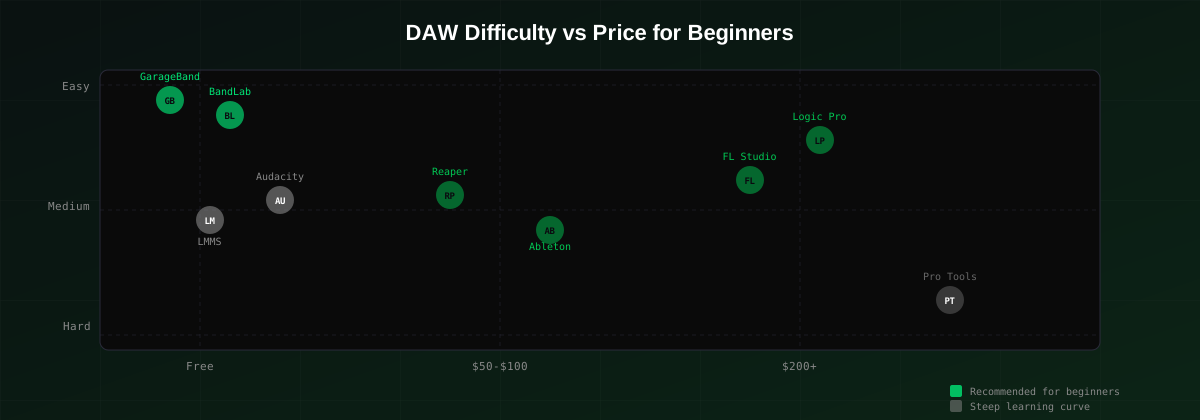
2026 Comparison Table: All DAWs Ranked
Here's how all the DAWs we covered stack up against each other for beginners:
| DAW | Price | Platform | Difficulty | Best For |
|---|---|---|---|---|
| GarageBand | Free | macOS | Very Easy | Absolute beginners on Mac |
| BandLab | Free | Web/iOS/Android | Very Easy | Quick ideas, collaboration |
| LMMS | Free | Win/Mac/Linux | Medium | Beat-making on a budget |
| Audacity | Free | Win/Mac/Linux | Easy (but limited) | Audio editing, not full production |
| FL Studio Producer | $199 | Win/Mac | Easy-Medium | Beat-makers, hip-hop, EDM |
| Ableton Live Intro | $99 | Win/Mac | Medium | Electronic music, live performance |
| Logic Pro | $199 | macOS | Easy-Medium | All-round production on Mac |
| Reaper | $60 | Win/Mac/Linux | Medium-Hard | Recording and mixing on a budget |
How GreenGo Complements Your DAW
Here's something most beginner guides won't tell you: your DAW is only half the workflow. Before you even open your DAW, you need your audio files prepared — and that's where a lot of beginners lose hours to manual work.
When you download a sample pack, rip a loop from a track, or grab audio from an online source, those files come with zero metadata. No BPM tag. No musical key. No energy rating. You drag them into your DAW and you're guessing: "Is this 120 or 128 BPM? What key is this in? Will it clash with my bassline?"
GreenGo handles all of that before your files ever touch your DAW:
- Drop your files into GreenGo — MP3, WAV, FLAC, AAC, M4A, or OGG. Batch process hundreds of files at once.
- GreenGo analyzes everything automatically — BPM detection (accurate to 0.1 BPM), musical key in Camelot notation (e.g., 8B, 5A), and energy/vibe rating on a 1-10 scale.
- Separate stems if you need them — Split any track into vocals, drums, bass, piano, guitar, and other. Great for sampling, remixing, or creating acapellas and instrumentals.
- Export tagged files straight to your DAW — Every file now has BPM, key, and metadata embedded. Your DAW's browser shows everything organized and ready to use.
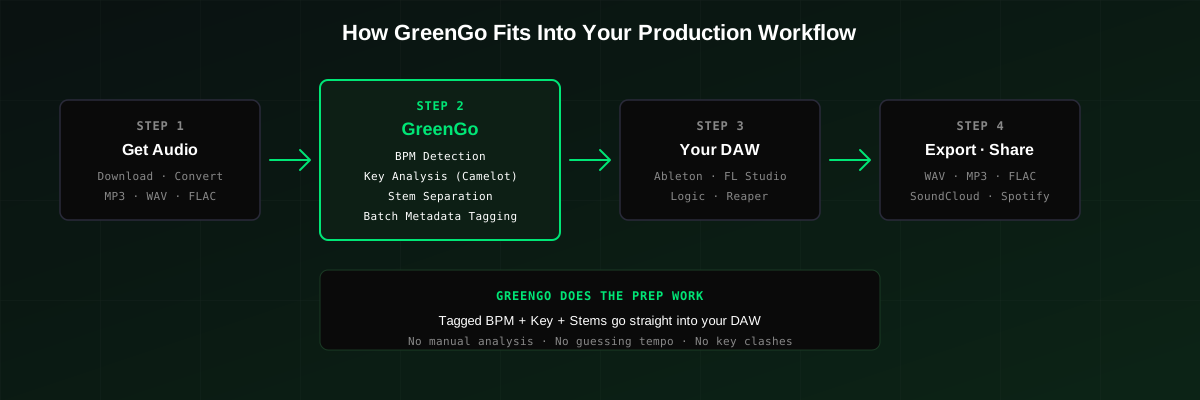
This is especially useful if you're coming from DJing into production. If you already use BPM detection tools for your DJ library, GreenGo does the same thing for your production sample library — plus stem separation, which you can read more about in our AI vocal remover comparison.
GreenGo runs locally on Windows and macOS. No internet connection required, no file uploads to servers. The free tier lets you separate stems from 3 songs, and the full version is $5.99/month with a 7-day free trial (no credit card required). It's not a DAW replacement — it's the prep tool that makes your DAW workflow faster and more organized.
Tips for Choosing Your First DAW
- Start free, then upgrade — If you're on Mac, start with GarageBand. On Windows, try BandLab or LMMS. Don't spend $200 before you know you'll stick with production.
- Pick based on your genre — FL Studio for beats and hip-hop, Ableton for electronic and live performance, Logic for all-round production on Mac, Reaper for recording live instruments.
- Don't switch DAWs in the first 6 months — Every DAW has a learning curve. Switching because you hit a wall just resets your progress. Push through the frustration; it gets easier.
- Learn keyboard shortcuts early — The difference between a slow workflow and a fast one is shortcuts. Spend a weekend memorizing the top 20 for your chosen DAW.
- Use reference tracks — Import a professional track in your genre into your DAW and compare your mix to it. This teaches you more about mixing than any tutorial.
- Organize your sample library before it grows — Tag your files with BPM and key from day one. Tools like GreenGo's batch tagger can handle this automatically so you don't end up with 5,000 unsorted samples six months later.
- Watch one tutorial, then make something — Tutorial paralysis is real. After each tutorial, apply what you learned immediately. Production skills come from doing, not watching.
FAQ
What is the best music production software for beginners in 2026?
For Mac users, GarageBand is the best free starting point, with Logic Pro as the natural paid upgrade. For Windows users, FL Studio Producer Edition is the best overall choice for beginners — its step sequencer and Piano Roll are intuitive for beat-making, and the lifetime free updates policy means it's a one-time investment. If budget is the primary concern, BandLab (free, browser-based) or Reaper ($60 one-time) are excellent alternatives.
What is the best free music production software?
GarageBand is the best free DAW if you're on macOS — it includes professional-grade instruments and a built-in drummer. On Windows or Linux, LMMS is the best free option for beat-making and electronic music. BandLab is the best free browser-based option and works on any platform. Audacity is free but is an audio editor, not a full DAW.
What is the easiest DAW for beginners?
GarageBand is the easiest DAW for absolute beginners — you can record a track within minutes of opening it. FL Studio is the easiest paid DAW for beginners who want to make beats, thanks to its visual step sequencer. BandLab is the easiest if you want zero setup — it runs in your browser with no installation.
Do I need a MIDI keyboard to start producing music?
No. Most DAWs let you program MIDI notes using your computer keyboard or by clicking directly in the Piano Roll. FL Studio, Ableton Live, and GarageBand all support this. A MIDI keyboard makes the process faster and more intuitive once you're comfortable, but it's not required for your first few months.
Can I make professional-quality music with free software?
Yes. GarageBand has been used to produce hit records, and LMMS can create release-quality electronic music. The software matters less than your skills in arrangement, sound design, and mixing. Free DAWs have limitations in plugin compatibility and advanced features, but for learning and early production, they're more than capable.
How does GreenGo work with my DAW?
GreenGo is a desktop app that prepares your audio files before they enter your DAW. It detects BPM, musical key (in Camelot notation), and energy rating, then writes that metadata directly into the file tags. It also separates stems (vocals, drums, bass, piano, guitar, other) for sampling and remixing. You process files in GreenGo, then drag the tagged files into any DAW — Ableton, FL Studio, Logic, Reaper, or any other. GreenGo runs on Windows and macOS, works offline, and never uploads files to servers.