An AI vocal remover takes a finished song and splits it into separate stems - vocals on one track, instruments on another. A few years ago, this was studio-grade work requiring Pro Tools, phase cancellation tricks, and a lot of patience. Now it's a one-click operation. But not every tool does it well.
We tested six vocal removers on the same batch of tracks - house, hip-hop, rock, pop, and drum & bass - and rated them on separation quality, processing speed, pricing, and how they fit into a real DJ or producer workflow. For a deeper dive into the technology behind this, see our guide on how AI stem separation works. Here's what we found.
How We Tested Every AI Vocal Remover
We ran the same five tracks through each tool. The tracks were chosen to stress-test different separation challenges:
- House - 124 BPM, dense mix with layered synths and a prominent vocal hook
- Hip-hop - 82 BPM, heavy low-end with vocals sitting right on top of the bass
- Rock - 140 BPM, distorted guitars competing with lead vocals in the midrange
- Pop - 102 BPM, polished production with vocal harmonies and ad-libs
- Drum & bass - 174 BPM, fast breaks with vocals floating above the mix
Each tool produced two stems: vocals and instrumental. We listened to both on studio monitors (Yamaha HS8) and checked for three things: artifact-free vocals (no ghost instruments bleeding through), clean instrumentals (no vocal residue), and usable quality - meaning the stems could actually be used in a DJ set or remix without sounding broken.
We also timed processing, checked format support, and noted whether the tool offered batch processing - because removing vocals from one song is easy. Removing vocals from 200 songs for a DJ library is a different problem entirely.
What Makes a Good AI Vocal Remover?
Not all vocal removal is created equal. The underlying technology matters, and so does the workflow around it. For a broader look at where vocal removal fits in the AI music landscape, see our best AI music tools 2026 guide.
The Technology
Modern vocal removers use source separation models - neural networks trained on thousands of songs where the stems are known. The model learns to identify spectral patterns that belong to vocals versus instruments. The best models in 2026 are based on architectures like Demucs and Spleeter, with custom training on genre-specific data.
What separates a good model from a bad one? It comes down to how well the network handles frequency overlap. Vocals and instruments share the same frequency space - a vocal at 2 kHz overlaps with guitar harmonics, snare overtones, and synth leads. A good model can distinguish between them. A bad one smears them together, leaving artifacts that sound like the song is playing through a tin can.
The Workflow
Separation quality is only half the equation. If you're a DJ prepping a set, you need to process dozens of tracks quickly. If you're a producer sampling a vocal, you need the output in a format your DAW can read. If you're a musician practicing along to an instrumental, you need it to sound clean at full volume.
The best tools handle the full workflow: import, separate, export, and integrate with whatever you're doing next. The worst ones make you upload files one at a time to a web form, wait in a queue, and download a compressed MP3.
2026 AI Vocal Remover Comparison
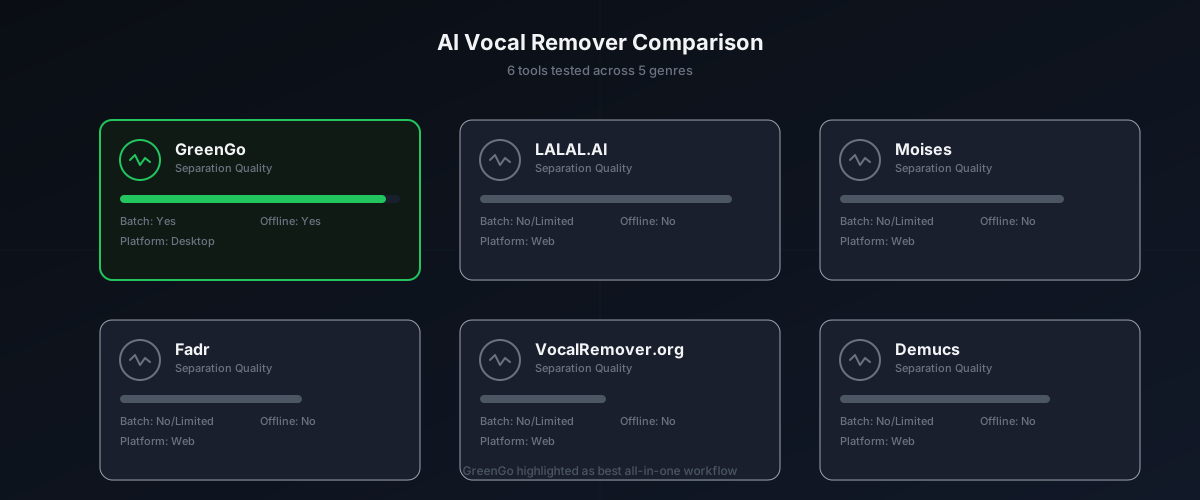
Here's how the six tools we tested stack up against each other:
| Tool | Separation Quality | Batch Processing | Platform | Free Tier | Best For |
|---|---|---|---|---|---|
| GreenGo | Excellent | Yes (unlimited) | Desktop (Win/Mac) | 7-day free trial | All-in-one DJ & producer workflow |
| LALAL.AI | Excellent | No | Web | Limited (10 min) | Quick one-off separation |
| Moises | Very Good | Limited | Web/Mobile/Desktop | Limited (5 tracks) | Mobile practice & remixing |
| Fadr | Good | Limited | Web | Limited | Quick web-based stems |
| VocalRemover.org | Fair | No | Web | Free | Free one-off vocal removal |
| Demucs (open-source) | Very Good | Yes | CLI/Python | Free | Developers & tinkerers |
Every tool here can remove vocals from a song. The differences show up when you look at what happens after the separation - and how many tracks you need to process.
Tool-by-Tool Breakdown
GreenGo
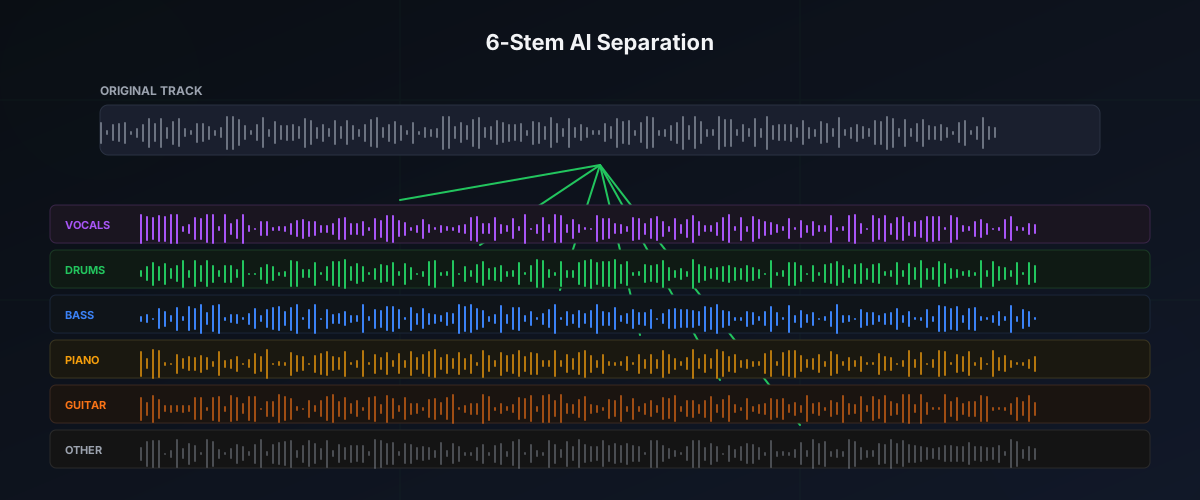
GreenGo's Stem Separator runs locally on your desktop - no uploading to a server, no queue, no file size limits. You drag in a folder of tracks, hit separate, and it processes them all in one batch. The output is clean WAV files: vocals and instrumental, plus optional drums, bass, piano, guitar, and other stems for six-way separation.
What sets GreenGo apart isn't just the separation quality - which is on par with LALAL.AI in our testing. It's that the Stem Separator is part of a larger workflow. After separating, you can run BPM and key analysis on the instrumental, use Key Detector to find the Camelot key (e.g., 8B to 9B for compatible mixing), tag everything with the Batch Tagger, and convert to whatever format your DJ software needs with the Converter. All in one app, all in one session.
The separation model handles dense mixes well. On our hip-hop test track, the vocal came out clean with minimal bass bleed. On the rock track, the vocal separated from the distorted guitars better than we expected - there was some midrange residue, but it was subtle enough to use in a live remix.
Pricing: $5.99/month, $15.99/3 months, or $59.99/year. See full pricing. Seven-day free trial with three stem separations included, no credit card required.
Downsides: It's a desktop app, so you need to install it. No web version. If you just need to split one track quickly from your phone, this isn't the tool for that.
LALAL.AI
LALAL.AI has been the name in online vocal removal for a while, and for good reason. Their separation model is genuinely excellent - consistently the cleanest vocal extraction in our tests, especially on the pop and house tracks. The vocal stem came out with almost no instrumental bleed, and the instrumental was clean enough to use as a backing track. TechSpot's review reached a similar conclusion.
The interface is simple: upload a file, choose your stem type (vocal, instrumental, drums, bass, piano, electric guitar, acoustic guitar, synthesizer), and download the result. The preview feature lets you hear a snippet before committing to a full separation.
Downsides: It's web-based, which means uploading your files to a server. No batch processing - you're doing one file at a time. The free tier gives you 10 minutes of processing, and after that you're paying per minute. For a DJ who needs to process 50 tracks, that adds up fast. And there's no integration with BPM detection, key analysis, or metadata tagging. You get stems, and that's it.
Moises
Moises offers a polished cross-platform experience - web, desktop, and mobile. Their separation quality is very good, though slightly behind LALAL.AI on dense mixes. Where Moises shines is the mobile app: you can separate vocals from a song on your phone, which is genuinely useful for musicians who want to practice along to an instrumental on the go.
Moises also includes a built-in mixer with EQ, pitch shifting, and tempo adjustment. So you can separate, then tweak the stems in the same app. That's a nice touch for practice and remixing workflows.
Downsides: The free tier limits you to 5 tracks per month with a 5-minute max per track. Batch processing exists but is limited to premium tiers. And like LALAL.AI, it's a dedicated separation tool - no BPM detection, no key analysis, no metadata tagging. If you're prepping a DJ library, you'll need other tools alongside it.
Fadr
Fadr is a web-based tool that offers vocal removal, stem separation, and some basic remixing features. The separation quality is good - not quite LALAL.AI level, but usable for most purposes. Fadr's standout feature is automatic key and BPM detection on separated stems, which is a step toward the all-in-one approach.
Downsides: Web-based only, with file size limits on the free tier. The key and BPM detection is basic compared to dedicated tools. For serious library prep, you'll still need something like GreenGo or Mixed In Key to handle metadata and batch workflows.
VocalRemover.org
VocalRemover.org is the free option that most people find first. It's a simple web tool - upload a file, wait, download the result. No signup, no payment, no frills.
The separation quality is fair. On simple pop tracks with clear vocals, it produces usable results. On dense mixes, the artifacts are noticeable - vocal residue in the instrumental, ghost instruments in the vocal stem. It's fine for a quick karaoke track or a rough acapella extraction. Not suitable for professional use.
Downsides: No batch processing, no metadata tagging, no BPM or key detection. Quality varies significantly by track. File size limits apply. But it's free, and for many casual users, that's enough.
Demucs (Open-Source)
Demucs is the open-source model that powers many of the commercial tools above. It's available as a Python library and can be run from the command line. The separation quality is very good - comparable to LALAL.AI on most tracks.
For users who want a GUI wrapper around Demucs and other models, the Ultimate Vocal Remover (UVR5) project provides a free desktop application with model selection, batch processing, and GPU acceleration. As Aiseesoft's UVR5 review notes, it delivers professional-quality separation at no cost.
Downsides: Requires technical knowledge to set up. No metadata tagging, no BPM detection, no key analysis. It's a separation engine, not a workflow tool. But for developers and technically inclined producers, it's the best free option available.
How to Remove Vocals from a Song with GreenGo
Here's a quick walkthrough of the GreenGo workflow, from import to finished stems:
- Download and install GreenGo - Available for Windows and macOS. The 7-day free trial includes three stem separations, no credit card required.
- Import your tracks - Drag a folder of audio files into the Stem Separator tab. GreenGo supports MP3, WAV, FLAC, M4A, and other common formats. There are no file size limits.
- Choose your separation mode - Select two-stem (vocals + instrumental) or six-stem (vocals, drums, bass, piano, guitar, other) separation. Six-stem gives you more flexibility for remixing and sampling.
- Hit Separate - GreenGo processes all tracks in the queue locally on your machine. No uploading, no queue, no waiting for a server.
- Review the output - The separated stems are saved as WAV files in your chosen output folder. Listen to them to verify quality.
- Run batch analysis - Switch to the Analyze tab to detect BPM and key on the instrumental stems. GreenGo writes results directly to ID3 tags for import into Rekordbox, Serato, or Traktor.
- Convert if needed - Use the Converter tab to change formats (e.g., WAV to MP3 for smaller file sizes) while preserving metadata.
The entire workflow - separation, analysis, tagging, and conversion - happens in one app without switching tools. For a DJ prepping a set with 50 tracks, this saves hours compared to using LALAL.AI for separation, Mixed In Key for analysis, and a separate converter for format changes. For more on the analysis side, see our guide on how to analyze tracks in GreenGo.
Free AI Vocal Remover vs Paid: What's the Difference?
The gap between free and paid vocal removers in 2026 is smaller than it used to be, but it still exists. Here's where the differences matter:
| Feature | Free Tools (VocalRemover.org, Demucs) | Paid Tools (GreenGo, LALAL.AI, Moises) |
|---|---|---|
| Separation quality | Good to very good (Demucs is excellent) | Excellent (custom-trained models) |
| Batch processing | Limited or none | Yes (GreenGo: unlimited) |
| Metadata tagging | No | Yes (GreenGo writes ID3 tags) |
| BPM and key detection | No | Yes (GreenGo, Fadr) |
| Format conversion | No | Yes (GreenGo) |
| Privacy (local processing) | Demucs/UVR5: yes, VocalRemover.org: no | GreenGo: yes, LALAL.AI: no, Moises: no |
| File size limits | Web tools: 50-100 MB, UVR5: none | GreenGo: none, LALAL.AI: varies by plan |
| Workflow integration | None | GreenGo: all-in-one, others: separation only |
The honest answer: if you only need to separate one or two tracks occasionally, free tools are fine. UVR5 gives you professional-quality separation at no cost if you're comfortable with desktop software setup. But if you're a working DJ or producer who needs to process libraries, tag metadata, detect BPM and key, and convert formats - all in one workflow - a paid tool like GreenGo at $5.99/month pays for itself in time saved within the first session.
Tips for Getting the Cleanest Vocal Separation
Regardless of which tool you use, these tips will help you get better results:
- Start with the highest quality source file you have - WAV or FLAC beats MP3 every time. Lossy compression introduces artifacts that the separation model has to work around. If you only have an MP3, use the highest bitrate version available.
- Choose the right stem count for your goal - Two-stem (vocals + instrumental) is fine for karaoke or simple acapella extraction. Six-stem separation gives you drums, bass, piano, guitar, and other instruments separately, which is better for remixing and sampling. See our stem separation guide for details.
- Process in batches for library prep - If you're prepping a DJ set, batch process all your tracks at once. GreenGo handles this natively. With web tools, you'll be uploading one at a time for hours.
- Check for half-time/double-time BPM errors - After separation, run BPM detection on the instrumental. DnB and trap tracks commonly get half-timed (174 BPM tagged as 87). See our BPM detection guide for troubleshooting.
- Tag your stems with metadata - Once you have separated stems, tag them with BPM, key, and original artist info. This makes them searchable in DJ software. Use the batch tagger workflow for efficiency.
- Use stems responsibly - You are responsible for your own downloads. Only separate and use music you own or are authorized to use. Distributing separated vocals or instrumentals without permission may violate copyright law.
- Accept that some tracks will never separate cleanly - Dense mixes with heavy reverb, layered vocals, and wide stereo effects will always produce some artifacts. No AI tool in 2026 can perfectly unmix a heavily processed pop vocal. If the separation sounds bad, it's probably the mix, not the tool.
FAQ
What is the best AI vocal remover in 2026?
The best AI vocal remover in 2026 depends on your use case. For batch processing and all-in-one DJ library prep, GreenGo is the best choice at $5.99/month with a 7-day free trial. For quick one-off separations, LALAL.AI has the cleanest vocal extraction. For mobile practice, Moises offers the best cross-platform experience. For free one-off removals, VocalRemover.org works without signup. For developers, the open-source Demucs model and Ultimate Vocal Remover (UVR5) provide professional-quality separation at no cost.
Can I remove vocals from any song for free?
Yes, you can remove vocals from any song for free using tools like VocalRemover.org (web-based, no signup), Ultimate Vocal Remover UVR5 (open-source desktop app), or Demucs (open-source Python library). Free tools have limitations: VocalRemover.org processes one file at a time with quality variations, UVR5 requires technical setup but delivers professional results, and Demucs requires command-line knowledge. For batch processing hundreds of tracks with metadata tagging, paid tools like GreenGo ($5.99/month with 7-day free trial) save significant time.
How does vocal remover and isolation AI work?
AI vocal removers use source separation models, which are neural networks trained on thousands of songs where the individual stems (vocals, drums, bass, instruments) are known. The model learns to identify spectral patterns that belong to vocals versus instruments. The best models in 2026 are based on architectures like Demucs and Spleeter, with custom training on genre-specific data. When you upload a song, the model analyzes the frequency spectrum and separates the vocal frequencies from the instrumental frequencies, outputting two or more stems. For a deeper explanation, see our guide to how AI stem separation works.
Is AI vocal removal legal?
AI vocal removal itself is legal as a technical process. What you do with the separated stems determines legality. Creating backing tracks for personal practice, making karaoke versions for private use, and extracting acapellas for educational study are generally acceptable. However, distributing separated vocals or instrumentals, using them in released remixes without permission, or monetizing them without licensing from the rights holder can violate copyright law. Always use vocal removal on tracks you own or are authorized to use, and consult a music licensing professional if you plan to publish or distribute derivative works.
Does GreenGo's vocal remover work offline?
Yes, GreenGo's Stem Separator runs entirely locally on your desktop computer for Windows and macOS. No uploading to a server, no queue, no file size limits. You drag in a folder of tracks, hit separate, and it processes them all in one batch. The output is clean WAV files: vocals and instrumental, plus optional drums, bass, piano, guitar, and other stems for six-way separation. GreenGo can operate without internet for local processing, making it suitable for use on the go or in studios with restricted connectivity.
What audio formats do AI vocal removers support?
Most AI vocal removers support common audio formats including MP3, WAV, FLAC, M4A, OGG, and AAC. Web-based tools like LALAL.AI and VocalRemover.org typically accept files up to 50-100 MB. Desktop tools like GreenGo and Ultimate Vocal Remover have no file size limits and support all standard formats plus AIFF and ALAC. The output format matters too: GreenGo exports WAV files for maximum quality, while web tools often compress output to MP3. For professional use, WAV or FLAC output is preferred to avoid generation loss. Use the GreenGo Converter to change formats while preserving metadata.