Serato vs Rekordbox is the eternal DJ platform debate, but the comparison almost never covers the thing that decides whether your library is actually usable: the quality of their audio analysis. Both platforms analyze BPM and key on import, both do it differently, and both have blind spots. Here's how they compare on the metrics that matter — and where both of them need outside help.
How Each Platform Analyzes Tracks
Rekordbox analyzes on import (or on demand) with two modes: Normal, which assumes a constant tempo per track, and Dynamic, which allows the BPM to vary — better for live drummers and vinyl rips. BPM, key, phrase structure, and waveform color data are all stored in Rekordbox's own database. Key detection writes to its internal library, not reliably back to file tags.
Serato DJ analyzes on import too, storing BPM, beatgrid, key, and waveform data in its library database. Serato's BPM detection is famously fast and its "Set Beatgrid" workflow is a strength. Key analysis exists in current Serato DJ versions, though it historically leaned on partners like Mixed In Key for accuracy. If you’re weighing third-party analyzers, the Mixed In Key alternatives roundup covers the field.
BPM Accuracy: Serato vs Rekordbox
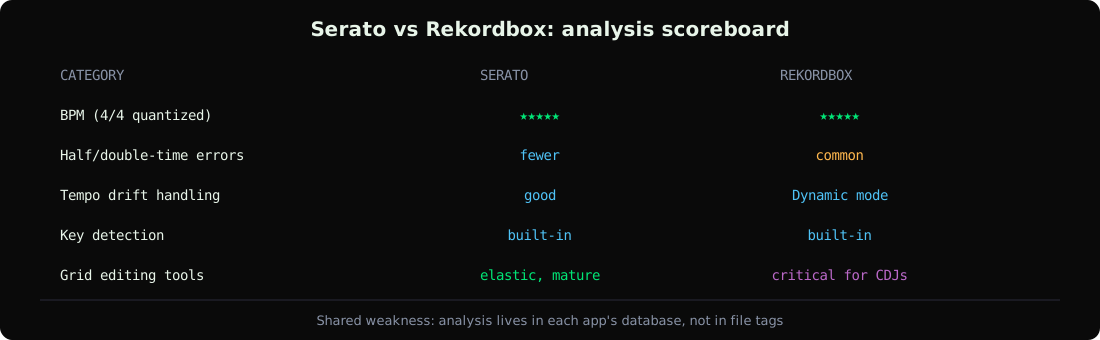
On quantized electronic music both engines land within 0.1 BPM of the true value almost every time — the difference shows up on difficult material:
| Material | Rekordbox | Serato |
|---|---|---|
| Quantized house/techno | Excellent | Excellent |
| Half-time / double-time prone (DnB, trap) | Frequent ½ or 2× errors | Fewer half-time errors, still happens |
| Tempo drift (live drums, vinyl) | Normal mode fails; Dynamic helps | Handles drift reasonably, grid needs manual checks |
| Ambient intros / sparse percussion | Grid often anchors late | Similar anchoring issues |
Neither is reliably right on edge cases — see the numbers in our BPM detection accuracy comparison, which tested all of these engines on the same corpus.
Key Detection Compared
This is where the two platforms diverge most:
- Rekordbox detects key and displays it in the library, with both standard notation and an option to show it in a DJ-friendly format. Accuracy is usable but trails dedicated tools on harmonically ambiguous tracks.
- Serato includes key analysis in current versions — a genuine improvement over the era when Serato DJs needed Mixed In Key as a separate purchase. It supports Camelot-style display via the Key Display settings.
The catch in both cases: the detected key lives in the app's database. If you analyze in Rekordbox and play in Serato next week, the key data doesn't travel — it's not written into the file's ID3 tags where every app can read it. That's the gap tools like GreenGo's analysis engine fill: four-signal fusion key detection written to standard TKEY/TBPM tags, readable by every platform. For notation systems, see the Camelot wheel reference.
Beatgrid Quality and Tempo Drift
Serato's beatgrid editing is the more mature workflow — elastic beatgrids, per-section correction, and a faster manual-fix loop. Rekordbox's Normal-mode grid is excellent when it lands correctly but brittle on drift; Dynamic mode handles variable tempo at the cost of sync predictability.
For CDJ/XDJ players specifically: hardware sync depends entirely on the Rekordbox grid, so grid quality matters more than the displayed BPM number. We cover the correction workflow in fixing Rekordbox BPM and grids, and the USB side in the CDJ export guide.
The Portability Problem Both Share
Both platforms analyze into their own database first and the file's tags second (or never). The consequences DJs actually hit:
- Analyze in Serato → move to Rekordbox → re-analyze everything from scratch.
- Rekordbox detects key → it doesn't reach the TKEY frame other apps read → empty key columns elsewhere.
- Correct a beatgrid in Serato → the correction lives in Serato's database, invisible to anything else.
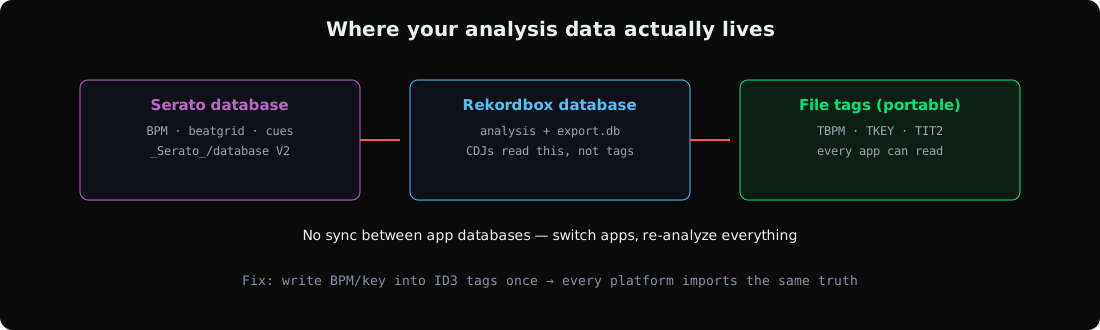
The fix is to treat analysis as a file-level job, not an app-level job: analyze once with a tool that writes standard ID3 tags (ID3 field guide), then let each platform import those values. The batch tagging guide covers doing this at library scale.
Verdict: Which Analysis Is Better?
- BPM on easy material: tie — both excellent.
- BPM on hard material: slight edge to Serato for fewer half-time errors; Rekordbox Dynamic mode closes the gap on drift.
- Key detection: both usable, neither class-leading; dedicated tools detect more accurately and write portable tags.
- Beatgrid editing: Serato's is the better tool; Rekordbox's matters more because CDJs depend on it.
- Portability: both lose — data stays in their databases.
The pragmatic setup most pros converge on: pick whichever performance software you like, but run detection through an external analyzer that writes file tags, so the analysis survives any platform switch. See the DJ software feature matrix for the platform-level comparison.
Frequently Asked Questions
Is Serato or Rekordbox analysis more accurate?
For BPM on standard electronic music they're effectively tied. Serato makes fewer half-time errors on DnB and trap; Rekordbox's Dynamic mode handles tempo drift better. Neither matches a dedicated multi-method analyzer on edge cases.
Does Serato detect key?
Yes — current Serato DJ versions include key analysis, displayed in the library with optional Camelot-style notation. It historically relied on third-party tools, so older workflows may not reflect current capability.
Does Rekordbox write BPM to the file?
Rekordbox reads TBPM tags on import but stores its own analysis in its database. To make BPM portable across apps, write the tag with an external tool first and disable Rekordbox's Auto Analysis so it doesn't overwrite your values.
Can I use GreenGo analysis with Serato or Rekordbox?
Yes — GreenGo writes standard ID3 tags (TBPM, TKEY, artist, title) that both platforms read on import. Disable auto-analysis in each app so your pre-analyzed values are preserved. See track analysis in GreenGo.
Why does my analysis data disappear when I switch DJ software?
Because Serato and Rekordbox store analysis in proprietary databases, not the audio file. Only values written into standard file tags travel between apps.
The platform war matters less than where your analysis data lives. Tag it into the files once and every platform benefits. Try GreenGo free for 7 days — no credit card required.
Ihor, Music software developer at GreenGo.