You load a track into Rekordbox and the BPM says 82 when the track is clearly 164. Or the grid drifts halfway through a live-recorded intro. Rekordbox BPM detection wrong is one of the most common complaints in DJ forums — and most of the time it's fixable in under a minute once you know which of the three failure modes you're looking at. This guide covers all three, plus the workflow that avoids them entirely. For the head-to-head against Serato’s engine, see the Serato vs Rekordbox analysis comparison.
Why Rekordbox Gets BPM Wrong
Rekordbox's BPM analysis is generally solid on four-on-the-floor electronic music. It struggles on the edges:
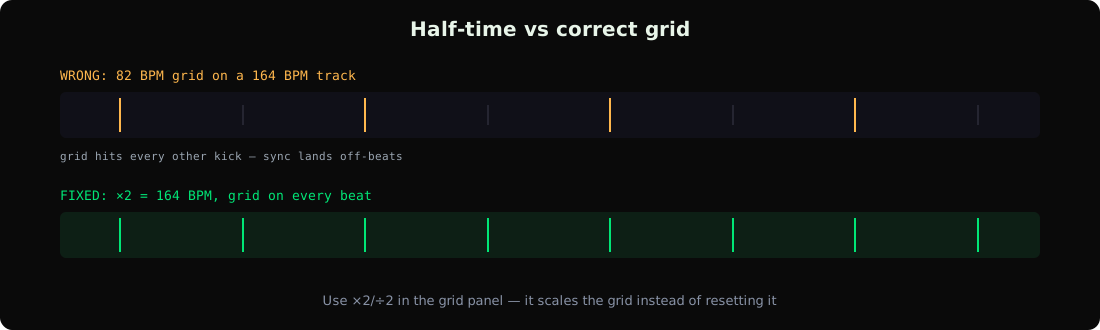
- Half/double-time errors: the detector locks onto the half-time feel. A 164 BPM DnB track reads as 82; a 70 BPM hip-hop track reads as 140.
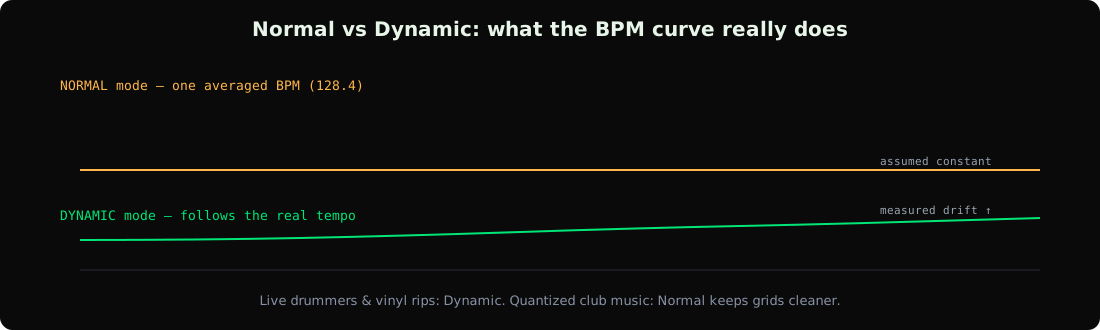
- Tempo drift: live drummers, vinyl rips, and older recordings aren't quantized to a clock. Rekordbox's Normal analysis mode assumes a constant tempo and picks one wrong average.
- Intros and breakdowns: ambient intros with no drums make the beatgrid anchor at the wrong offset, so the grid is shifted even when the BPM number is right.
- Non-4/4 and rubato music: waltzes, swung jazz, trap hats at double-time — the algorithm assumes standard dance meters.
The Half-Time / Double-Time Problem
This is the most common failure and the easiest to fix. When the detected value is exactly half or double the real tempo, don't re-analyze — just use the ×2 or ÷2 button:
- Open the track in Rekordbox's deck or export view.
- Open the beatgrid editing panel (the GRID tab in the track inspector).
- Click ×2 to double the BPM, or ÷2 to halve it. The whole grid scales accordingly.
×2/÷2 preserves the beatgrid alignment, which is why it's better than typing a new number manually — typing a new BPM resets the grid to a flat line and you'll need to re-set the first beat.
Dynamic vs Normal Analysis
Rekordbox has two analysis modes in Preferences → Analysis → Track Analysis Setting:
- Normal finds a single constant BPM for the whole track. Right for produced electronic music, wrong for anything with real tempo movement.
- Dynamic allows the BPM to change through the track — better for live drummers, transitions, and tempo-shifted edits, at the cost of a less stable grid.
If a track drifts, re-analyze it in Dynamic mode: right-click → Analyze Tracks → change the analysis setting to Dynamic first. We measured the practical accuracy differences in our Dynamic vs Normal accuracy comparison.
How to Fix Wrong BPM in Rekordbox, Step by Step
- Confirm the real BPM first. Tap along on a metronome app, check a reference like Tunebat, our BPM-finding methods comparison, or the genre BPM chart. Don't trust your ears alone on half-time feel — both readings can "sound right".
- If it's half/double: use ×2 or ÷2 in the grid panel.
- If the number is right but the grid is shifted: set the first downbeat. Zoom to the first real kick, click Set Grid at that point.
- If the grid drifts mid-track: re-analyze in Dynamic mode, or manually correct sections (see next section).
- If it's wrong by a weird amount (127.98 instead of 128): the detector found the tempo but the track is genuinely off-grid — a live recording or vinyl rip. Decide whether you want the measured value or a snapped integer.
Fixing a Drifting Beatgrid
A beatgrid that starts correct and drifts means the tempo isn't constant. Your options inside Rekordbox:
- Re-analyze in Dynamic mode — the grid becomes adaptive.
- Manually set grid markers at key points (start of each section) in Normal mode: more work, but keeps the grid quantization-friendly for sync.
- For vinyl rips, normalize the tempo offline first — warp the audio to a constant tempo in a DAW, export, re-analyze.
If you play on CDJs, remember the grid is what sync actually uses. A correct BPM number with a shifted grid still produces off-beat sync. See the USB export guide for getting corrected data onto hardware.
The Better Fix: Analyze Before Import
Rekordbox's analyzer is a generalist. Dedicated tools use more sophisticated algorithms — multi-method consensus, per-stem analysis, genre-aware models — and write the result into standard TBPM/TKEY ID3 tags before Rekordbox ever sees the file:
- Analyze with a dedicated tool. GreenGo's analysis uses multi-method consensus with integer BPM snapping across a 70-200 range, and writes the result straight into the file's tags.
- In Rekordbox, go to Preferences → Analysis → Track Analysis Setting and disable Auto Analysis for BPM/Grid and Key.
- Import — the BPM column populates from your tags instantly, no re-analysis, no overwritten values.
This is documented behavior, not a workaround — the Rekordbox manual confirms Auto Analysis overrides imported tags, and Lexicon DJ's docs recommend the same disable-analysis step. For the full accuracy picture across engines, see our BPM detection accuracy comparison. And to batch-tag a whole library before import, the batch tagger workflow is the fastest path.
Frequently Asked Questions
Why does Rekordbox show half the real BPM?
The detector locked onto the half-time feel — common on DnB (shows ~87 instead of 174), dubstep, and trap. Fix it with the ×2 button in the grid editor, which doubles the BPM while keeping the beatgrid aligned.
How do I fix Rekordbox BPM without losing my cue points?
Use ×2/÷2 or the Set Grid function rather than typing a new BPM — those operations scale the grid and keep cues in place. Manually entering a new BPM value resets the beatgrid and can shift cue timing.
Should I use Normal or Dynamic analysis in Rekordbox?
Normal for quantized electronic music (stable, sync-friendly grid). Dynamic for live drummers, vinyl rips, tempo transitions, and any track where the BPM legitimately changes. When in doubt, check the track in both and compare the grid.
Can I stop Rekordbox from overwriting my tagged BPM?
Yes — Preferences → Analysis → Track Analysis Setting → disable BPM/Grid and Key analysis. Rekordbox will then trust the TBPM/TKEY values already in the file on import.
Is Rekordbox BPM detection accurate?
On quantized 4/4 electronic music, usually within 0.1 BPM. Its weak spots are half/double-time readings, tempo-drift material, and ambient intros — the cases where a dedicated multi-method analyzer does measurably better.
Most wrong-BPM cases are a one-minute fix once you know which failure you're looking at. For libraries bigger than a few hundred tracks, analyzing before import is the durable fix — GreenGo does it in bulk, 7-day free trial, no credit card required.
Ihor, Music software developer at GreenGo.