The Setting Most People Get Wrong
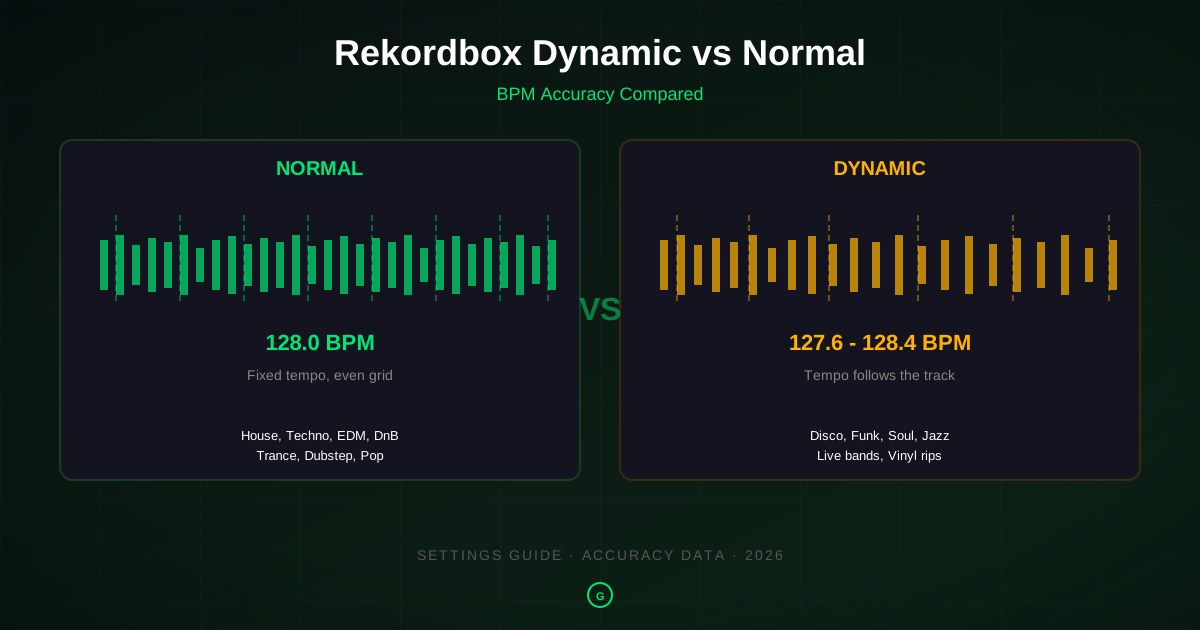
Open Rekordbox, go to Preferences, click Analysis, and you see a dropdown labeled Track Analysis Mode with three options: Normal, Dynamic, and High Precision. Most DJs pick one one time, leave it forever, and never think about it again. Then they wonder why a 128 BPM house track shows up as 127.6 to 128.4, or why the beatgrid on a disco edit drifts away from the actual beats by bar 32.
The mode you pick changes two things: how Rekordbox calculates BPM, and how it places the beatgrid. Get it right and sync, loops, and beat jumps all land where they should. Get it wrong and your grid slides off the kick drum, your BPM column shows a range instead of a number, and CDJ sync pulls you out of phase.
This guide covers what each mode does, when to use it, why BPM detection fails on certain tracks, and how the accuracy compares across Rekordbox, Serato, Traktor, Engine DJ, and dedicated analyzers. If you want the short version: use Normal for anything produced on a grid, use Dynamic for live recordings and pre-digital disco or funk, and use High Precision when Normal places a grid that looks right but sync still drifts. The rest of this guide explains why, with accuracy data from tempo estimation research and MIREX benchmarks.
What Normal Analysis Actually Does
Normal mode, called "Static" in older Rekordbox versions and in the Lexicon DJ writeup on beatgrid modes, runs the entire track through a beat tracker and picks one BPM value. That value is fixed for the whole track. The beatgrid is placed at even intervals from the first detected downbeat, with no adjustment for tempo changes anywhere in the file.
This is the correct behavior for any track recorded to a fixed tempo grid, which is nearly all music produced in a DAW since roughly 1995. House, techno, trance, drum and bass, dubstep, trap, future bass, hardstyle, and most pop and hip-hop produced in the last 30 years all have a single fixed tempo. The kick drum hits at exactly 128.000 BPM from the first bar to the last. Normal mode finds that value, sets it, and builds an even grid on top of it.
The BPM range setting matters here. Rekordbox lets you set a range (default 90-180) that tells the beat tracker where to look. If you analyze a 174 BPM drum and bass track with the default 90-180 range, the tracker might lock onto 87 BPM (half-time) instead of 174. Set the range to 150-220 for drum and bass, or 60-90 for half-time genres like dubstep and trap when you want the half-time reading. The range does not change the audio; it changes what the tracker considers a valid tempo.
Normal mode is faster than Dynamic because it samples fewer points. On a 5,000-track library, Normal analysis might take 40 minutes where Dynamic takes 90. For most DJs, Normal is the right default and should stay selected unless you are analyzing a batch of live recordings or disco vinyl rips.
What Dynamic Analysis Actually Does
Dynamic mode samples tempo at multiple points throughout the track and adjusts the beatgrid to follow tempo changes. Instead of one BPM value, you get a tempo curve. The reported BPM in your library is an average or a range, and the beatgrid stretches or compresses to match the actual beats at each point.
This is the correct behavior for any track where the tempo genuinely moves. A live band recording has tempo drift because the drummer is human. A 1974 disco track mastered from vinyl has drift because the turntable speed was not perfectly constant, and because the original recording was not locked to a click. Jazz, soul, funk, and reggae from before the mid-1980s all fall in this category. So do modern tracks that deliberately use tempo changes, like a build-up that accelerates into a drop, or an intro that starts at 110 BPM and switches to 128.
On these tracks, Normal mode places an even grid that fits the first few bars but drifts off by bar 16 or 32. Sync to that grid and you slip out of phase with the actual audio. Dynamic mode follows the drift, so the grid stays on the beats through the whole track.
The problem is that DJs often select Dynamic for their entire library, thinking it is "more accurate" because it does more work. It is not. On a quantized house track at 128.000 BPM, Dynamic mode detects micro-fluctuations that are not real tempo changes. They are quantization rounding, interpolation artifacts, or silence at the start and end of the file. The result: your 128 BPM track shows as 127.6 to 128.4, the beatgrid wobbles, and sync behaves unpredictably. Pioneer's own forum staff recommend Normal for studio-produced tracks and Dynamic only for live recordings.
High Precision Analysis: The Third Option
Rekordbox 7, released in December 2025, added a third analysis mode called High Precision. According to user reports and Pioneer's release notes, it runs a more CPU-intensive beat tracking pass that places beatgrid markers with sub-frame accuracy. It does not change BPM detection; it refines where the grid lines fall.
Use High Precision when Normal mode places a grid that looks correct on the waveform but sync still drifts on a CDJ. This happens on tracks with tricky transients, such as a kick drum with a long tail, or a track where the first downbeat is slightly ahead of the first detected onset. High Precision catches those cases.
The tradeoff is speed. High Precision takes roughly 2-3 times longer than Normal on the same library. For a working DJ with 10,000 tracks, that is the difference between an overnight analysis and a two-day analysis. Run it only on tracks where Normal sync is off, not on the whole library.
High Precision does not replace Dynamic. If a track has real tempo drift, you still need Dynamic. High Precision is a refinement of Normal, not a different approach.
BPM Accuracy: Normal vs Dynamic
Here is where the data gets interesting. Tempo estimation is a well-studied problem in music information retrieval. The MIREX Audio Tempo Estimation benchmark has tracked algorithm accuracy since 2005, and a 2020 survey by Schreiber and Müller in the Transactions of the International Society for Music Information Retrieval asked whether the problem was solved. The answer: mostly yes for quantized music, still no for tracks with tempo drift.
On fixed-tempo electronic music, modern beat trackers reach around 95% accuracy when allowing a 4% tolerance (so 128 BPM detected as 123-133 counts as correct). Below 4% tolerance, accuracy drops because of octave errors, where the tracker locks onto half or double the actual tempo. This is the "my 174 BPM drum and bass track shows as 87 BPM" problem, and it is the most common BPM error in Rekordbox.
On tracks with tempo drift, accuracy drops significantly. The same survey found that on the GTzan benchmark, which includes live recordings and classical music, accuracy fell below 70% even with 4% tolerance. No algorithm reliably tracks tempo through a live drummer's rubato, because the tempo is not a single value; it is a curve.
What this means for Rekordbox mode selection:
| Track Type | Best Mode | Expected BPM Accuracy | Common Error |
|---|---|---|---|
| House, techno, trance (quantized) | Normal | 95%+ | Octave error if BPM range wrong |
| Drum and bass, dubstep (quantized) | Normal (wide range) | 95%+ | Half-time / double-time detection |
| Pop, hip-hop (quantized) | Normal | 90-95% | Occasional octave error on trap |
| Disco, funk, soul (pre-1985) | Dynamic | 70-85% | Grid drift if Normal used |
| Live band, jazz | Dynamic | 60-75% | No single BPM is correct |
| Mixed tempo (intro + drop) | Dynamic | Varies | Normal locks to wrong section |
The accuracy numbers come from published MIREX results and the Schreiber and Müller survey. They are not specific to Rekordbox; they apply to all beat trackers because the underlying algorithms are similar. Rekordbox, Serato, and Traktor all use variants of the same onset-detection and tempo-estimation approaches. The differences are in tuning, not in fundamental approach.
If you want to dig deeper into how BPM detection works, the Essentia tutorial on beat detection and tempo estimation from the Music Technology Group at Universitat Pompeu Fabra walks through the signal processing steps: onset detection, tempo hypothesis generation, and beat tracking. It is the same pipeline Rekordbox runs, just open source.
When to Use Each Mode (By Genre)
Here is the practical guide. For each genre family, the recommended mode and BPM range setting:
| Genre | Recommended Mode | BPM Range Setting | Why |
|---|---|---|---|
| House / Tech House | Normal | 90-180 | Fixed grid, 120-130 BPM, no drift |
| Deep House | Normal | 90-180 | Fixed grid, 118-125 BPM |
| Techno | Normal | 90-180 | Fixed grid, 125-150 BPM |
| Hard Techno / Schranz | Normal | 130-200 | Fixed grid, 140-160 BPM |
| Trance | Normal | 90-180 | Fixed grid, 130-145 BPM |
| Psytrance | Normal | 130-180 | Fixed grid, 140-150 BPM |
| Drum & Bass | Normal | 150-220 | Fixed grid, 170-176 BPM; half-time error if range too low |
| Liquid DnB | Normal | 150-220 | Fixed grid, 170-180 BPM |
| Dubstep | Normal | 60-90 or 130-160 | 140 BPM felt as 70 half-time; pick the range for the reading you want |
| Trap | Normal | 60-90 or 130-160 | Same half-time issue as dubstep |
| Future Bass | Normal | 90-180 | Fixed grid, 140-160 BPM |
| Bass House | Normal | 90-180 | Fixed grid, 125-130 BPM |
| Pop (modern) | Normal | 90-180 | Fixed grid, 100-130 BPM |
| Hip-hop (modern) | Normal | 60-90 or 90-180 | Fixed grid, 70-90 BPM half-time or 140-160 double |
| Disco (1970s) | Dynamic | 90-180 | Vinyl drift, live drummer, no click track |
| Funk / Soul (pre-1985) | Dynamic | 90-180 | Live drummer, tempo drift |
| Jazz | Dynamic | 90-180 | Rubato, no fixed tempo |
| Live band recordings | Dynamic | 90-180 | Human tempo variation |
| Reggae / Dub (vintage) | Dynamic | 60-90 | Live drummer, analog tape drift |
| Rock / Indie | Dynamic | 90-180 | Live drummer unless quantized |
| EDM mashups / edits | Dynamic | 90-180 | Often combine sources at slightly different tempos |
The pattern is simple. If the track was made in a DAW with a fixed tempo project, use Normal. If it was recorded live or mastered from vinyl before the digital era, use Dynamic. When in doubt, analyze with Normal first and check the beatgrid. If it drifts off the kick drum after 16 or 32 bars, switch to Dynamic and reanalyze.
For a full BPM reference by genre, see our BPM chart for every music genre, which lists tempo ranges for 40+ genres with production context.
Beatgrid Behavior Compared
The beatgrid is the visual and functional reference Rekordbox uses for sync, loops, beat jumps, and the quantized pad modes. The mode you pick changes how the grid is placed.
Normal (Static) Grid
The grid is placed at even intervals from the first detected downbeat. Every grid line is exactly the same distance from the next. If the track is quantized, the grid sits perfectly on every kick and snare from start to finish. If the track has drift, the grid fits the first few bars and then slides off, with the gap between the grid line and the actual beat growing wider as the track plays.
You can manually adjust the grid by dragging the first beat marker, but you cannot fix drift this way. Moving the first marker shifts the entire grid, so if the grid is correct at bar 1 but off by a 16th note at bar 32, manual adjustment will not help. You need Dynamic mode, or you need to time-stretch the track to a fixed tempo in a DAW before importing.
Dynamic Grid
The grid follows the tempo curve. Grid lines are not evenly spaced; they compress where the track speeds up and stretch where it slows down. On a disco track with a drummer who pushes the chorus, the grid lines get closer together in the chorus and wider in the verse. This is correct behavior, and it is the only way sync will work on these tracks.
The downside is that some CDJ features expect an even grid. Beat jump, in particular, can behave unpredictably with a dynamic grid because it moves by a fixed number of beats at the average BPM, not at the local BPM. If you rely on beat jump for looping on the fly, test it on a dynamic-grid track before using it live.
High Precision Grid
Same as Normal, but with more accurate marker placement. The grid is still even, but the first downbeat is placed with sub-frame accuracy, and transient-based adjustments are applied to handle tracks where the onset is slightly ahead of or behind the ideal grid position. This fixes sync drift on tracks where Normal looks right but plays wrong.
Common BPM Problems and How to Fix Them
Problem: BPM shows as a range (127.6 to 128.4)
Cause: Dynamic mode was used on a fixed-tempo track. The tracker detected micro-fluctuations that are not real tempo changes.
Fix: Switch to Normal mode, set the correct BPM range, right-click the track, and select Analyze Tracks. The BPM will lock to a single value.
Problem: BPM is doubled or halved (87 instead of 174)
Cause: The BPM range setting does not include the actual tempo. A 174 BPM drum and bass track analyzed with a 90-180 range might lock onto 87 (half-time) because 87 is inside the range and 174 is at the edge.
Fix: Set the BPM range to 150-220 for drum and bass, or 60-90 if you want the half-time reading for mixing. Reanalyze. The range tells the tracker where to look; it does not change the audio.
Problem: Beatgrid drifts off the kick drum after 16 or 32 bars
Cause: Normal mode was used on a track with real tempo drift. The grid is even, but the track is not.
Fix: Switch to Dynamic mode and reanalyze. The grid will follow the tempo. If the drift is minor (a few cents over 4 minutes), you can also try High Precision mode, which may place the grid accurately enough without going fully dynamic.
Problem: BPM is correct but sync still drifts
Cause: The beatgrid first marker is placed slightly off the actual downbeat. The BPM is right, but the grid is shifted.
Fix: Zoom into the first beat on the waveform, manually drag the grid marker to align with the first kick or snare, and check if sync improves. If manual adjustment does not fix it, try High Precision analysis, which refines marker placement.
Problem: Track has a long beatless intro, BPM is wrong
Cause: The beat tracker locks onto the first detected onset, which might be a vocal or melody note in the intro rather than the first kick drum. The BPM is calculated from the wrong starting point.
Fix: Set a beatgrid anchor manually at the first kick drum, then reanalyze. Or trim the beatless intro in a DAW before importing, which is the cleaner solution for tracks you play regularly.
Problem: BPM changes mid-track (intro at 110, drop at 128)
Cause: The track has a real tempo change. Normal mode locks to one BPM for the whole track, so it picks whichever section is longer or louder.
Fix: Use Dynamic mode. The grid will follow the tempo change. Be aware that sync will switch tempos when you cross into the new section, which may or may not be what you want.
Problem: Rekordbox will not reanalyze a track
Cause: Rekordbox caches analysis results. If you change the mode and reanalyze, it may use the cached result.
Fix: Right-click the track, select Delete Info, then reanalyze. This clears the cached analysis and forces a fresh pass. You can also hold Shift while clicking Analyze to force a full reanalysis.
For batch-fixing BPM across a large library, see our batch audio tagger guide, which covers writing corrected BPM values to ID3 tags that Rekordbox reads on import.
How Other DJ Software Handles This
Rekordbox is not the only DJ software with analysis settings. Here is how the others compare.
Serato DJ Pro
Serato has a single analysis setting: Set BPM to Half, Double, or Normal. There is no Dynamic mode. Serato's beatgrid is always static, placed at even intervals from the first detected beat. For tracks with tempo drift, Serato's grid will drift off, and there is no built-in fix beyond manual grid adjustment. Serato's BPM detection is generally accurate on quantized music but struggles with live recordings for the same reason Rekordbox Normal does: it assumes a fixed tempo.
Traktor Pro
Traktor runs a single analysis pass and places a static beatgrid. There is no Dynamic option. Traktor's BPM detection historically had issues with half-time detection on drum and bass, but recent versions have improved. Traktor uses its own beat tracking algorithm, not the same one as Rekordbox, so results can differ on the same track. If Rekordbox gets the BPM wrong, try analyzing in Traktor as a cross-check.
Engine DJ
Engine DJ, used by Denon Prime players, has Normal and Dynamic modes similar to Rekordbox. Engine DJ community discussions cover the same Normal-vs-Dynamic questions as the Pioneer forums. The behavior is comparable: Normal for quantized music, Dynamic for live recordings. Engine DJ's analysis is generally faster than Rekordbox's but slightly less accurate on tricky tracks, according to user reports.
VirtualDJ
VirtualDJ runs automatic analysis with a static beatgrid. It has a "dynamic BPM" option in settings, but it is off by default and most users leave it off. VirtualDJ's BPM detection is considered one of the more accurate among DJ software, partly because it uses a different beat tracking approach that handles octave errors better than Rekordbox on some tracks.
Dedicated Analyzers (Mixed In Key, GreenGo, KeyFinder)
Dedicated BPM and key detection tools take a different approach. They do not place beatgrids; they only calculate BPM and key and write the results to ID3 tags. This means they can use more CPU-intensive algorithms without worrying about real-time grid placement. Mixed In Key, GreenGo, and KeyFinder all report a single BPM value per track, which is what DJ software expects on import.
For a comparison of dedicated analyzers, see our GreenGo vs Mixed In Key comparison and our BPM detection methods comparison.
BPM Detection Accuracy Benchmarks
If you want to understand why BPM detection fails on certain tracks, it helps to know what the research field has measured. Tempo estimation has been benchmarked annually since 2005 through MIREX (Music Information Retrieval Evaluation eXchange). The results paint a clear picture.
Octave Errors Are the Main Problem
A 2020 survey by Schreiber and Müller, published in the Transactions of the ISMIR, reviewed 15 years of tempo estimation research. The key finding: on fixed-tempo music, modern algorithms reach over 95% accuracy when allowing a 4% tolerance window. But when requiring exact octave accuracy (no half-time or double-time errors), accuracy drops to around 80%. The remaining 20% of errors are almost all octave errors, where the tracker locks onto half or double the actual tempo.
This is why the BPM range setting in Rekordbox matters so much. The range setting is essentially a constraint that tells the tracker which octave to look in. Set it wrong and you get an octave error. Set it right and the tracker has a much smaller search space and rarely fails.
Tempo Drift Is Still Unsolved
The same survey found that on the GTzan benchmark, which includes live recordings and classical music, accuracy fell below 70% even with 4% tolerance. No published algorithm reliably tracks tempo through a live drummer's rubato. The problem is not detection accuracy; it is that a single BPM value is the wrong output for a track with a tempo curve. Dynamic mode in Rekordbox and Engine DJ is a practical workaround, but it does not solve the underlying problem. It just reports a range instead of a single value.
Real-Time Beat Tracking Has Improved
A 2024 paper by Meier and colleagues in the Transactions of the ISMIR presented a real-time beat tracking system with zero latency that matched or beat offline trackers on several benchmarks. This suggests that future DJ software could use real-time beat tracking instead of pre-analysis, which would eliminate the need to choose a mode before analyzing. For now, though, pre-analysis with a mode selection is the standard approach.
What This Means for Your Library
If you analyze 1,000 tracks of mixed genres with Normal mode and the correct BPM range, expect roughly 950 to get the right BPM, 30 to have octave errors (fixable by adjusting the range), and 20 to have drift-related errors (fixable by switching to Dynamic). That is a 95% success rate, which matches the research. The 5% that fail are not random; they cluster in specific genres and recording types, which is why the genre guide above works.
How GreenGo Handles BPM Detection
GreenGo takes a different approach from DJ software analyzers. Instead of placing a beatgrid, it calculates BPM and key and writes the results to ID3v2.4 tags that Rekordbox, Serato, Traktor, and VirtualDJ all read on import. This means the BPM value you see in Rekordbox after importing a GreenGo-analyzed track is the value GreenGo calculated, not the value Rekordbox would have calculated on its own.
The BPM model in GreenGo was trained on 14,859 tracks across multiple genres, with a detection range of 70-200 BPM. It uses a multi-signal approach: onset detection, spectral flux, low-band energy, and autocorrelation. The outputs are fused and checked against genre-aware tempo profiles to catch octave errors before they reach the tag. If a track looks like drum and bass based on its spectral content but the raw BPM reading is 87, the model flags it as a likely half-time error and outputs 174 instead.
This does not mean GreenGo is always right. No BPM detector is. But because it writes a single value to the tag, you get a consistent BPM across all your DJ software. Rekordbox, Serato, and Traktor all read the same number, so you do not get the situation where Rekordbox says 128.0, Serato says 127.6, and Traktor says 128.2 for the same track.
For tracks with real tempo drift, GreenGo reports the dominant tempo, which is the tempo that covers the largest portion of the track. This is the same approach Mixed In Key uses. It is not a range; it is a single value that best represents the track as a whole. If you need a dynamic beatgrid for a disco edit, you still need to run Dynamic analysis in Rekordbox after import. GreenGo handles the BPM and key; Rekordbox handles the grid.
To analyze a folder of tracks with GreenGo, drag it into the Analyze tab. The batch processor writes BPM, key (Camelot and Open Key), energy, and mood to ID3 tags. For a full walkthrough, see our GreenGo analysis guide. For batch-tagging an entire library, see our batch tagger guide.
FAQ
What is the best analysis setting for Rekordbox?
For most electronic music produced on a grid (house, techno, trance, EDM, drum and bass, dubstep), Normal analysis with a 90-180 BPM range is the best setting. It locks the BPM to a single fixed value and places an even beatgrid, which is what CDJs and controllers expect. Use Dynamic only for tracks with real tempo drift, such as live bands, disco vinyl rips, funk, and jazz. High Precision analysis, added in Rekordbox 7, improves beatgrid placement for tricky tracks but does not change BPM detection.
Should I use Dynamic or Normal analysis in Rekordbox?
Use Normal for any track recorded to a fixed tempo grid, which covers nearly all modern electronic music. Use Dynamic for tracks where the tempo genuinely moves, such as live drummer recordings, 1970s disco, funk, soul, jazz, and some indie rock. Dynamic mode lets the beatgrid follow tempo changes, but it can introduce small BPM fluctuations on quantized tracks that should have a single fixed tempo. If your BPM shows as 127.6 to 128.4 on a house track, you used Dynamic when Normal was correct.
Why does my BPM change on Rekordbox?
BPM changes in Rekordbox usually mean Dynamic analysis was used on a track with a fixed tempo. Dynamic mode samples tempo across the track and reports a range, so a 128 BPM house track might show as 127.6 to 128.4. Other causes include a wrong BPM range setting (for example, 70-140 set for a 174 BPM drum and bass track, causing half-time or double-time detection), or a track with a long beatless intro or breakdown that confuses the beat tracker. Switch to Normal analysis and reanalyze to fix it.
How can I fix the incorrect BPM in Rekordbox?
To fix an incorrect BPM in Rekordbox, right-click the track and select Analyze Tracks, then choose Normal mode with the correct BPM range for your genre. If the BPM is doubled or halved, adjust the BPM range setting (for example, use 150-220 for drum and bass instead of 70-180). You can also manually edit the BPM by double-clicking the BPM field in the track list, but this does not fix the beatgrid. For a clean beatgrid to match the corrected BPM, reanalyze after changing the range.
What is the difference between static and dynamic analysis in Rekordbox?
Static (Normal) analysis detects one BPM value for the entire track and places an even beatgrid at that tempo. Dynamic analysis samples tempo throughout the track and adjusts the beatgrid to follow tempo changes. Static is correct for music produced on a fixed grid, which is most electronic music. Dynamic is correct for music with real tempo drift, such as live recordings and pre-digital disco or funk. High Precision, added in Rekordbox 7, is a refinement of static analysis that uses more CPU to place beatgrid markers more accurately.
Is there a way to analyze all tracks in Rekordbox at once?
Yes. Select all tracks in your collection (Ctrl+A or Cmd+A), right-click, and choose Analyze Tracks. In the dialog, pick your analysis mode (Normal, Dynamic, or High Precision) and BPM range. Rekordbox processes them in batches. For very large libraries (10,000+ tracks), this can take several hours. If you only need BPM and key data without beatgrids, a batch analysis tool like GreenGo can process thousands of tracks faster by skipping waveform rendering and writing BPM and key directly to ID3 tags that Rekordbox reads on import.