What Are ID3 Tags and Why DJs Should Care
ID3 tags are the metadata containers embedded inside digital audio files. They store information like track title, artist, album, genre, BPM, and musical key. For DJs, ID3 tags are not just organizational labels. They are the data your DJ software reads to display track info, sort your library, and power features like harmonic mixing and BPM matching.
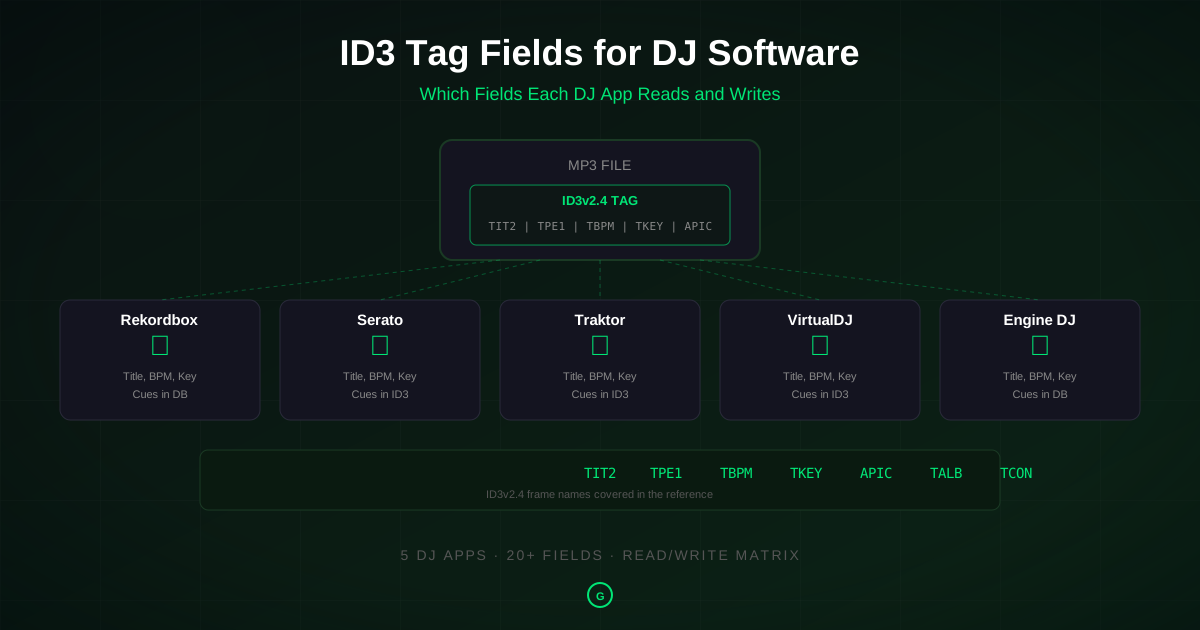
Every major DJ platform, from Rekordbox to Serato to Traktor, reads ID3 tags. But they do not all read the same fields, and they definitely do not all write the same data back to your files. Understanding which fields each software supports is the difference between a portable, well-organized library and one that falls apart when you switch platforms.
If you have ever wondered why your cue points disappear when you move tracks from Serato to Rekordbox, or why your BPM column shows different values in Traktor than in VirtualDJ, the answer is in how each software handles ID3 tags. This reference covers every ID3 field that matters for DJ software, with a field-by-field compatibility table for the five major platforms.
For a broader introduction to ID3 metadata for DJs, see our ID3 metadata guide. For batch tagging your entire library, see our batch tagger guide.
ID3v2.3 vs ID3v2.4: What DJs Need to Know
There are two ID3v2 versions you will encounter in practice: ID3v2.3 and ID3v2.4. Both are widely supported, but they have important differences.
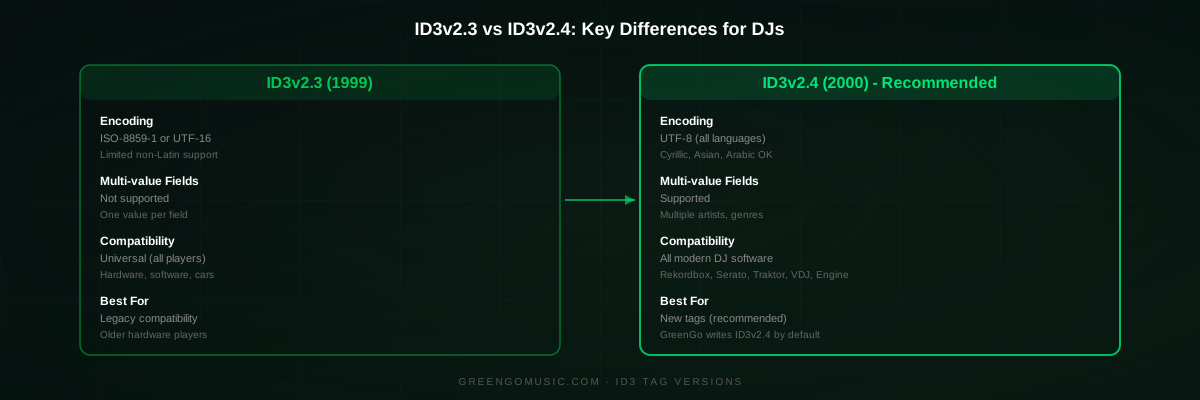
ID3v2.3 is the older, more universally compatible version. It has been the de facto standard since 1999 and is supported by virtually every music player, hardware device, and DJ software on the market. It uses ISO-8859-1 or UTF-16 encoding, which covers most Western languages but can cause issues with non-Latin characters.
ID3v2.4, released in 2000, adds several improvements. It supports UTF-8 encoding, which handles all languages correctly. It allows multiple values in a single field (useful for multiple artists or genres). It also has a more flexible frame structure. The ID3 specification documents both versions in full.
For DJ use, the practical advice is simple: use ID3v2.4 for new tags, and do not worry about converting existing ID3v2.3 tags unless you see encoding problems. All five major DJ platforms read both versions. GreenGo writes ID3v2.4 tags by default.
One thing to avoid: ID3v1 tags. These are the original 1996 format, limited to 30 characters per field and no support for BPM, key, or any DJ-specific data. Some older rippers created both ID3v1 and ID3v2 tags. If your files have ID3v1 tags, strip them with a tool like Kid3 or Mp3tag to avoid conflicts.
The Complete ID3 Tag Field Reference Table
This is the core of this reference. The table below shows every ID3 tag field that matters for DJ software, mapped against the five major platforms. For each field, you can see whether the software reads it, writes it, both, or neither.
The data is compiled from multiple sources: the Lexicon DJ field mapping documentation (the most comprehensive public cross-platform reference), official support articles from each software vendor, Mp3tag field mapping documentation, and community-confirmed behavior from the Engine DJ community and Native Instruments forum.
Legend: R = reads from file, W = writes to file, R/W = reads and writes, blank = not supported
| ID3 Field | ID3v2 Frame | Rekordbox 6/7 | Serato DJ Pro | Traktor Pro | VirtualDJ | Engine DJ |
|---|---|---|---|---|---|---|
| Title | TIT2 | R/W | R/W | R/W | R/W | R/W |
| Artist | TPE1 | R/W | R/W | R/W | R/W | R/W |
| Album Artist | TPE2 | R/W | R | R | R | R |
| Original Artist | TOPE | R/W | ||||
| Album | TALB | R/W | R/W | R/W | R/W | R/W |
| Year / Date | TYER / TDRC | R/W | R/W | R | R/W | R/W |
| Track Number | TRCK | R/W | R/W | R/W | R | R/W |
| Disc Number | TPOS | R/W | ||||
| Genre | TCON | R/W | R/W | R/W | R/W | R/W |
| BPM | TBPM | R/W | R/W | R/W | R/W | R/W |
| Key | TKEY | R/W | R/W | R/W | R/W | R/W |
| Comment | COMM | R/W | R/W | R/W | R/W | R/W |
| Comment 2 | TXXX:COMMENT2 | R/W | ||||
| Grouping | TIT1 | R/W | R/W | |||
| Composer | TCOM | R/W | R/W | R/W | R/W | |
| Producer | TIPL | R/W | ||||
| Publisher / Label | TPUB | R/W | R/W | R/W | R/W | R/W |
| Lyricist | TEXT | R/W | ||||
| Remixer | TPE4 | R/W | R/W | R/W | R/W | R/W |
| Mix | TXXX:MIX | R/W | R/W | R/W | ||
| Rating | POPM | R/W | R/W | R/W | R/W | |
| Color | TXXX:COLOR | R/W | R/W | R/W | R/W | |
| Play Count | TXXX:PLAYCOUNT | R/W | R/W | R/W | R/W | |
| Lyrics | USLT | R/W | ||||
| Release Date | TDRL | R | R | |||
| Date Added | TXXX:DATE_ADDED | R/W | R/W | R/W | R/W | R/W |
| Date Created | TXXX:DATE_CREATED | R | R | |||
| Cover Art | APIC | R/W | R/W | R/W | R/W | R/W |
Note on DJ-specific fields: The table above covers standard ID3 fields. Each DJ software also uses proprietary frames or database entries for performance data like cue points, beatgrids, and waveforms. These are covered in the software-specific sections below.
How Each DJ Software Stores Metadata
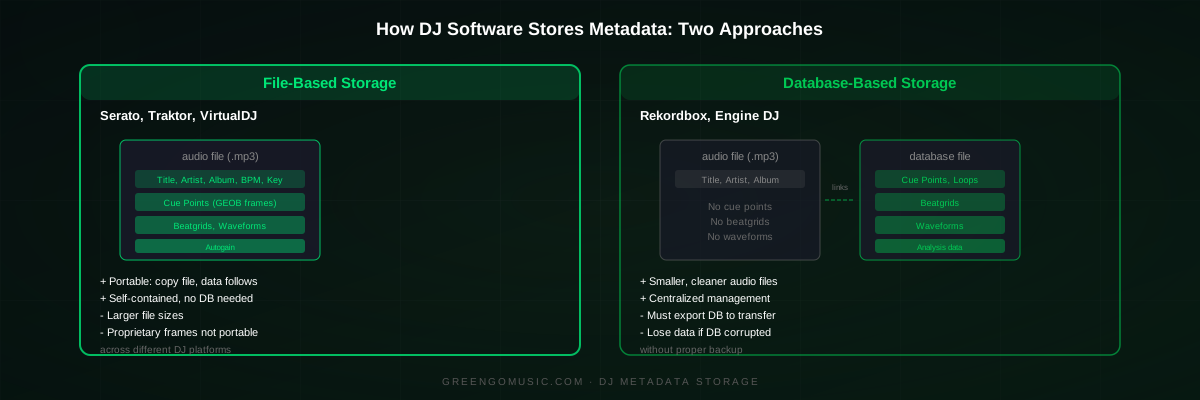
Before diving into each software, it is important to understand the two fundamentally different approaches DJ software takes for storing performance data (cue points, beatgrids, waveforms, energy analysis).
As Digital DJ Tips explains in their metadata deep dive, the split is between file-based storage and database storage:
- File-based (Serato, Traktor, VirtualDJ): Performance data is written directly into the audio file's ID3 tags. Move the file to another computer with the same software, and your cues, beatgrids, and loops come with it.
- Database-based (Rekordbox, Engine DJ): Performance data is stored in an internal database file, not in the audio files. Move the files without the database, and you lose all your prep work. You must export the library properly to transfer it.
This distinction is the single most important thing to understand about DJ software metadata. It explains why switching between platforms is painful, and why backup strategies differ depending on your software.
Rekordbox ID3 Tags: What It Reads and Writes
Rekordbox, made by AlphaTheta (formerly Pioneer DJ), takes a database-first approach. It reads and writes standard ID3 metadata fields (title, artist, album, genre, BPM, key, comment, etc.) to your audio files, but it stores all DJ performance data in its internal database rather than embedding it in the files.
According to Digital DJ Tips: "Rekordbox stores nearly all of your DJ prep information in its internal library database and folders, some of which are hidden away from its visible folder. That includes beatgrids, cue points, loops, waveform data, key and BPM analysis, phrase analysis, ratings, and more. None of that gets written to the music file itself by default."
Fields Rekordbox reads and writes to files: Title, Artist, Album Artist, Original Artist, Album, Year, Track Number, Disc Number, Genre, BPM, Key, Comment, Composer, Lyricist, Remixer, Mix, Label, Rating, Color, Play Count, Date Added, Cover Art.
Fields Rekordbox keeps in database only: Cue points, loops, beatgrids, waveforms, phrase analysis, energy, and related track data. These are not written to ID3 tags.
Rekordbox reads BPM and key from the standard TBPM and TKEY ID3 frames. If you analyze tracks with an external tool like GreenGo before importing them into Rekordbox, the BPM and key values will appear correctly because GreenGo writes them to standard ID3v2.4 fields that Rekordbox reads natively.
One important note: Rekordbox supports the most ID3 fields of any DJ software, including Album Artist, Original Artist, Disc Number, and Lyricist, which most other platforms ignore. This makes Rekordbox the most metadata-complete platform for library organization.
For more on preparing tracks specifically for Rekordbox, see our DJ set prep guide and our batch tagging guide.
Serato ID3 Tags: What It Reads and Writes
Serato DJ Pro takes the opposite approach from Rekordbox. It writes everything, including cue points, beatgrids, waveforms, and autogain, directly into the audio files using proprietary ID3 frames.
The serato-tags project, which reverse-engineered Serato's tag format, documents the exact frames Serato uses. Data is stored inside ID3v2.4 GEOB (General Encapsulated Object) frames with these names:
- Serato Overview - waveform overview data
- Serato Analysis - analysis version information
- Serato Autotags - autogain and track gain data
- Serato Markers_ - legacy cue points and loops (fixed format)
- Serato Markers2 - cue points, saved loops, flips, track color, beatgrid lock
- Serato BeatGrid - beatgrid marker data
- Serato Offsets_ - additional offset data (MP3 only)
In addition to these proprietary GEOB frames, Serato also writes standard ID3 fields: TBPM (BPM), TKEY (key), TIT2 (title), TCON (genre), and RVAD (relative volume adjustment for autogain).
As Digital DJ Tips notes: "Serato writes all of your performance metadata directly into the music files, even into WAV files (which officially don't allow this), by using its own proprietary method. This includes BPM, key, waveform data, cue points, loops, and even auto-gain information. This means if you move a music file to another Serato system, all that data comes with it."
Fields Serato reads and writes to files: Title, Artist, Album, Year, Track Number, Genre, BPM, Key, Comment, Grouping, Composer, Remixer, Label, Rating, Color, Play Count, Date Added, Cover Art, plus proprietary GEOB frames for cue points, loops, beatgrids, waveforms, and autogain.
Fields Serato does not support: Album Artist, Original Artist, Disc Number, Lyricist, Mix, Producer, Lyrics.
One important behavior: Serato's ID3 tag editing writes changes to files by default, but you need to enable "Write Tags to File" in some configurations. If you edit metadata in Serato and do not see it appear in other software, check this setting.
For more on how Serato compares to other tools for library prep, see our GreenGo vs Mixed In Key comparison.
Traktor ID3 Tags: What It Reads and Writes
Traktor Pro from Native Instruments uses a hybrid approach. It stores performance data in its internal collection database (collection.nml) and also writes most of it to the audio files themselves.
According to Digital DJ Tips: "Traktor stores all your DJ performance data in its internal collection database and also writes most of it to the music files themselves. This includes BPM, beatgrids, cue points, saved loops, key analysis and autogain. Traktor writes its metadata into the files using a proprietary block, and uses appropriate tagging systems for formats like FLAC or AIFF."
This dual-storage method means Traktor is the most resilient platform for metadata. If the database is lost, Traktor can re-import data from file tags. If file tags are lost, the database still has everything. Traktor will use the most recent version if there is a conflict.
The Native Instruments community forum documents the standard ID3 fields Traktor uses. A user named JLuuuu confirmed the mapping: "Remixer maps to mp3tag's mixartist field, Label maps to publisher, and Producer maps to involvedpeople." Another user, Patch, added: "BPM, Key, Label, Cover, Year and more are all available in Mp3tag's Extended Tags view."
Fields Traktor reads and writes to files: Title, Artist, Album, Track Number, Genre, BPM, Key, Comment, Comment 2, Producer, Publisher/Label, Remixer, Mix, Rating, Color, Play Count, Lyrics, Release Date, Date Added, Date Created, Cover Art, plus proprietary blocks for cue points, beatgrids, waveforms, and autogain.
Fields Traktor does not support: Album Artist, Original Artist, Disc Number, Grouping, Composer, Lyricist.
One unique Traktor feature: the Comment 2 field. This is a second comment field that Traktor writes to a TXXX frame. It does not appear in most other software, making it useful for storing Traktor-specific notes you do not want visible elsewhere.
To make sure Traktor writes all data to files, enable "Save all tags to file" in Preferences. Without this setting, Traktor may only store data in its database.
VirtualDJ ID3 Tags: What It Reads and Writes
VirtualDJ stores performance metadata in its own XML database files, located per drive or folder. But it also reads and writes ID3 tags for supported formats (MP3, FLAC, M4A, AIFF).
One notable feature: VirtualDJ reads cue points and loops from Serato's ID3 tags by default. As Digital DJ Tips explains: "By default, VirtualDJ also reads cue points and loops from Serato. So if you add a track to the VirtualDJ collection and it shows cues automatically, those are actually from Serato, not ones set in VirtualDJ. However, as soon as you set even one cue or loop in VirtualDJ, it stops reading the Serato data for that track."
Fields VirtualDJ reads and writes to files: Title, Artist, Album, Year, Track Number, Genre, BPM, Key, Comment, Grouping, Composer, Remixer, Mix, Label, Rating, Color, Play Count, Date Added, Date Modified, Cover Art, plus proprietary XML database entries for cue points, loops, beatgrids, and waveforms.
Fields VirtualDJ does not support: Album Artist, Original Artist, Disc Number, Lyricist, Producer, Publisher, Lyrics, Release Date.
VirtualDJ offers preferences to control whether it writes tags back to files. This is useful if you want to keep your audio files untouched and only store DJ data in the VirtualDJ database. The VirtualDJ forum has ongoing discussions about expanding ID3 tag compatibility.
VirtualDJ also supports User1 and User2 fields, which are custom TXXX frames that no other DJ software reads. These can be used for storing custom data like energy levels or personal ratings.
Engine DJ ID3 Tags: What It Reads and Writes
Engine DJ, made by inMusic (Denon DJ), uses a database approach similar to Rekordbox. It stores all analyzed data (BPM, beatgrids, cue points, loops, key, waveforms) in its internal database rather than embedding it in audio files.
The Engine DJ community forum has a detailed discussion about which ID3 fields the software supports. A user named Barbie-qu confirmed: "The software only reads and writes to a fairly limited selection of tags. The user guide lists these: Title, Artist, Album, Comment, Genre, Key, Track #, Year, Label, Composer, Mixartist."
Another user, androphonic, added important context: "ContentGroup (Grouping) is not there and would require a database change to include. Remixer isn't even an official ID3 tag (unless you consider it InterpretedBy) and it's not in Apple Music."
Fields Engine DJ reads and writes to files: Title, Artist, Album, Year, Track Number, Genre, Key, Comment, Composer, Label/Publisher, Remixer (Mixartist), Cover Art.
Fields Engine DJ does not support: Album Artist, Original Artist, Disc Number, Grouping, Lyricist, Mix, Producer, Rating, Color, Play Count, Lyrics, BPM (writes to database, not file).
Engine DJ is the most limited of the five platforms for ID3 field support. Notably, it does not write BPM to file tags (only to its database), and it does not support the Grouping field that Serato users rely on heavily. If you are migrating from Serato to Engine DJ, you will lose any data stored in the Grouping field unless you remap it to another field first.
For this reason, library conversion tools like Lexicon DJ are popular for Serato-to-Engine migrations. Lexicon can remap fields that Engine DJ does not natively support into fields it does, preserving your organizational data.
How to Edit ID3 Tags for DJ Software
Now that you know which fields each DJ software supports, here are the best tools for editing ID3 tags in a way that works across all platforms.
1. GreenGo (Batch Analysis and Tagging)
GreenGo writes standard ID3v2.4 fields that every DJ software reads: BPM (TBPM), Key (TKEY), Title (TIT2), Artist (TPE1), Genre (TCON), and Comment (COMM). You drag a folder of tracks into the Analyze tab, and it processes them all in one batch, writing data that is compatible with Rekordbox, Serato, Traktor, VirtualDJ, and Engine DJ.
The key advantage is that GreenGo writes to standard ID3 fields, not proprietary frames. This means your BPM and key data is portable across all platforms. GreenGo's key detection model was trained on 14,859 tracks across multiple genres, and it outputs both Camelot and Open Key notation. For a full walkthrough, see our GreenGo analysis guide.
GreenGo is available for Windows and macOS at $5.99/month with a 7-day free trial (no credit card required). See our pricing page for details.
2. Mp3tag (Manual Tag Editing)
Mp3tag is the most popular free ID3 tag editor for Windows. It supports ID3v2.3, ID3v2.4, and many other tag formats. You can edit any ID3 field, including custom TXXX frames that DJ software uses for color, play count, and other data. Mp3tag's field mapping documentation shows exactly which internal names map to which ID3 frames.
For DJs, Mp3tag is best for fixing metadata problems, batch-renaming files, and adding custom fields that your DJ software does not expose in its own editor. It does not detect BPM or key, so use it alongside an analysis tool like GreenGo.
3. Kid3 (Cross-Platform Tag Editor)
Kid3 is a free, open-source tag editor for Windows, macOS, and Linux. It supports the same ID3 fields as Mp3tag and has a simpler interface. If you are on macOS or Linux and want a graphical tag editor, Kid3 is the best option.
4. Lexicon DJ (Library Conversion and Tag Writing)
Lexicon DJ is a DJ library management tool that can write tags to files with custom field mappings for each DJ platform. If you are switching between Rekordbox, Serato, Traktor, VirtualDJ, or Engine DJ, Lexicon can remap fields that one platform supports but another does not. Its field mapping system is the source for much of the compatibility data in this reference.
Common ID3 Tag Problems and How to Fix Them
Cue Points Disappear When Switching Software
This is the most common ID3-related complaint from DJs. The cause is always the same: you are moving from a file-based platform (Serato, Traktor) to a database-based platform (Rekordbox, Engine DJ), or vice versa. The cue points are stored in proprietary frames or database entries that the other software does not read.
Fix: Use a library conversion tool like Lexicon DJ to transfer cues between platforms. Or export your library properly from the source software (Rekordbox XML export, Serato crate export) rather than just copying files.
BPM Shows Different Values in Different Software
If Serato shows 128 BPM but Rekordbox shows 64 BPM (half-time), the issue is that each software has its own BPM doubling logic. The ID3 TBPM field stores a single value, but software may interpret it differently.
Fix: Analyze tracks with a single tool (like GreenGo) before importing into any DJ software. This ensures the TBPM field has a consistent value. Most software will respect the existing BPM tag rather than re-analyzing if you configure it to do so.
Key Notation Is Wrong or Inconsistent
DJ software displays key in different notations: Camelot (8A), Open Key (5m), or classical (A minor). The TKEY field stores the raw key value, and each software converts it for display.
Fix: Set your preferred key notation in your DJ software's preferences. In Rekordbox, go to Preferences, Analysis, Key Format. If you use GreenGo for analysis, it writes key data that all software can interpret correctly. See our key detection guide for more.
Non-English Characters Show as Garbled Text
This is an encoding problem, typically caused by ID3v2.3 tags with ISO-8859-1 encoding being read as UTF-8, or vice versa.
Fix: Convert your tags to ID3v2.4 with UTF-8 encoding using Mp3tag or Kid3. In Mp3tag, select all files, then use File, Write Tags, and choose ID3v2.4 UTF-8. See our ID3 metadata guide for step-by-step instructions.
Grouping Field Not Showing in Engine DJ
Engine DJ does not support the Grouping (TIT1) field. If you rely on Grouping in Serato for organization, that data will be invisible in Engine DJ.
Fix: Before migrating, remap your Grouping data to the Comment or Genre field using Mp3tag or Lexicon DJ. The Engine DJ community confirms this is a known limitation.
Serato Overwrites Your Custom Tags
Serato can overwrite ID3 tags when it analyzes tracks, replacing your carefully edited metadata with its own analysis values.
Fix: In Serato settings, disable "Write BPM to file tags" and "Write Key to file tags" if you want to preserve externally analyzed data. Or analyze with GreenGo first, then tell Serato not to re-analyze. See our batch tagging guide for the recommended workflow.
FAQ
What ID3 tag should I use for DJ software?
Use ID3v2.4 for maximum compatibility with modern DJ software. All five major DJ platforms (Rekordbox, Serato, Traktor, VirtualDJ, and Engine DJ) read ID3v2.4 tags. The essential fields for DJs are title (TIT2), artist (TPE1), album (TALB), genre (TCON), BPM (TBPM), key (TKEY), and comment (COMM). Serato and Traktor also write proprietary GEOB frames for cue points, beatgrids, and waveforms. GreenGo writes all standard ID3v2.4 fields that every DJ software reads.
What format does Rekordbox read?
Rekordbox reads ID3v2.3 and ID3v2.4 tags from MP3 files, and supports equivalent metadata in AIFF, FLAC, ALAC, and WAV formats. It reads standard fields including title, artist, album artist, original artist, album, year, track number, disc number, genre, BPM, key, comment, composer, lyricist, remixer, mix, label, rating, color, play count, and date added. Rekordbox does not write DJ performance data (cue points, beatgrids, waveforms) to file tags. Instead, it stores that information in its internal database.
Do WAV files have ID3 tags?
WAV files do not officially support ID3 tags in the way MP3 files do. The WAV format uses RIFF INFO chunks for metadata, which are much more limited. However, Serato and Traktor work around this by injecting ID3 blocks into WAV files to store cue points, beatgrids, and other DJ performance data. Rekordbox and Engine DJ do not embed DJ metadata in WAV files. For full metadata support across all DJ software, use MP3, AIFF, or FLAC instead of WAV. See our audio format guide for more on choosing the right format.
How can I change the key notation in Rekordbox?
To change key notation in Rekordbox, go to Preferences, then Analysis, then Key Format. You can choose between Camelot, Open Key, Classical Notation, or Alphanumeric. Rekordbox reads the key from the ID3v2 TKEY field and converts it to your chosen display format. If you use GreenGo to analyze tracks, it writes key data in both Camelot and Open Key notation to ID3 tags, so Rekordbox displays it correctly regardless of which format you select. See our musical key by genre reference for more on key notation systems.
Is there a tool that can edit music ID3 tags?
Yes. Mp3tag is the most popular free ID3 tag editor for Windows, supporting ID3v2.3, ID3v2.4, and many other formats. Kid3 is a cross-platform alternative for Windows, macOS, and Linux. For DJs specifically, GreenGo writes BPM, key, and energy data directly to ID3v2.4 tags in a single batch operation, compatible with all major DJ software. Lexicon DJ can also write tags to files with custom field mappings for each DJ platform.
Does Serato write cue points to ID3 tags?
Yes. Serato writes cue points, loops, beatgrids, waveform overviews, and autogain data directly into ID3 tags using proprietary GEOB (General Encapsulated Object) frames. The frames are named Serato Markers_, Serato Markers2, Serato BeatGrid, Serato Overview, Serato Analysis, and Serato Autotags. This means if you copy a Serato-analyzed MP3 file to another computer running Serato, all your cue points and beatgrids come with it. Serato also writes standard TBPM and TKEY fields. The serato-tags project documents the full format specification.
Why are my ID3 tags different in Rekordbox and Serato?
Rekordbox and Serato handle metadata differently. Serato writes all performance data (cues, beatgrids, waveforms) directly to ID3 tags in the file. Rekordbox stores performance data in its internal database and only writes standard metadata fields (title, artist, genre, etc.) to files. If you analyze the same track in both, the Serato version will have GEOB frames with cue data embedded, while the Rekordbox version will not. This is why moving files between the two platforms requires export tools or library conversion software like Lexicon DJ. See our ID3 metadata guide for more on cross-platform compatibility.
What is the difference between ID3v2.3 and ID3v2.4?
ID3v2.3 and ID3v2.4 are the two most widely used versions of the ID3 tag standard. ID3v2.3 is the most broadly compatible version, supported by virtually all music software and hardware. ID3v2.4 adds support for UTF-8 encoding (important for non-Latin characters), allows multiple values in a single field, and uses a different frame structure for some fields. All major DJ software reads both versions. For new tags, ID3v2.4 is recommended. GreenGo writes ID3v2.4 tags. The official ID3 specification documents both versions in full.