Every DJ's library starts with the same question: where do I actually get tracks? The answer matters more than people think — where you source music determines the quality, metadata, and licensing of everything downstream. Here's the complete map of legal sources in 2026, what format to buy, and how to get downloads into a properly tagged, analyzed library without the manual slog.
Where DJs Legally Get Music in 2026
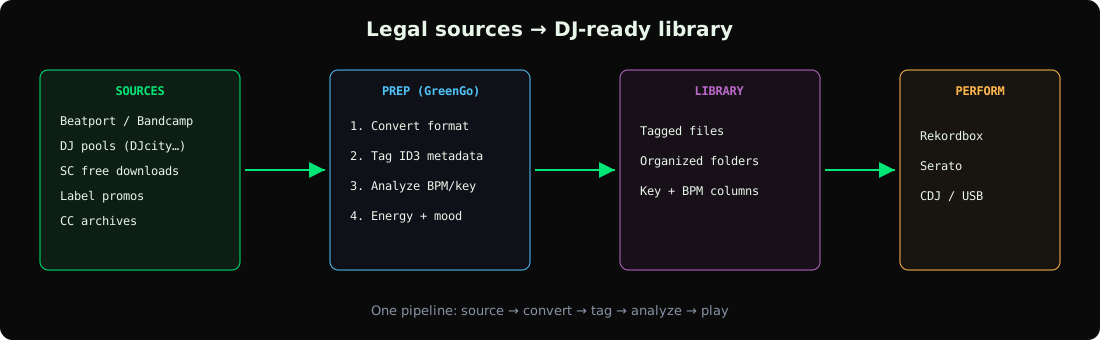
Legal DJ music sources fall into four buckets:
- Download stores — you buy and own the file (Beatport, Bandcamp, Traxsource, Juno Download, iTunes).
- DJ pools / record pools — subscription services giving working DJs unlimited promo downloads (DJcity, BPM Supreme, ZipDJ).
- Artist-direct and free sources — SoundCloud free downloads, artist Bandcamp pages, label promos, Creative Commons catalogs.
- Streaming integrations — Beatport/Beatsource/Tidal inside DJ software. Caveat: streamed tracks can't be stem-separated, tagged, or burned to USB for older gear — they live inside the app's DRM.
Download Stores: Beatport, Bandcamp & Friends
- Beatport / Beatsource: the default for electronic music — Beatport for underground/club, Beatsource for open-format. WAV/AIFF cost extra; MP3 320 is the base tier.
- Bandcamp: artist-direct, pays artists best, and lets you choose FLAC/WAV/MP3 at no extra cost. The best source for self-released edits, bootlegs, and underground producers.
- Traxsource: house music specialists, slightly cheaper than Beatport, frequent discounts on WAV.
- Juno Download: broad catalog, competitive prices, good back-catalog depth.
- iTunes / Amazon: mainstream catalog, AAC/MP3 256-320kbps — fine for open-format gigs.
DJ Pools and Record Pools
Pools are subscription services (~$10-40/month) that give working DJs unlimited promo downloads — typically including exclusive edits, clean/dirty versions, and extended intros that stores don't carry:
- DJcity, BPM Supreme, Club Killers, Digital DJ Pool — open-format and club-focused.
- ZipDJ, Promo Only — industry-standard pools with label relationships.
- Franchise Record Pool, Crate Connect — hip-hop/open-format niches.
Most pools require proof you're a working DJ and license the downloads for performance use — check the terms, they're not for casual listening.
Free and Artist-Direct Sources
- SoundCloud free downloads: thousands of artists offer free downloads via the download gate or linked stores — the deepest source of bootlegs, edits, and unreleased-style material. Capture rights-cleared tracks directly with the GreenGo browser workflow.
- Artist/label Bandcamp: "name your price" releases are effectively free and often higher quality than anything on streaming.
- Label promo lists: sign up for promos from labels in your genre — free music in exchange for playing/reporting.
- Creative Commons archives: Free Music Archive and similar, cleared for performance.
Which Format and Bitrate to Buy
| Format | Use it when | Avoid when |
|---|---|---|
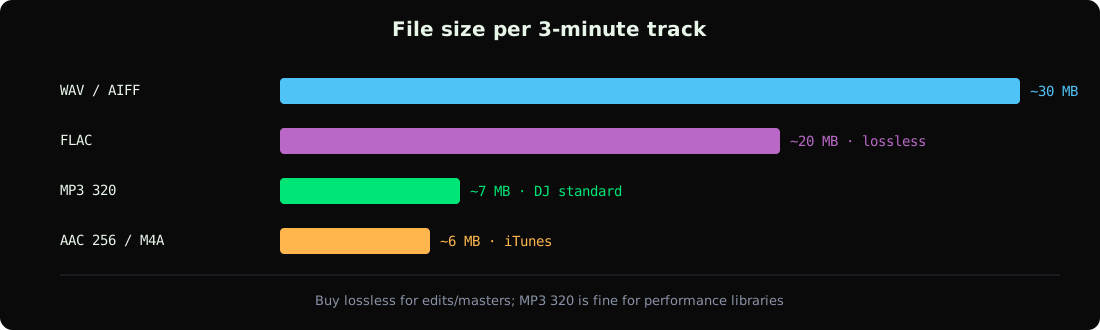
| MP3 320kbps | Default DJ choice — universal compatibility, transparent in clubs | Archival / re-editing |
| WAV / AIFF | Edits, mashups, stem work, archival masters | Storage-constrained USB sticks (10× the size) |
| FLAC | Lossless at ~60% size; all modern DJ apps read it | Very old CDJs (CDJ-2000 era) |
| AAC / M4A 256 | Only source available (iTunes) | Choosing it over 320 MP3 at the same price |
Full decision criteria in our format guide and the audio format reference. If your player chain involves CDJs, also check the USB drive format guide — format and filesystem choices interact.
From Download to DJ-Ready: The Prep Pipeline
Sourcing is only half the job — a downloaded track still needs metadata, BPM, and key before it's useful in a set:
- Normalize formats: convert odd files (M4A, OGG) to MP3 320 or FLAC with the converter.
- Tag: fix artist/title fields and embed artwork — the batch tagging guide covers the tooling.
- Analyze: detect BPM, key, energy and mood with GreenGo's analysis so Rekordbox/Serato columns populate on import.
- Organize: a consistent folder structure saves hours — see DJ library organization, and the complete prep guide for set-ready output.
- Export: into Rekordbox or onto USB — the CDJ export guide covers the last mile.
GreenGo condenses steps 1-3: capture or import the file and it comes out converted, tagged, and analyzed. Prep a whole digging session in minutes instead of an evening.
Frequently Asked Questions
Where do DJs legally download music?
From download stores (Beatport, Bandcamp, Traxsource, Juno), DJ record pools (DJcity, BPM Supreme, ZipDJ — subscription promos for working DJs), artist-direct pages, and free sources like SoundCloud free-download gates and Creative Commons catalogs.
Can I DJ with music downloaded from YouTube or Spotify?
Not legally, and not practically — both are licensed for personal streaming only, and rips are low-quality. Use their licensed DJ integrations where supported (Serato/Rekordbox work with Beatport Streaming, Tidal), or buy the files outright.
What is a DJ pool?
A record pool is a subscription service giving working DJs unlimited promo downloads, usually including exclusive remixes, clean edits, and extended intros. Most require proof of DJ work; typical cost is $10-40/month.
Should I buy WAV or MP3 for DJing?
MP3 320kbps covers most DJ needs at a tenth of the size. Buy WAV/FLAC for edits, mashups, stem separation work, or archival masters. All modern DJ software plays both.
Is it legal to download music for DJing for free?
Yes, when the source grants it: artist-offered free downloads, Bandcamp name-your-price, label promos, and Creative Commons releases are all legitimate. Ripping subscription streams is not.
Buy from stores, pull promos from pools, capture rights-cleared tracks — then let the pipeline handle the tagging and analysis. Try GreenGo free for 7 days, no credit card required.
Ihor, Music software developer at GreenGo.