Why audio format matters for DJs
The format of your tracks changes three things that matter on a gig: how much of your USB you fill, how much metadata your CDJ can read, and how the track sounds on a big system. Most DJs default to whatever the store hands them and never think about it again. That works until you hit a CDJ that refuses to read your FLAC, or a WAV file shows up as 'Unknown Artist' because RIFF metadata is nearly empty.
This reference breaks down every format you are likely to see in 2026, what each one is good for, where it falls down, and which DJ platforms support it. If you want a deeper look at how metadata itself works, see our ID3 metadata reference. For a broader look at library preparation, see our DJ library organization guide.
Lossy vs lossless: the core split
Every audio format falls into one of three buckets:
- Lossy - MP3, AAC, OGG Vorbis. Audio data is permanently discarded to shrink the file. A 320 kbps MP3 is roughly one fifth the size of the equivalent WAV.
- Lossless compressed - FLAC, ALAC. No audio data is lost, but the file is compressed like a ZIP. Roughly half the size of a WAV.
- Lossless uncompressed - WAV, AIFF. Raw PCM audio. Largest files, widest hardware support, and (for WAV) the weakest metadata story.
The diagram below shows how the common DJ formats stack up across compression type, file size, and metadata support.
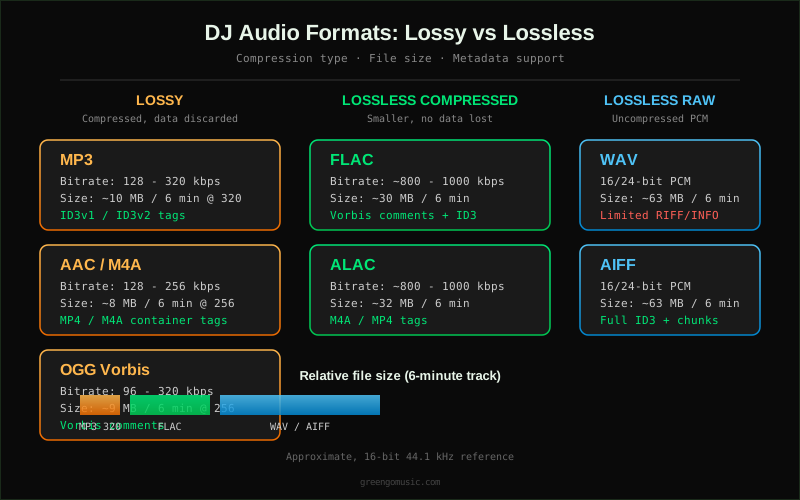
The trade-off is simple. Smaller files mean more tracks on a USB and faster analysis. Larger files mean better theoretical quality and, for some formats, richer metadata. In practice, on a club system, 320 kbps MP3 is indistinguishable from WAV for most listeners - but it is not indistinguishable for all listeners, and it is not indistinguishable to the DJ who wants to see BPM, key, and energy tags on the CDJ screen.
Format-by-format reference
MP3
Container/codec: MPEG-1 Audio Layer III
Typical bitrate: 128 - 320 kbps
File size (6-minute track, 320 kbps): ~14 MB
Metadata: ID3v1 and ID3v2 (full tagging support)
Hardware support: Universal - every CDJ, every controller, every software
MP3 is the lingua franca of DJ music. Every player made in the last 20 years can read it, and ID3 tagging is the richest metadata ecosystem in audio. The downside is that MP3 is lossy: data above ~16 kHz is rolled off and transients are smoothed. For most club and mobile gigs, 320 kbps MP3 is the safe default. For a deeper comparison of BPM detection accuracy across formats, see our BPM detection comparison.
Buy MP3 when you are unsure what hardware you will be playing on. Buy MP3 when your USB is small. Buy MP3 when you want every tag field populated. Avoid MP3 only when you have a known lossless playback chain and the storage to support it.
AAC / M4A
Container/codec: MP4/M4A container, AAC-LC codec
Typical bitrate: 128 - 256 kbps
File size (6-minute track, 256 kbps): ~11 MB
Metadata: MP4/M4A atoms (full tagging, including iTunes metadata)
Hardware support: Near-universal on modern CDJs and software
AAC is the modern successor to MP3. At 256 kbps it is transparent to WAV for almost all listeners and roughly 20 percent smaller than a 320 kbps MP3. iTunes Store tracks are AAC, so if you have been buying from Apple you already have a library of AAC files. The main gotcha is that some older CDJs (pre-2016) and some older Denon players list AAC support but struggle with VBR AAC. If you play on club standard CDJ-2000NXS2 or newer, AAC is safe.
OGG Vorbis
Container/codec: Ogg container, Vorbis codec
Typical bitrate: 96 - 320 kbps
File size (6-minute track, 256 kbps): ~11 MB
Metadata: Vorbis comments (full tagging)
Hardware support: Spotty on CDJs, strong in software (Serato, Traktor, VirtualDJ, Engine DJ)
OGG Vorbis is the open-source lossy codec. It is technically excellent - at 192 kbps it is arguably better than MP3 at 320 - but Pioneer CDJs historically did not support it, and even on the CDJ-3000 it is not officially listed. OGG is common in streaming backends and in some game audio, but for DJ libraries it is a niche choice. Use it only if your entire playback chain is software-based (Serato, Traktor, VirtualDJ, or Engine DJ on a controller).
WAV
Container/codec: RIFF/WAV, PCM audio
Typical bitrate: ~1,500 kbps at 16-bit/44.1 kHz
File size (6-minute track, 16-bit/44.1 kHz): ~63 MB
Metadata: RIFF/INFO chunks (very limited - artist, title, sometimes comment)
Hardware support: Universal on CDJs and software
WAV is the reference format. Every player reads it, every software writes it, and the audio is bit-for-bit identical to the source. The two problems are file size (a 6-minute track is 63 MB, so a 128 GB USB holds roughly 2,000 tracks instead of 10,000) and metadata. WAV's RIFF/INFO chunk can hold artist and title but not much else. Beatport WAVs ship with a separate .txt file for metadata, which most DJs throw away. Rekordbox and Serato can read WAV ID3 chunks if they are written, but the ecosystem is inconsistent.
Use WAV when you need guaranteed playback on any hardware and you do not care about metadata on the CDJ screen. Use WAV when you are mastering or processing audio. Do not use WAV as your everyday library format if you have a large collection and a small USB.
AIFF
Container/codec: AIFF, PCM audio
Typical bitrate: ~1,500 kbps at 16-bit/44.1 kHz
File size (6-minute track, 16-bit/44.1 kHz): ~63 MB
Metadata: Full ID3v2 chunks embedded in COMM and ID3 chunks (rich tagging)
Hardware support: Universal on modern CDJs and software
AIFF is Apple's answer to WAV. Same PCM audio, same file size, but with one critical difference: AIFF supports full ID3v2 metadata chunks. This means an AIFF file can carry BPM, key, genre, energy, album art, and every other ID3 field, while a WAV file cannot. For DJs on Mac who want lossless audio with full metadata, AIFF is the format to use. Beatport and Juno both offer AIFF as a download option, and Rekordbox reads AIFF metadata correctly.
Use AIFF when you want lossless quality and full metadata on a Mac-centric workflow. The only downside is file size - same as WAV.
FLAC
Container/codec: FLAC (Free Lossless Audio Codec)
Typical bitrate: ~800 - 1,000 kbps at 16-bit/44.1 kHz
File size (6-minute track, 16-bit/44.1 kHz): ~30 MB
Metadata: Vorbis comments (full tagging) plus optional ID3v2
Hardware support: CDJ-2000NXS2 and newer, CDJ-3000, XDJ-XZ, most modern Denon Prime gear, all major DJ software
FLAC is the smart engineer's format. It is lossless (bit-for-bit identical to WAV when decoded), roughly half the size of WAV, and it carries full Vorbis comment metadata including BPM, key, genre, and album art. The only catch is hardware support: older CDJs (CDJ-2000NXS, CDJ-900) do not support FLAC. If you play on club standard CDJ-2000NXS2 or CDJ-3000, FLAC works. If you play on older gear or at venues where you do not control the hardware, FLAC is a gamble.
Use FLAC when you know your playback chain supports it and you want lossless quality at half the storage cost of WAV. For a full breakdown of how FLAC compares to other formats in a DJ context, the Crossfader file format guide is a good companion read.
ALAC
Container/codec: MP4/M4A container, Apple Lossless codec
Typical bitrate: ~800 - 1,000 kbps at 16-bit/44.1 kHz
File size (6-minute track, 16-bit/44.1 kHz): ~32 MB
Metadata: MP4/M4A atoms (full tagging, including iTunes metadata)
Hardware support: CDJ-2000NXS2 and newer, CDJ-3000, VirtualDJ, Engine DJ; not officially listed for Traktor Pro
ALAC is Apple's lossless compressed format - essentially FLAC in an MP4 container. It has the same compression ratio as FLAC and the same metadata richness as AAC. If you buy from the iTunes Store in lossless quality (where available) or rip CDs in Apple Music, you get ALAC. The main limitation is software support: Traktor Pro does not officially list ALAC, and some older CDJs do not support it. For Mac-centric DJs on Rekordbox or Serato, ALAC is a reasonable alternative to FLAC.
DJ software support matrix
The matrix below summarizes which formats each major DJ platform supports, based on official vendor documentation. Always test your specific setup before a gig - support can vary by software version and controller firmware.
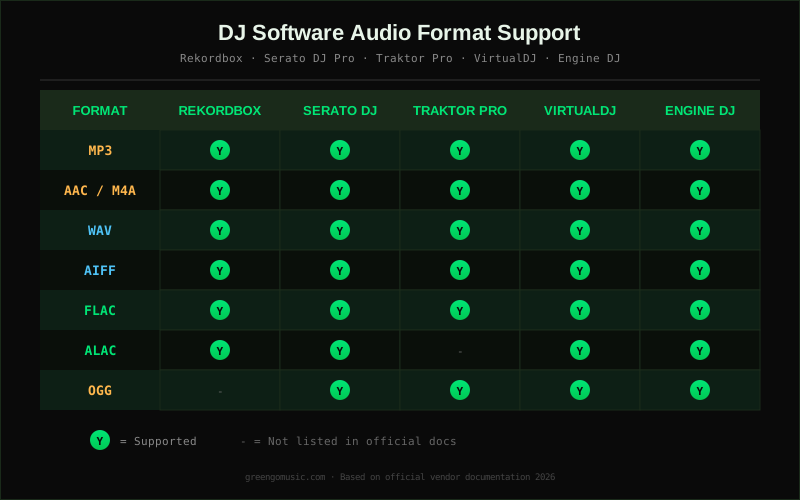
For a full feature comparison of the software itself - pricing, platforms, stem separation, DVS, and more - see our DJ software comparison matrix.
Metadata and tagging
Metadata is the hidden half of the format question. A WAV file and an AIFF file sound identical, but the AIFF file can carry BPM, key, energy level, genre, and album art, while the WAV file carries almost nothing. This matters because CDJs and DJ software read metadata to display track info, sort crates, and enable key-matching features.
The tagging support by format:
- MP3 (ID3v2): Full support - artist, title, album, BPM, initial key, genre, energy, comment, album art. The richest ecosystem.
- AAC/M4A (MP4 atoms): Full support, including iTunes-specific fields. Compatible with most taggers.
- OGG (Vorbis comments): Full support, but fewer hardware players read it.
- FLAC (Vorbis comments + optional ID3): Full support. BPM and key tags work in Rekordbox and Serato.
- ALAC (MP4 atoms): Full support, same as AAC.
- AIFF (ID3v2 chunks): Full support. The only uncompressed format with rich metadata.
- WAV (RIFF/INFO): Limited - artist, title, sometimes comment. No standard BPM or key field. Some tools write ID3v2 chunks into WAV, but support is inconsistent across players.
If you want your CDJ to show BPM and key on screen, you need a format that carries those tags. MP3, AAC, FLAC, ALAC, and AIFF all do. WAV does not, reliably. For batch-tagging your library, see our batch audio tagger guide.
Bitrate and audible quality
The question every DJ asks: can the crowd hear the difference between 320 kbps MP3 and WAV? The honest answer is: on a properly tuned club system, almost never. Controlled ABX tests consistently show that 320 kbps MP3 and 256 kbps AAC are transparent to WAV for the vast majority of listeners, even on high-end monitors. The differences people claim to hear in MP3 vs WAV are usually differences in master quality, not codec artifacts.
Where bitrate does matter:
- Below 192 kbps MP3: Audible artifacts on cymbals, reverb tails, and quiet passages. Avoid for DJ use.
- 192 - 256 kbps MP3: Acceptable for mobile gigs, background sets, and backup USBs.
- 320 kbps MP3 / 256 kbps AAC: The DJ standard. Transparent on virtually all systems.
- Lossless (FLAC, ALAC, WAV, AIFF): No codec artifacts. Worth it if you have the storage and the playback chain supports it.
The real argument for lossless is not audible quality on the night. It is future-proofing. A FLAC file is a perfect archive - you can transcode it to any lossy format later without generation loss. An MP3 is a final delivery format; transcoding MP3 to AAC makes it worse. For a deeper look at how bitrate affects analysis accuracy, see our BPM detection methods comparison.
USB and filesystem notes
Format choice and USB setup are linked. A few practical notes:
- USB filesystem: exFAT is the safe choice for cross-platform use (Mac and Windows). FAT32 works on older CDJs but has a 4 GB file size limit, which WAV files can exceed on long mixes. See the Pioneer DJ music management guide for vendor recommendations.
- USB capacity planning: A 128 GB USB holds roughly 10,000 MP3s at 320 kbps, 4,000 FLACs, or 2,000 WAVs. Plan accordingly.
- Rekordbox export: Rekordbox writes its own database (PIONEER folder) regardless of source format. The source format still matters for playback on the CDJ.
- Analysis speed: Lossless files take longer to analyze than lossy. For a 5,000-track library, FLAC analysis can take 2-3x longer than MP3.
Which format should you use?
The decision flow below distills the whole reference into a single chart. Use it as a starting point, then test on your actual hardware.
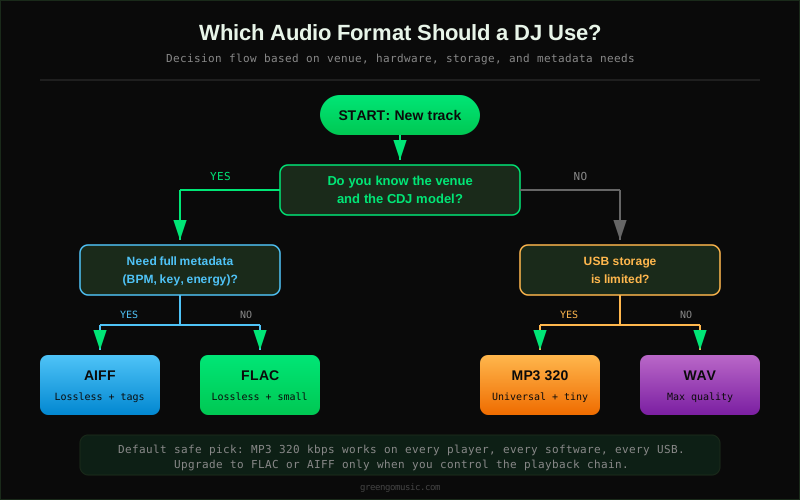
The short version:
- Default safe pick: MP3 320 kbps. Works everywhere, full metadata, small files.
- Best lossless with metadata: AIFF (Mac) or FLAC (cross-platform). Both carry full tags, both are lossless.
- Best for storage-constrained USBs: MP3 320 or AAC 256. Roughly 5x smaller than WAV.
- Best for archival: FLAC. Lossless, half the size of WAV, full metadata, open format.
- Avoid for DJ use: OGG on Pioneer CDJs, WAV if you need metadata on screen, anything below 192 kbps.
Where GreenGo fits
GreenGo is a desktop audio preparation suite (Windows 10/11 64-bit and macOS 12+ on Apple Silicon and Intel). It does not replace your DJ software - it sits before it in the workflow. GreenGo captures audio from supported cloud sources, separates it into six stems, detects BPM and key, analyzes energy and danceability, and writes ID3 tags into MP3, AAC, FLAC, and AIFF files. The audio converter handles format conversion between MP3, WAV, FLAC, and AIFF, so you can capture in one format and export your gig USB in another.
A typical GreenGo workflow: capture a track, run stem separation for a clean instrumental, detect BPM and key, write the tags into a FLAC file for your archive, and export a 320 kbps MP3 for your gig USB. The 7-day free trial includes 3 stem separations and does not require a credit card. Unlimited processing requires a subscription. See the analysis page for what GreenGo detects and writes.
If you are comparing preparation tools, our GreenGo vs Mixed In Key comparison breaks down the differences in detection, tagging, and workflow.
FAQ
Is WAV or FLAC better for DJing?
FLAC is better for most DJs. It is lossless (identical audio to WAV), roughly half the file size, and carries full Vorbis comment metadata including BPM and key. WAV is better only when you need guaranteed playback on older CDJs that do not support FLAC, or when you are working in a mastering context where any compressed container is undesirable. For a full breakdown, see the DJTechTools format guide.
What is the best audio file format for DJs?
There is no single best format. The safe default is MP3 at 320 kbps - it works on every player, carries full ID3 metadata, and fits roughly 10,000 tracks on a 128 GB USB. If you want lossless quality and your hardware supports it, FLAC is the best balance of size, quality, and metadata. If you are on Mac and want lossless with full metadata, AIFF is the best choice.
Do most DJs use MP3 or WAV?
Most working DJs use MP3 at 320 kbps as their everyday format, with FLAC or AIFF as a secondary archive format. WAV is common among producers and mastering engineers but less common in DJ libraries because of file size and poor metadata support. Surveys in DJ communities (Reddit r/DJs, DJTechTools) consistently show MP3 320 as the most-used format, with FLAC gaining ground as CDJ-2000NXS2 and CDJ-3000 become club standard.
Is MP3 or FLAC better for DJing?
MP3 is better for compatibility and storage. FLAC is better for quality and archiving. If you play on a known CDJ-2000NXS2 or CDJ-3000, FLAC gives you lossless audio at half the size of WAV with full metadata. If you play on unknown or older hardware, MP3 320 is the safe choice. Many DJs keep a FLAC archive and export an MP3 320 USB for gigs.
Can you DJ with FLAC files?
Yes, on modern hardware. Rekordbox, Serato DJ Pro, Traktor Pro, VirtualDJ, and Engine DJ all support FLAC. Pioneer CDJ-2000NXS2, CDJ-3000, XDJ-XZ, and XDJ-RX3 all play FLAC from USB. Older CDJs (CDJ-2000NXS, CDJ-900, CDJ-850) do not support FLAC. If you are playing on club standard gear from 2016 or newer, FLAC works. If you are unsure, test before the gig or carry an MP3 backup USB.
Why do my WAV files show as Unknown Artist on the CDJ?
WAV's RIFF/INFO metadata format is limited and inconsistently read by CDJs. Many WAV files from Beatport and other stores ship with metadata in a separate text file rather than embedded in the audio. To fix this, either re-tag your WAVs with a tool that writes ID3v2 chunks into WAV (Rekordbox and some taggers can do this), or convert to AIFF, which carries full ID3v2 metadata and is the same audio quality. See our ID3 metadata reference for how tagging works.