A disorganized DJ library costs you gigs. Not because your mixing is bad, but because you cannot find the right track at the right moment. You scroll through thousands of files with missing BPM data, inconsistent names, and no key information, while the dancefloor waits. Every DJ has been there. The fix is not more willpower or better memory. The fix is a system.
This guide covers everything you need to organize your DJ library from scratch or rescue a messy one. Folder structure, file naming, ID3 tags, playlist strategy, and the automation tools that cut library prep from hours to minutes. No fluff, just the system that works. For another perspective on library organization, see the Crossfader guide to organising your DJ collection.
Why DJ Library Organization Matters
When you have 500 tracks, you can find anything by scrolling. When you have 5,000 or 15,000, scrolling is no longer an option. You need search, sort, and filter to work, and they only work if your metadata is consistent.
The three problems that disorganized libraries cause:
- You cannot mix harmonically because key data is missing or inconsistent. Half your tracks say 8A, the other half say A minor, and some say nothing at all.
- You cannot build sets by energy because energy levels are not tagged. You are guessing based on memory or track name.
- You cannot export to USB without re-analyzing everything, because your DJ software database does not match your file tags. Switch from Serato to Rekordbox and you lose all your cue points and grids.
Every one of these problems has the same root cause: metadata lives in the DJ software database, not in the file. When you switch platforms, play on a club CDJ, or rebuild your library, the data is gone. The solution is to write analysis data directly into ID3 tags inside the audio files themselves. A proper ID3 tagging workflow makes your library portable.
Folder Structure That Scales
Your folder structure is the physical foundation of your library. It determines how fast you can find files on disk, how easy backups are, and how cleanly your DJ software imports them. The wrong structure makes everything harder. The right one makes everything invisible.
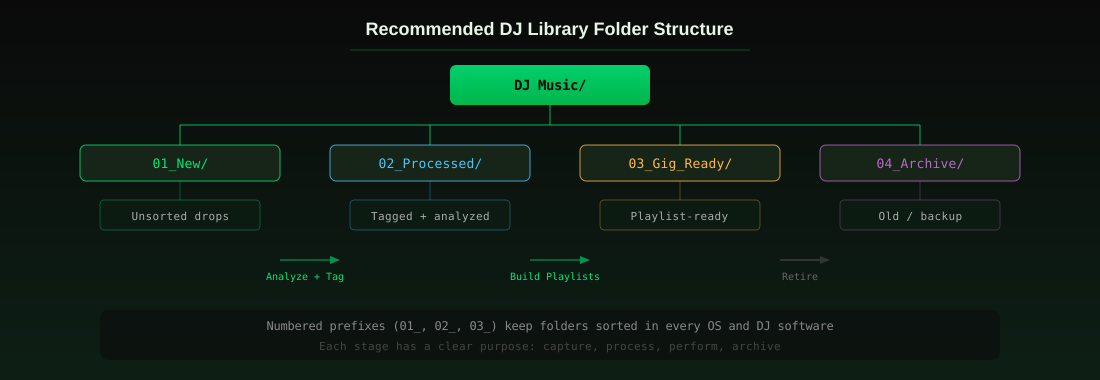
The system below uses numbered prefixes to keep folders sorted in every operating system and every DJ software. It follows the natural lifecycle of a track: you capture it, you process it, you perform with it, and eventually you archive it.
The Four-Stage Folder System
01_New/ - Everything you download or capture goes here first. This is your inbox. Nothing in this folder has been analyzed, tagged, or approved. It is a holding area. When you are ready to process new music, you work through this folder and move files to the next stage.
02_Processed/ - Tracks that have been analyzed (BPM, key, energy) and tagged (ID3 fields populated). The audio is in its final format (320kbps MP3 or WAV). This is your master library. Every track here is ready to be added to a playlist but has not been assigned to a specific set or gig yet.
03_Gig_Ready/ - Playlists organized by gig, venue, or set type. These are subsets of your Processed library, not duplicates. If your DJ software uses referenced playlists (Rekordbox, Serato, Traktor), the files stay in 02_Processed and the playlist points to them. If you need physical copies for USB export, you copy from 02_Processed into 03_Gig_Ready with a tool like the Rekordbox USB export workflow.
04_Archive/ - Tracks you no longer play but want to keep. Old purchases, tracks from past gigs, genres you have moved away from. Moving them out of your active library keeps your DJ software fast and your search results relevant.
Genre Subfolders: Optional but Helpful
Inside 02_Processed, you can organize by genre or keep it flat. Genre subfolders help if you mix multiple genres and want to browse by style on disk. They hurt if your genres are fluid (e.g., a track that is both house and techno). A flat structure with genre stored in the ID3 tag is more flexible, but subfolders are faster for manual browsing.
Recommended subfolder approach if you use them:
02_Processed/
  House/
  Techno/
  Hip-Hop/
  Open Format/
  Classics/
  Tools and Acapellas/
Keep genres broad. Do not create a folder for every subgenre. Five to eight top-level genre folders are manageable. Thirty are not.
File Naming Conventions
Consistent file names make search work. Inconsistent names make search useless. The convention below works across all DJ software and operating systems.
The Standard Format
ARTIST - TITLE (BPM KEY).ext
Example: M83 - Midnight City (105 8A).mp3
This format puts the most important information first. Artist and title are what you search for. BPM and key in the filename give you a quick visual scan even before importing into DJ software. The parentheses keep the metadata separate from the title.
Naming Rules
- Use spaces, not underscores in the artist and title fields. DJ software search treats underscores as literal characters.
- Keep BPM as an integer (105, not 105.3). DJ software displays integer BPM, and fractional BPM in filenames causes confusion.
- Use Camelot notation for key (8A, 8B) rather than musical notation (A minor, A major). Camelot is what you use for harmonic mixing, and it sorts numerically.
- No special characters. Avoid colons, question marks, and slashes in filenames. They cause issues on Windows and in some DJ software.
- Keep it under 100 characters. Long filenames get truncated in DJ software browsers and on USB displays.
If you have an existing library with inconsistent names, do not rename files manually. Use a batch tagging tool that reads ID3 tags and renames files automatically based on tag data. Renaming 5,000 files manually takes days. A batch tool does it in minutes.
ID3 Tags: The Invisible Backbone
ID3 tags are metadata fields embedded inside your audio files. DJ software reads these tags to display BPM, key, artist, title, genre, and energy. If the tags are empty or wrong, your DJ software shows empty or wrong data. If the tags are correct, every platform reads them correctly.
This is the single most important part of library organization. Folders and filenames help you find files on disk. ID3 tags help your DJ software find, sort, and display them correctly. Without consistent tags, none of the other organization matters.
The Seven Fields That Matter
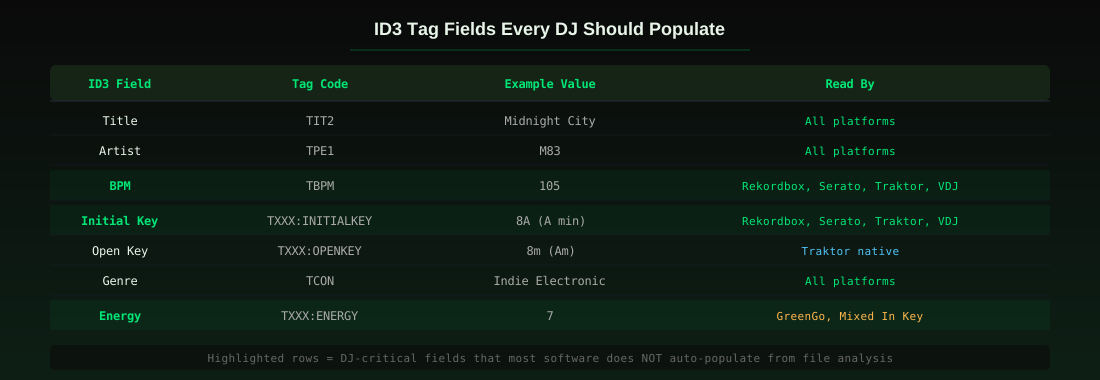
Out of the dozens of ID3 fields available, seven matter for DJ library organization:
- Title (TIT2) - The track title. Every DJ platform reads this.
- Artist (TPE1) - The artist name. Every DJ platform reads this.
- BPM (TBPM) - The tempo as an integer. Read by Rekordbox, Serato, Traktor, and VirtualDJ. This is what makes BPM sort and filter work.
- Initial Key (TXXX:INITIALKEY) - The musical key in Camelot notation (e.g., 8A). Read by Rekordbox, Serato, and VirtualDJ. This is what makes harmonic mixing possible.
- Open Key (TXXX:OPENKEY) - The musical key in Open Key notation (e.g., 8m). Read natively by Traktor. If you use Traktor, this field is essential.
- Genre (TCON) - The genre tag. Every platform reads this. Keep genres broad and consistent.
- Energy (TXXX:ENERGY) - A 1-10 energy rating. Not read by all DJ software natively, but useful for tools that support it and for your own sorting.
The highlighted fields in the diagram above (BPM, Initial Key, Energy) are the ones that most DJ software does not auto-populate from its own analysis. Rekordbox stores BPM in its database but does not write it back to the file. Serato does the same. When you switch platforms or play on a club CDJ, those fields are empty. A tool like GreenGo's track analysis writes all seven fields directly into the file, so they persist everywhere.
Tag Consistency Rules
- One key notation per library. If you use Camelot, tag every track in Camelot. Do not mix Camelot and musical notation (8A and A minor in the same library).
- Integer BPM only. 105, not 105.3 or ~105. Fractional BPM in tags causes sort issues in some software.
- Genre from a fixed list. Define 10-15 genres and stick to them. Do not let genre become a free-text field with 200 variations.
- Energy as 1-10 integer. If you tag energy, use the same scale across your entire library. Mixed In Key uses 1-10. GreenGo uses 1-10. Pick one and be consistent.
Playlist Organization
Playlists are how you turn a organized library into organized sets. Your folder structure handles storage. Your ID3 tags handle sorting and filtering. Your playlists handle performance.
Playlist Types Every DJ Needs
Crates by Genre - One playlist per genre you play. These are your raw material. When you need a techno track, you open the techno crate. These should be large (200-500 tracks) and sorted by BPM.
Crates by Energy - Group tracks by energy level (1-3 warmup, 4-6 peak, 7-8 main, 9-10 closer). This lets you build sets by energy arc rather than by genre. Sort by energy within each crate.
Crates by Key - Group tracks by Camelot number (1A through 12B). This is your harmonic mixing toolkit. When you are in 8A and need a compatible track, you open the 8A crate or the 7A/9A crates.
Gig-Specific Playlists - One playlist per gig or venue. These are your set lists. Build them from your crates, not from scratch. A 2-hour set needs 30-50 tracks, not 500.
Emergency Crate - 20-30 tracks that always work, regardless of crowd or genre. These are your save-the-floor tracks. Every DJ needs one.
Smart Playlists vs Manual Playlists
Smart playlists (called smart crates in Serato, smart lists in Traktor) auto-populate based on rules. For example, a smart playlist that includes all tracks with BPM 120-128, key 8A, and energy 6-8 gives you every compatible peak-time track in your library without manual curation.
Use smart playlists for broad categories (all house tracks, all 120-128 BPM tracks). Use manual playlists for gig-specific sets where you want precise control over order and selection.
The Capture-to-Export Workflow
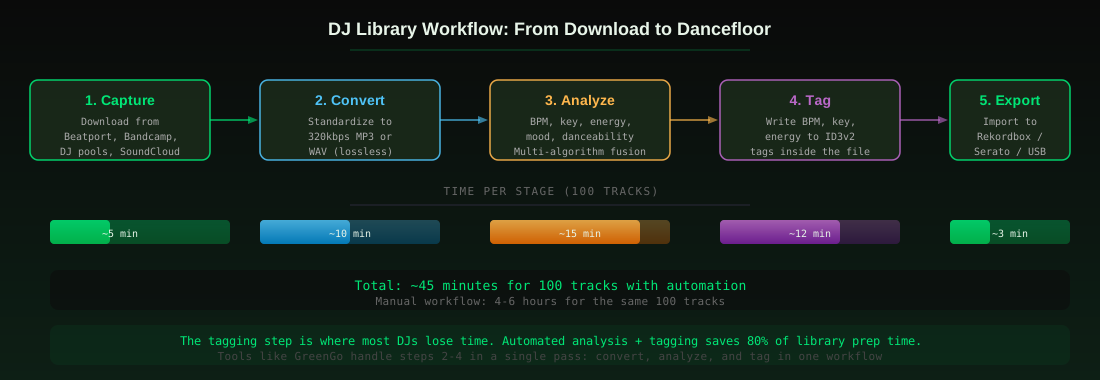
Library organization is not a one-time project. It is a recurring workflow. Every week, you capture new tracks, process them, and add them to your library. The workflow below is the system that keeps your library clean without eating your week.
The Five Stages
1. Capture - Download or capture tracks from your sources. Beatport, Bandcamp, DJ record pools, SoundCloud, and other cloud audio sources. Everything goes into 01_New/.
2. Convert - Standardize audio format. If you downloaded FLAC or WAV, convert to 320kbps MP3 for DJ software (smaller files, faster loading, no audible quality loss on club systems). If you only play lossless, standardize to WAV. The key is consistency: one format across your entire library. Use a batch audio converter to process multiple files at once.
3. Analyze - Detect BPM, musical key, energy level, and mood. This is where accuracy matters most. Built-in DJ software analysis is often wrong on BPM (half-time/double-time errors) and inconsistent on key. A multi-algorithm approach that cross-checks results is more reliable. Accurate BPM detection is the foundation of everything else.
4. Tag - Write the analysis results into ID3 tags inside the file. BPM goes into TBPM. Key goes into TXXX:INITIALKEY (Camelot) and TXXX:OPENKEY (Traktor). Energy goes into TXXX:ENERGY. This is the step that makes your library portable across platforms.
5. Export - Import into your DJ software (Rekordbox, Serato, Traktor, VirtualDJ) or export to USB for club CDJs. Because your ID3 tags are already populated, the DJ software reads them on import. No re-analysis needed. No missing BPM or key fields.
Time Comparison
The diagram above shows the time per stage for 100 tracks. With manual workflow (analyzing in DJ software, tagging by hand, renaming files one by one), 100 tracks takes 4-6 hours. With automated tools handling steps 2-4 in a single pass, the same 100 tracks takes about 45 minutes. That is an 80% time savings, and the result is more consistent because machines do not make typos or skip fields.
Automating the Boring Parts
The biggest mistake DJs make with library organization is doing everything manually. Analyzing BPM by ear. Typing key notation into tag fields one track at a time. Renaming files by hand. This is why most DJ libraries are disorganized: the manual workflow is so tedious that DJs give up after 50 tracks.
Automation does not mean letting software make creative decisions for you. It means letting software handle the repetitive data work (BPM detection, key detection, tag writing, file renaming) so you can focus on the creative work (crate building, set planning, track selection).
What to Automate
- BPM detection - Multi-algorithm analysis is more accurate than tapping or guessing. Let software detect it.
- Key detection - Four-signal fusion (libKeyFinder, librosa chroma, STFT chroma, sub-bass root) is more accurate than any single method. Let software detect it.
- Energy and mood detection - ML models trained on thousands of tracks give consistent ratings. Let software detect it.
- ID3 tag writing - Writing BPM, key, and energy into tags for hundreds of files is a batch operation. Let software do it.
- File renaming - Renaming files based on tag data is a batch operation. Let software do it.
What Not to Automate
- Playlist curation - Which tracks belong in your peak-time crate is a creative decision. Software can suggest, but you decide.
- Gig set lists - Which tracks you play at a specific venue is a creative decision based on the crowd, the time, and the vibe.
- Genre classification - Software can suggest genres, but genre boundaries are subjective. Override when the software is wrong.
- Track approval - Not every track you download belongs in your library. Listen and decide.
Software Tools for Library Management
Several tools handle parts of the library organization workflow. None of them do everything, but they cover different stages.
DJ Software (Built-in Library Management)
Rekordbox has the strongest library management for USB export. Smart playlists, cloud sync, and the export mode built for Pioneer CDJs make it the club standard. Its analysis is decent but stores data in its own database, not in ID3 tags. See our DJ software comparison matrix for the full breakdown. Pioneer DJ also has a useful guide to managing your music like a pro.
Serato DJ Pro uses crates and smart crates for organization. Good for performance, but no USB export and no ID3 tag writing.
Traktor Pro 4 uses playlists and smart lists. Flexible beatgrids are the best in the industry, but no USB export.
Dedicated Library Management Tools
Lexicon DJ is a dedicated library manager that works alongside your DJ software. It handles playlists, tagging, and library migration between platforms. Good for DJs who switch between Serato and Rekordbox.
GreenGo handles the analysis and tagging stages. It captures tracks from web sources, converts formats, detects BPM and key using multi-algorithm fusion, detects energy and mood with ML models, and writes everything into ID3 tags. It runs as a desktop browser on Windows and macOS, with a 7-day free trial that includes 3 stem separations, no credit card required. The advantage is that it handles steps 2-4 of the workflow (convert, analyze, tag) in a single pass, which is the most tedious part of library prep.
Mixed In Key focuses on key detection and energy levels. Accurate key detection, but it is a one-trick tool. It does not handle capture, conversion, or stem separation.
Choosing the Right Tool
If you only need key detection, Mixed In Key or a free online tool works. If you need to migrate between DJ platforms, Lexicon DJ is the best option. If you need the full capture-to-tag workflow in one tool, GreenGo covers the most ground. Most DJs end up using two tools: one for analysis and tagging, one for performance and export.
Common Mistakes to Avoid
1. Relying on DJ Software Database Instead of ID3 Tags
Rekordbox stores BPM in its database. Serato stores key in crates. When you switch platforms, the data does not transfer. Always write analysis results into ID3 tags inside the files, not just into the DJ software database.
2. Using Multiple Key Notations in the Same Library
Half your tracks tagged 8A, the other half tagged A minor. Harmonic mixing becomes impossible because you cannot sort or filter consistently. Pick one notation (Camelot is the most widely supported) and tag everything in it.
3. Never Archiving Old Tracks
A 15,000-track library where 10,000 tracks are from gigs you no longer play is not a library, it is a graveyard. Archive old tracks to keep your active library fast and searchable. Your DJ software will load faster, and your search results will be more relevant.
4. Inconsistent Audio Formats
Mixing MP3, WAV, FLAC, and M4A in the same library causes issues with some DJ software and makes file size unpredictable. Standardize on one format (320kbps MP3 for most DJs, WAV for lossless purists) and convert everything to it on import.
5. No Capture Workflow
Downloading tracks to your desktop, your downloads folder, and three different cloud storage services means you have tracks scattered across locations. Everything goes into 01_New/ first, then gets processed. No exceptions.
6. Skipping Energy Tags
BPM and key tell you what mixes. Energy tells you what works. A 128 BPM track at energy 3 is a warmup track. A 128 BPM track at energy 9 is a peak-time banger. Without energy tags, you cannot build sets by energy arc. Tag energy on every track.
FAQ
What is the best way to organize a DJ music library?
Use a four-stage folder structure (New, Processed, Gig Ready, Archive), consistent file naming (Artist - Title (BPM KEY).ext), and complete ID3 tags (BPM, key, energy, genre). Automate the analysis and tagging steps with a tool that writes to ID3 tags, not just to a DJ software database. This makes your library portable across platforms.
How do I organize my Rekordbox library?
Create playlists by genre, energy, and key. Use smart playlists for broad categories (all tracks 120-128 BPM). Keep your master library in one folder and use Rekordbox playlists to reference tracks. Always write BPM and key to ID3 tags before importing, so Rekordbox reads them on import instead of re-analyzing.
What is the best software for managing DJ libraries?
For USB export and club compatibility, Rekordbox is the standard. For library migration between platforms, Lexicon DJ is the best option. For analysis and tagging (BPM, key, energy, mood), GreenGo handles the full capture-to-tag workflow. Most DJs use two tools: one for analysis and tagging, one for performance and export.
How do I tag BPM and key in my DJ library?
Use a batch analysis tool that writes to ID3 tags. The TBPM field stores BPM as an integer. The TXXX:INITIALKEY field stores key in Camelot notation (e.g., 8A). The TXXX:OPENKEY field stores key in Open Key notation for Traktor (e.g., 8m). GreenGo writes all three fields automatically during analysis, along with energy and mood.
Should I use MP3 or WAV for my DJ library?
320kbps MP3 is the standard for DJ libraries. It is small enough for fast loading and large USB libraries, and the quality is indistinguishable from WAV on club sound systems. WAV is for DJs who need lossless audio for production or who have unlimited storage. Pick one format and standardize your entire library to it.
How many tracks should a DJ library have?
Quality over quantity. A well-organized library of 2,000 tracks you know well is more useful than 15,000 tracks you have never listened to. Most working DJs have 3,000-8,000 active tracks. Archive anything you have not played in 12 months to keep your active library fast and focused.