What is a DJ energy level?
An energy level is a number from 1 to 10 that describes how intense a track feels on a dancefloor. The scale was popularized by Mixed In Key, which introduced automatic energy detection in its software, but the concept predates any tool. DJs have always sorted tracks by vibe - as Resident Advisor's genre guide shows - and the 1-10 scale simply puts a number on that intuition - warm-up, build, peak, cool-down - and the 1-10 scale simply puts a number on that intuition.
Energy level is not the same as BPM. A 128 BPM deep house track can be a level 4, while a 128 BPM techno track can be a level 8. Energy is about how a track feels, not just how fast it is. BPM is one input to energy, but it is not the whole story. For a deeper look at BPM itself, see our BPM detection guide.
Energy levels matter because they let you program a set that has a shape. A flat set of all level-7 tracks is exhausting. A set that jumps from level 3 to level 9 and back is jarring. A set that builds from 2 to 8 over two hours is satisfying. The energy scale gives you a vocabulary for that shape.
The 1-10 energy scale
The scale below is the one most DJs and detection tools agree on. It is not a scientific standard - it is a practical convention. Use it as a starting point, then adjust for your own ears and your own crowd.
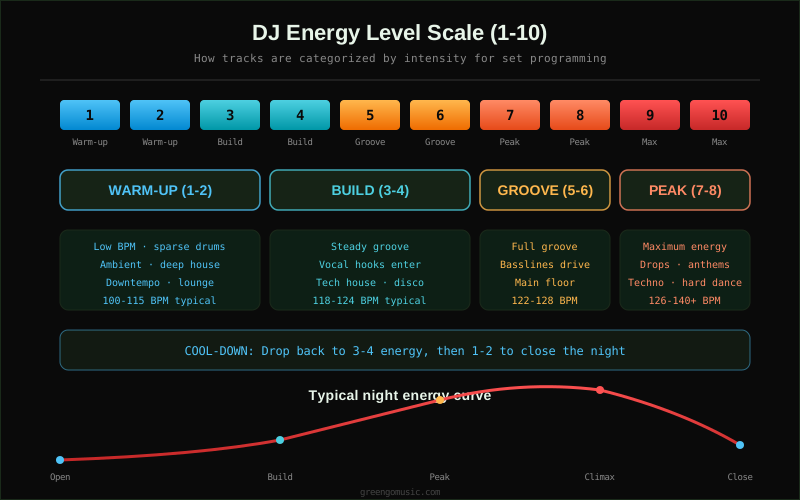
Here is what each band means in practice:
- Level 1-2 (Warm-up): Low BPM, sparse drums, ambient textures. Think deep house, downtempo, lounge. The floor is empty or just filling. You are setting a mood, not moving bodies.
- Level 3-4 (Build): Steady groove, vocal hooks start to appear, basslines become prominent. Tech house, disco, progressive. The floor is moving but not packed.
- Level 5-6 (Groove): Full groove, driving basslines, the main body of the night. House, tech house, mainstream club. The floor is full and dancing.
- Level 7-8 (Peak): Maximum energy, drops and anthems, hands in the air. Techno, hard house, mainstage EDM. The floor is at its most intense.
- Level 9-10 (Max): Reserved for the biggest moments. Hard techno, hardstyle, drum and bass at full tilt. Use sparingly - a full night of 9-10 is exhausting and clears floors.
The cool-down at the end of the night drops back through 3-4 and then 1-2. This is not a failure - it is how you close a room gracefully.
What determines a track's energy
Energy detection algorithms weigh five main factors. No single factor defines energy - it is the combination that matters.
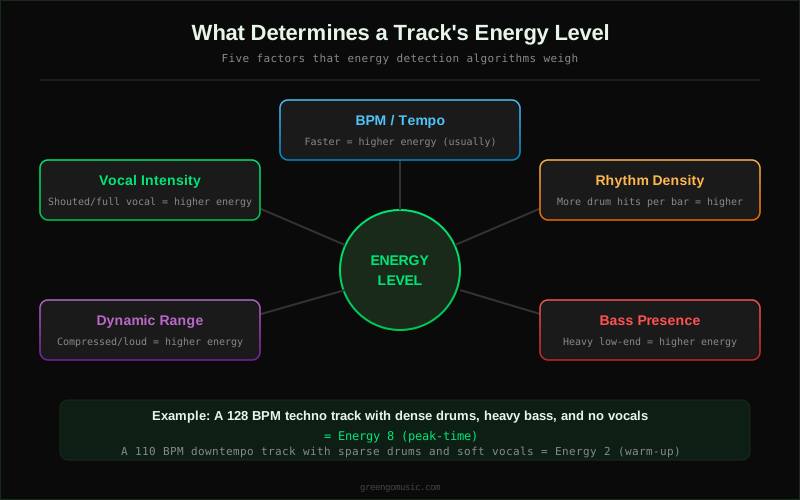
The five factors in detail:
- BPM / Tempo: Faster tracks tend to have higher energy, but not always. A 174 BPM liquid drum and bass track can be a level 5, while a 128 BPM peak-time techno track is an 8. BPM is a baseline, not a ceiling.
- Rhythm density: How many drum hits per bar? A four-on-the-floor kick with a busy hi-hat pattern reads as higher energy than a sparse kick-snare pattern at the same BPM. Detection tools measure onset density and percussive content.
- Bass presence: How heavy is the low end? A track with a driving sub-bass line reads as higher energy than a track with a thin low end. This is why tech house often scores higher than progressive house at the same BPM.
- Dynamic range: How compressed is the track? A loud, compressed master reads as higher energy than a dynamic, breathing master. This is why remastered classics often score higher than the originals.
- Vocal intensity: A shouted full vocal reads as higher energy than a whispered vocal or no vocal. This is why pop-dance crossover tracks often score high even at moderate BPM.
The practical takeaway: if you want to raise the energy without changing BPM, add rhythm density and bass. If you want to lower it, strip elements back. This is why DJs talk about 'taking the crowd on a journey' - the journey is the energy curve, and the tools are the tracks you pick.
Energy levels by genre
Genre is a rough proxy for energy, but it is not exact. The table below shows typical energy ranges for common DJ genres. Use these as a starting point, not a rule.
| Genre | Typical BPM | Typical Energy | Set Phase |
|---|---|---|---|
| Downtempo / Ambient | 80-100 | 1-2 | Warm-up |
| Deep House | 115-122 | 2-4 | Warm-up / Build |
| Disco / Nu-Disco | 110-120 | 3-5 | Build |
| Tech House | 122-128 | 5-7 | Groove / Peak |
| Progressive House | 124-128 | 4-6 | Build / Groove |
| Techno (peak) | 128-135 | 7-9 | Peak |
| Hard Techno | 140-150 | 9-10 | Max |
| Drum and Bass | 160-180 | 6-9 | Peak / Max |
| Hardstyle | 150 | 9-10 | Max |
| Mainstream EDM | 126-128 | 6-8 | Peak |
Notice that BPM and energy do not always track together. Drum and bass at 170 BPM can be a 6 (liquid) or a 9 (neurofunk). The genre tells you the range, the track tells you the exact number.
Programming a set with energy levels
The point of tagging energy levels is to program better sets. Here is how to use them in practice.
Step 1: Tag your library
Before you can program by energy, you need every track in your library tagged with an energy level. You can do this manually (listen and assign 1-10) or automatically (use a tool like Mixed In Key, GreenGo, or Rekordbox's built-in analysis). Manual tagging is more accurate but slower. Automatic tagging is fast but needs spot-checking. For a workflow that combines both, see our DJ library organization guide.
Step 2: Decide on your curve
Before the gig, decide what shape the night should take. A club set is usually a steady build. A bar set is a wave. A wedding is a zigzag. The curve is not the setlist - it is the framework the setlist hangs on.
Step 3: Pick tracks to fit the curve
With your library tagged, picking tracks becomes a filter problem. For the warm-up phase, filter to energy 1-3. For the build, filter to 4-5. For the peak, filter to 7-8. Within each band, pick tracks that work together harmonically. For harmonic mixing, see our key lock and harmonic mixing guide.
Step 4: Read the room and adjust
The curve is a plan, not a contract. If the floor clears at level 6, drop to 4. If the floor goes wild at level 5, push to 7. Energy tagging gives you the vocabulary to make those adjustments quickly - you know exactly which tracks in your library are one step up or one step down.
Energy curve examples
The diagram below shows three common energy curves for a 2-hour set. Each one is suited to a different type of gig.
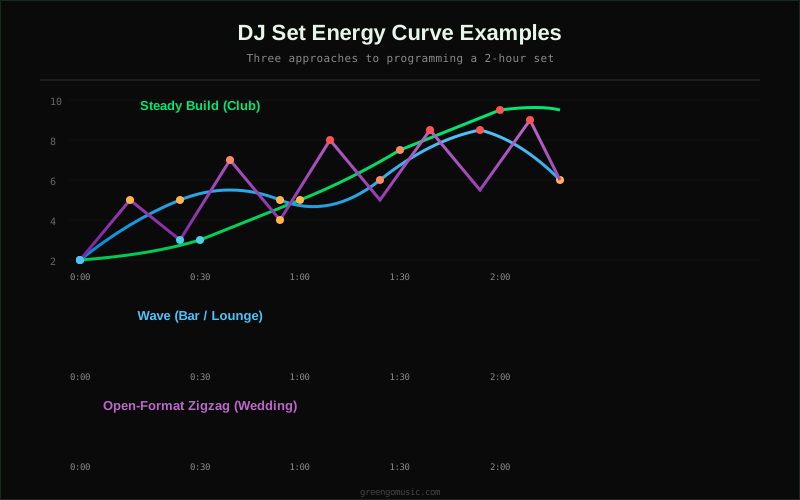
The three curves in detail:
- Steady build (club): Start at 2, build to 8 over 90 minutes, hold at 8 for 20 minutes, drop to 4 for the last 10. This is the classic club set. The build is slow enough that the crowd does not notice it happening, but steep enough that the peak feels earned.
- Wave (bar / lounge): Rise to 5, drop to 3, rise to 7, drop to 4, rise to 8. The wave keeps a bar crowd engaged without exhausting them. It works because bar crowds come and go - each wave catches a new group of people.
- Open-format zigzag (wedding): Jump between 4 and 8 every 10-15 minutes. Weddings are not about a journey - they are about keeping different age groups on the floor at different times. The zigzag ensures that everyone gets a turn.
For another perspective on reading the room, the Crossfader guide to reading a crowd is a useful companion. For a practical walkthrough of building an open-format set with energy levels, see our open-format set prep guide.
How energy detection works
Automatic energy detection is not magic - it is signal processing. The algorithm analyzes the audio file and extracts features that correlate with perceived energy. Here is what happens under the hood:
- Tempo extraction: The algorithm detects BPM using onset detection and autocorrelation. See our BPM detection methods comparison for details.
- Rhythm analysis: The algorithm measures onset density - how many percussive events occur per bar. More onsets = higher energy.
- Spectral analysis: The algorithm looks at the distribution of energy across frequency bands. More low-frequency energy (bass) and high-frequency energy (cymbals, hi-hats) = higher energy.
- Loudness measurement: The algorithm measures integrated loudness (LUFS) and dynamic range. Louder, more compressed tracks = higher energy.
- Machine learning model: Some tools (Mixed In Key, GreenGo) train a model on human-labeled tracks to predict energy from the extracted features. The model learns which combinations of BPM, density, bass, and loudness correspond to which energy levels.
The result is a number from 1 to 10. It is usually accurate within plus or minus 1 level. Tracks that are borderline (a 5 that could be a 6) are where manual checking matters most.
Tools for energy tagging
Several tools can detect and tag energy levels automatically. Here is how the main options compare:
- Mixed In Key: The original energy detection tool. Assigns a 1-10 energy level and writes it to the ID3 comment field. Also detects key and BPM. Paid software, Mac and Windows.
- GreenGo: Detects energy, mood, and danceability alongside BPM and key. Writes all tags into the ID3 fields of MP3, FLAC, AIFF, and AAC files. Desktop app for Windows 10/11 and macOS 12+. See the analysis page for details.
- Rekordbox: Has a built-in 'track info' analysis that includes a relative energy indicator, but it does not write a 1-10 number to the tag. Useful within Rekordbox but not portable.
- Serato DJ Pro: Does not have native energy detection. Serato DJs typically use Mixed In Key or GreenGo to tag energy, then import the tags into Serato via the comment field.
- Traktor Pro: Same as Serato - no native energy detection. Use an external tool and import the tags.
For a detailed comparison of GreenGo and Mixed In Key, see our GreenGo vs Mixed In Key guide. For batch tagging a large library, see our batch audio tagger guide.
Where GreenGo fits
GreenGo detects energy level, mood, and danceability as part of its track analysis. It writes the energy level into the ID3 tag of your audio files, so it shows up in Rekordbox, Serato, Traktor, and any other software that reads ID3 tags. GreenGo also detects BPM, key, and run six-stem separation for instrumental and vocal versions.
A typical GreenGo workflow for energy-based set programming: import your library, run batch analysis to tag every track with BPM, key, and energy, then filter by energy level in your DJ software to build your set. The 7-day free trial includes 3 stem separations and does not require a credit card. Unlimited processing requires a subscription. For more on how GreenGo's analysis works, see the analysis page, and for format conversion between MP3, WAV, FLAC, and AIFF, see the converter page.
If you are new to library preparation in general, our 5 time-saving DJ workflows guide covers the basics.
FAQ
What is a DJ energy level?
A DJ energy level is a number from 1 to 10 that describes how intense a track feels on a dancefloor. Level 1-2 is warm-up, 3-4 is build, 5-6 is groove, 7-8 is peak, and 9-10 is maximum energy. The scale was popularized by Mixed In Key and is now used by most energy detection tools.
How do you calculate a track's energy level?
Energy level is calculated from five factors: BPM, rhythm density, bass presence, dynamic range, and vocal intensity. Detection tools analyze the audio file, extract these features, and use a model trained on human-labeled tracks to predict a 1-10 score. You can also assign energy levels manually by listening.
Is energy level the same as BPM?
No. BPM is one input to energy level, but it is not the whole story. A 128 BPM deep house track can be a level 4, while a 128 BPM techno track can be a level 8. Energy is about how a track feels, which depends on rhythm density, bass, dynamics, and vocals in addition to tempo.
What energy level should I start a DJ set with?
Start at level 1-3 for most gigs. A club set typically starts at level 2 and builds to 8 over 90 minutes. A bar set starts at 3 and waves between 3 and 7. A wedding starts at 4 and zigzags between 4 and 8. The rule is: start lower than you think you need to, and build from there.
Does Mixed In Key detect energy levels?
Yes. Mixed In Key was the first tool to popularize automatic energy detection. It assigns a 1-10 energy level and writes it to the ID3 comment field. GreenGo also detects energy, mood, and danceability and writes the tags into MP3, FLAC, AIFF, and AAC files. For a comparison, see our GreenGo vs Mixed In Key guide.
How do I tag energy levels in Rekordbox?
Rekordbox does not write a 1-10 energy level to the tag. Use an external tool like Mixed In Key or GreenGo to detect energy and write it to the ID3 comment field, then import your library into Rekordbox. The energy level will appear in the comment column and can be used for sorting and filtering. See our ID3 metadata reference for how tags work across DJ software.