Vibes and GreenGo both prepare DJ libraries before the set, but they sit at different ends of the job. Vibes is a $49 one-time desktop app for tagging tracks by mood and building sets on a visual canvas. GreenGo is a $5.99-per-month Chromium browser that captures tracks from streaming platforms, converts them, splits stems, and writes BPM, key, energy and mood into the file's ID3 tags. If you are still weighing the bigger ecosystem choice first, our GreenGo vs Mixed In Key breakdown covers the other side of this workflow. For most DJs the decision comes down to one question: is your bottleneck organizing tracks you already own, or getting new tracks ready to play at all?
The Short Answer
Choose Vibes if your library is complete and your pain is sorting it by feel on a visual canvas. Choose GreenGo if your library still needs tracks captured, converted, stemmed, analyzed and tagged. GreenGo is the only tool in this comparison that takes a track from a URL on the web to a fully tagged file Rekordbox reads correctly.
- Choose Vibes if you want a one-time purchase, offline-first mood tagging with unlimited custom categories, a keyboard-first sorting flow, and a visual set canvas with chapters and track connections.
- Choose GreenGo if you still need to acquire tracks from SoundCloud, YouTube and other platforms, convert formats, separate stems, and get BPM, key, energy and mood written into ID3 tags automatically.
- Choose both if you want GreenGo to build and tag the library, then Vibes to plan sets on top of it — they do not overlap on the core job.
What Vibes Does Well
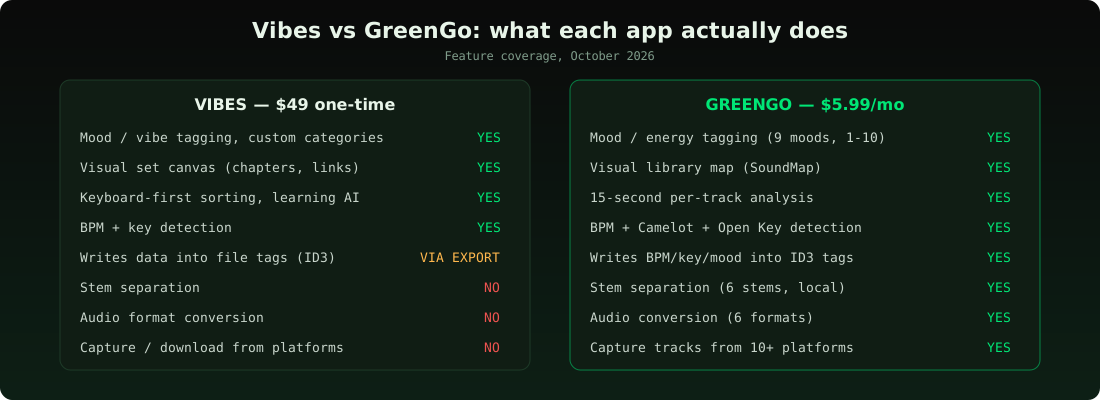
Vibes earns its $49 on three things GreenGo does not try to do. First, the visual set canvas: you drag tracks onto a board, draw chapters and connections between them, and the app suggests the next track by BPM, key and vibe. Second, Vibe Sort: a keyboard-first, one-track-at-a-time sorting flow with an AI that learns which vibe you pick. Third, pricing shape — $49 once, no subscription, a 14-day full trial, no account, everything offline.
Vibes imports a library from Rekordbox, Serato, Traktor or Engine DJ, lets you organize it with your own tag vocabulary, then writes playlists and data back into the DJ app — including direct export into Rekordbox and Engine DJ databases. The Companion Pro browser extension (a $19 add-on, included) grabs track lists from sites like Beatport so you can plan with tracks you have not bought yet.
Where Vibes Stops
Vibes assumes your tracks already exist as files. GreenGo exists because that assumption is where most prep time actually goes. Vibes has no stem separation, no audio conversion, no way to pull a track off a platform, and no built-in ad-free browsing for the sites where DJ music actually lives. If a track exists only as a SoundCloud or YouTube upload, Vibes cannot see it until something else makes it a file.
Vibes also keeps its analysis inside its own model rather than centering the audio file's tags. Playlists and vibe data export to your DJ app, but the BPM and key Vibes detects do not travel inside the file the way GreenGo's ID3 writes do — re-import that file into a different tool and the tags are only there if the tags are in the file.
What GreenGo Adds
GreenGo covers the steps before organization: capture a track from any of 10+ platforms — see the converter in one click, convert it to MP3, WAV, FLAC, M4A, OGG or AAC, separate it into six stems locally, detect BPM, Camelot and Open Key, energy and mood within about 15 seconds of playback, and write all of it into the file's ID3 tags. Rekordbox, Serato, Traktor and VirtualDJ then read those tags directly on import — no plugin, no export step, no second analysis pass.
GreenGo's SoundMap plots the whole library by BPM, key, energy and mood so harmonic next-tracks are a glance away — the closest equivalent to Vibes' set canvas, minus the drag-and-drop chapter builder. The built-in ad blocker matters more than it sounds: the platforms DJs pull tracks from are ad-heavy by design.
Honest gap: GreenGo has no visual set builder and no learning AI that picks up your sorting taste the way Vibe Sort does. If sequencing a set on a canvas is your ritual, Vibes does that and GreenGo does not.
The Two-Year Cost Math
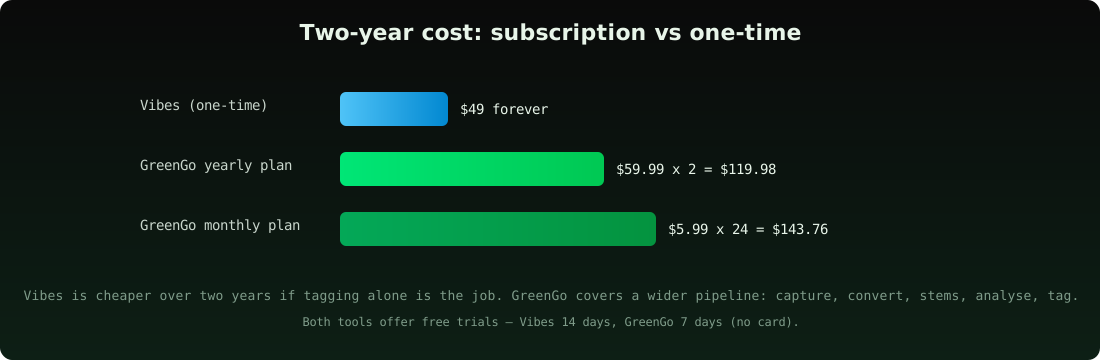
Vibes costs $49 once, forever. GreenGo costs $5.99 a month or $59.99 a year on the pricing page, so Vibes is cheaper on pure dollars after about month ten. That comparison only holds if tagging is the whole job — Vibes cannot replace a converter, a stem splitter, a capture tool and a tagger, which are four separate purchases or subscriptions elsewhere. GreenGo's 7-day free trial includes 3 stem separations, 30 conversions and 30 track analyses with no credit card; Vibes gives a 14-day full trial.
Workflow Compared
The clearest way to see the divide is a single track's journey from discovery to USB stick:
| Step | With Vibes | With GreenGo |
|---|---|---|
| Find a track on SoundCloud | Companion Pro clips the listing for planning | GreenGo captures and converts the audio itself |
| Get it as a usable file | Buy/download elsewhere first | GreenGo downloads and converts in one click |
| BPM, key, energy, mood | Vibes detects on import | GreenGo detects in ~15 seconds and writes ID3 tags |
| Stems for remixing | Not available | GreenGo separates six stems locally |
| Sort by feel | Vibe Sort + custom categories | GreenGo's SoundMap + energy/mood tags |
| Plan the set visually | Canvas with chapters and connections | Not available — use Rekordbox/Serato playlists |
| Land in Rekordbox/Serato | Direct DB export (Rekordbox, Engine DJ) | Tags already inside the file — any DJ app reads them |
Who Should Pick What
Choose Vibes over GreenGo if your files are already downloaded and clean, you organize by feel rather than by metadata fields, you want a canvas for planning sets, and a one-time $49 beats a subscription for you.
Choose GreenGo over Vibes if any part of your weekly routine is still: find track online → figure out how to get the file → fix its format → guess its key → tag it manually. GreenGo removes that entire chain, which is where prep time actually disappears.
Choose both if you want the full pipeline: GreenGo captures, converts, stems and tags; Vibes plans the set on top of the clean library. Nothing overlaps, nothing conflicts.
Frequently Asked Questions
Is Vibes better than GreenGo for organizing a DJ library?
Vibes is better than GreenGo for one specific job: planning sets on a visual canvas with custom mood categories and keyboard-first sorting. GreenGo is better than Vibes for everything before that — capturing tracks, converting formats, separating stems, and writing BPM, key, energy and mood into the file's ID3 tags.
Does Vibes separate stems or convert audio?
No — Vibes does not separate stems, convert audio formats, or capture tracks from the web. GreenGo splits six stems locally, converts between MP3, WAV, FLAC, M4A, OGG and AAC, and captures from 10+ platforms, which is why the two tools complement rather than replace each other.
Is GreenGo cheaper than Vibes?
Vibes is cheaper in dollars — $49 once versus GreenGo's $59.99 per year. GreenGo replaces a converter, a stem separator, a download tool and a tagger, which typically cost more than $49 combined if bought separately, so the honest comparison is scope, not sticker price.
Do Vibes tags show up in Rekordbox and Serato?
Vibes exports playlists and organization data to Rekordbox, Serato, Traktor and Engine DJ, with direct database export for Rekordbox and Engine DJ. GreenGo writes BPM, key, Camelot, Open Key, energy and mood into the file's ID3 tags, so every DJ app reads them without any export step.
Can I use Vibes and GreenGo together?
Yes — GreenGo builds and tags the library, Vibes plans sets on top of it, and neither app touches the other's job. That pairing covers the full path from a URL on the web to a planned set on a canvas.
Deeper reading in this series: best DJ library management software 2026, how to organize a DJ library, the complete guide to preparing tracks for a DJ set, open-format set prep in under 30 minutes, the Camelot wheel reference, why ID3 tags decide whether Rekordbox reads your metadata, and the GreenGo stem separation walkthrough. External references: Vibes' own comparison page, the Digital DJ Tips library-prep coverage, and r/DJs for community verdicts on both tools.
The Bottom Line
Vibes is the better set-planning surface; GreenGo is the better track pipeline. If your prep bottleneck is deciding which of your tracks go together, buy Vibes. If your bottleneck is getting raw tracks playable at all — captured, converted, stemmed and tagged — GreenGo is the tool that removes that work. Most DJs hitting this comparison need the pipeline first.