Open any MP3 in a tag editor and you are looking at one of three different metadata standards glued to the same file: ID3v1, ID3v2.3, or ID3v2.4. They store the same information — artist, title, BPM, key — in completely different parts of the file with completely different rules. Understanding the difference explains almost every "my tags are there but my DJ software can't see them" problem, including why Rekordbox shows a key that Traktor doesn't, and why your carefully tagged library sometimes displays garbage characters.
What Are the ID3 Versions?
ID3 is the metadata standard for MP3 files. It has two generations that coexist in the wild:
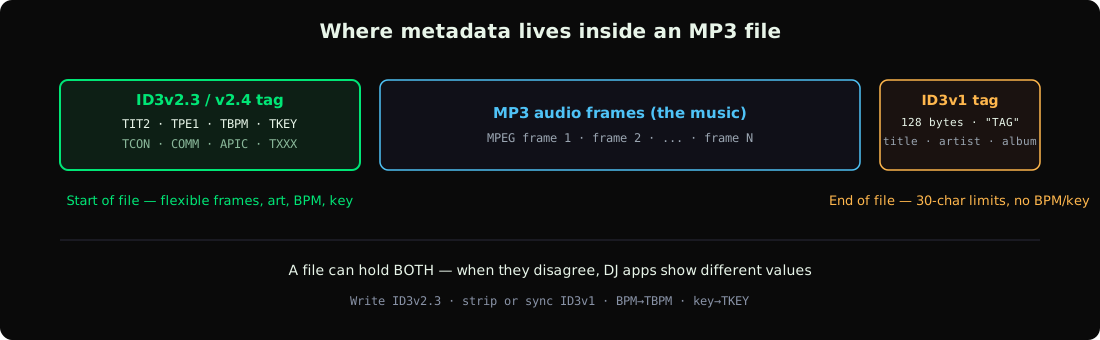
- ID3v1 (1996): a fixed 128-byte block at the very end of the file. Simple, universal, and extremely limited.
- ID3v2 (1998+): a flexible tag at the beginning of the file, made of named "frames" that can hold almost anything, including images and custom fields. Comes in two versions that actually matter: v2.3 and v2.4.
A single MP3 can carry an ID3v1 tag and an ID3v2 tag at the same time — and they can disagree with each other. That dual-tag situation is the source of most DJ metadata bugs.
ID3v1: The 128-Byte Trailer
ID3v1 was designed when hard drives were measured in megabytes. The entire tag is exactly 128 bytes appended to the end of the file, starting with the letters TAG:
| Field | Bytes | Limit |
|---|---|---|
| Title | 30 | 30 characters — longer titles get truncated |
| Artist | 30 | 30 characters |
| Album | 30 | 30 characters |
| Year | 4 | "2026" only, no full dates |
| Comment | 28-30 | 28 bytes if track number is present |
| Genre | 1 | One of 80 fixed genre IDs — no "Melodic Techno" |
There is no BPM field, no key field, no composer, no album art, no remixer. ID3v1 also predates Unicode, so anything beyond basic Latin characters — Cyrillic artist names, accented characters, Japanese titles — either fails or produces mojibake.
For a DJ library in 2026, ID3v1 is a compatibility fallback at best. Its only real job today is letting ancient hardware and car stereos display something recognizable.
ID3v2.3 vs ID3v2.4: The Frames That Matter
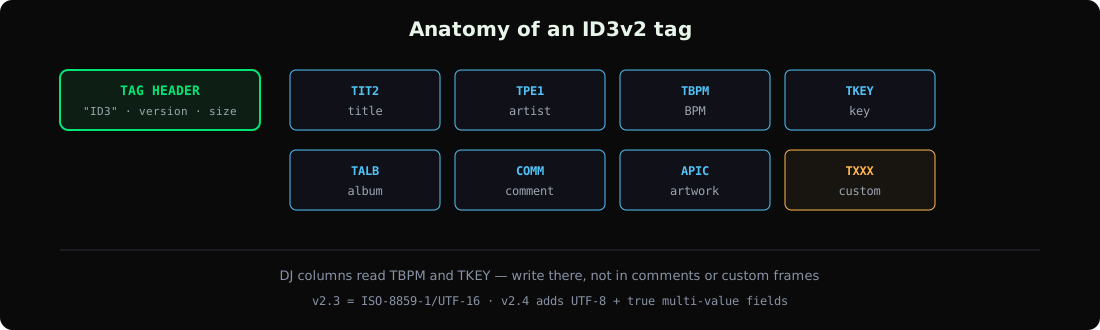
ID3v2 lives at the start of the file and stores metadata in named frames. The frames DJs actually care about:
| Frame | Holds | Read by DJ software? |
|---|---|---|
TIT2 | Title | Yes, everywhere |
TPE1 | Lead artist | Yes, everywhere |
TALB | Album | Yes |
TBPM | Beats per minute | Yes — Rekordbox, Serato, Traktor, VirtualDJ, Engine DJ |
TKEY | Initial key (e.g. "8A", "Am") | Yes — the key column in your library |
TCON | Genre (free text in v2) | Yes |
TCOM | Composer | Partial |
COMM | Comments | Yes — Rekordbox comments column |
APIC | Embedded artwork | Yes — waveform strip thumbnails |
TXXX | Custom/user-defined text | Used by tools for energy, mood, analysis data |
The difference between v2.3 and v2.4 is mostly invisible until it breaks something:
- Text encoding: v2.3 stores text as ISO-8859-1 or UTF-16. v2.4 adds UTF-8, which is what modern tools expect. A v2.3 tag with UTF-8 written by a sloppy editor is technically invalid — and some software renders it as garbage characters.
- Multi-value fields: v2.4 officially supports multiple values per frame separated by a null byte ("Techno\0House"). v2.3 doesn't — tools fake it with slashes or semicolons, which is why you sometimes see "Techno/House" as one genre.
- Extended header and unsynchronisation: v2.4 cleaned up the unsynchronisation scheme (protecting tag data that looks like MP3 frame sync). Old players misapply v2.3 unsync rules to v2.4 tags and corrupt the audio read.
The formal ID3v2.4 specification documents all of this, but the practical takeaway for DJs is simpler: v2.3 is the maximum-compatibility format, v2.4 is the technically-correct modern format. Nearly every DJ application reads both without issue in 2026.
APEv2, Vorbis Comments, and MP4 Tags
ID3 only applies to MP3 (and, awkwardly, AIFF and WAV). Other formats have their own standards:
- FLAC / OGG: Vorbis comments — flexible key-value pairs like
BPM=128andINITIALKEY=8A. Well-supported by all major DJ apps. - M4A / AAC: MP4 atoms —
tmpofor BPM, and key support is patchy (some apps store it in a freeform field). - WAV: historically just the INFO chunk; modern tools write ID3v2 into a dedicated
id3chunk. Older Rekordbox versions ignored WAV tags entirely. - APEv2: a clean tag format mostly seen on MPC, WavPack, and some MP3s written by older tools. Rare in DJ libraries.
Our audio format reference covers which formats are worth converting to — and the field-level reference maps every tag to exactly which DJ app reads it.
Which Tag Format Each DJ App Reads
| Software | ID3v1 | ID3v2.3 | ID3v2.4 | Notes |
|---|---|---|---|---|
| Rekordbox | Yes | Yes | Yes | Prefers v2.x; reads TBPM/TKEY. Re-analyzes by default on import unless disabled. |
| Serato DJ | Yes | Yes | Yes | Enable "Read iTunes/ID3 tags" if fields look empty. |
| Traktor | Yes | Yes | Yes | Maps TKEY into Open Key notation. |
| VirtualDJ | Yes | Yes | Yes | Aggressive tag reader, tolerates malformed tags well. |
| Engine DJ | Yes | Yes | Yes | Reads TBPM/TKEY for Prime hardware prep. |
| CDJ/XDJ players | via Rekordbox export | — | — | Players read the Rekordbox database, not file tags directly. |
The important nuance: CDJs don't read your file tags at all. They read the Rekordbox database on your USB stick — which is built from whatever Rekordbox parsed when you imported. This is why tag work happens before export, not after. See the Rekordbox USB export guide for the full pipeline.
Common Tag Problems and How to Fix Them
Tags visible in one app but not another. Almost always a dual-tag conflict: your editor wrote v2.4, the other app is reading stale v1 data. Fix: strip the v1 tag, or write both consistently.
Mojibake (garbage characters like é or ’). Encoding mismatch — text written as UTF-8 but declared as Latin-1, or vice versa. Common in files tagged by old tools or downloaded from sketchy sources. Rewrite the tag with a proper editor — free options like MusicBrainz Picard handle encoding correctly; for the paid/automatic side see our MP3 tag editors ranking, or edit metadata in GreenGo.
BPM present in file but empty in DJ software. Two causes: the BPM was written to a comment or TXXX field instead of TBPM, or the app re-analyzed on import and discarded the tag. For Rekordbox, disable Auto Analysis as we covered in the Dynamic vs Normal analysis comparison.
Album art shows in iTunes but not in Rekordbox. APIC frame written in a format Rekordbox dislikes, or art stored in a separate iTunes-side database rather than embedded. Re-embed artwork into the file itself.
Genre shows as a number like "(17)". That's an ID3v1 genre ID leaking into a v2 field — a hallmark of tools that write v1-style genre references inside v2 frames. Replace with plain text.
What Format Should DJs Write?
The boring, correct answer for 2026:
- Write ID3v2.3 for maximum compatibility — every DJ app, every OS, every embedded player reads it cleanly. v2.4 works everywhere modern too, but v2.3 remains the safest common denominator for random gear.
- Keep or strip ID3v1 deliberately. If your files also target very old hardware, write both tags consistently. Otherwise strip v1 to eliminate dual-tag conflicts.
- Use UTF-16 or UTF-8 encoding consistently — this is where GreenGo's tag writer avoids the classic corruption cases.
- Put BPM in TBPM and key in TKEY — not comments, not TXXX. That's what the DJ apps' sortable columns read.
If you're tagging at library scale, do it once, correctly: the batch tagging guide and the complete track-prep guide covers the tools and the workflow, and GreenGo writes clean v2.3-compatible frames with BPM, key, and energy already filled in during analysis.
Frequently Asked Questions
Should I use ID3v2.3 or ID3v2.4 for DJ libraries?
v2.3 is the safest choice — every DJ application, media player, and embedded device reads it without quirks. v2.4 is technically superior (UTF-8, proper multi-value fields) and works in all modern DJ software, but v2.3 avoids edge cases on older hardware. GreenGo writes v2.3-compatible frames.
Why does my MP3 show different titles in different programs?
The file has both ID3v1 and ID3v2 tags with different values. ID3v1 truncates at 30 characters, so a long title like "Artist Name - Track Title (Extended Remix)" gets cut in v1 but stored fully in v2. Some apps display the v1 version. Strip the v1 tag or sync both.
Does Rekordbox read ID3v2.4?
Yes. Rekordbox reads v2.3 and v2.4 tags including TBPM, TKEY, and APIC artwork. Just remember Rekordbox re-analyzes BPM on import by default — disable Auto Analysis in Preferences to keep your tagged values.
Can ID3 tags store BPM and musical key?
Yes — TBPM holds BPM and TKEY holds the initial key (as "8A", "Am", etc.). These are standard v2 frames that Rekordbox, Serato, Traktor, VirtualDJ, and Engine DJ all read into their BPM and key columns. ID3v1 cannot store either.
What is the difference between ID3 and MP3 metadata?
ID3 is MP3 metadata — it's the tag standard for MP3 files specifically. Other formats use different systems: FLAC uses Vorbis comments, M4A uses MP4 atoms, WAV uses INFO or embedded ID3 chunks. "MP3 metadata" almost always means its ID3 tag.
Tag formats aren't glamorous, but they're the plumbing your entire library runs on. Write clean v2.3 frames with BPM and key in the right fields, strip conflicting v1 data, and every DJ app will just work. GreenGo does all of this automatically during analysis — 7-day free trial, no credit card required.
Ihor, Music software developer at GreenGo.