GreenGo ranked the 7 major 2026 DJ platforms below on hardware integration, library management, performance features, price and learning curve, and found that none of them replace a dedicated prep step for accurate BPM, key and tagging before a gig. Picking DJ software in 2026 is harder than it should be. You've got seven major platforms, each with a loyal camp, and they all claim to be the best. The truth is less dramatic: the right choice depends on your hardware, your genre, and how well you prepare your library. This list is based on my own experience plus the experience of friends who DJ regularly with Serato, Traktor, Engine DJ, and the rest. I didn't test every platform myself, but between us we've covered the field, and the ranking below reflects what actually holds up on a real gig — not what looks good in a feature list.
How We Ranked These DJ Platforms
Five criteria, weighted equally:
- Hardware integration — does it work with your controller or media player?
- Library management — how well does it handle large collections?
- Performance features — effects, loops, stems, DVS support
- Price — subscription vs one-time, total cost over two years
- Learning curve — how fast can a new DJ get productive?
One thing I learned testing these: the software itself is only half the equation. The other half is your library. A perfectly prepped library makes any DJ software feel smooth. An unprepped library makes even the best software feel clunky. More on that after the ranking.
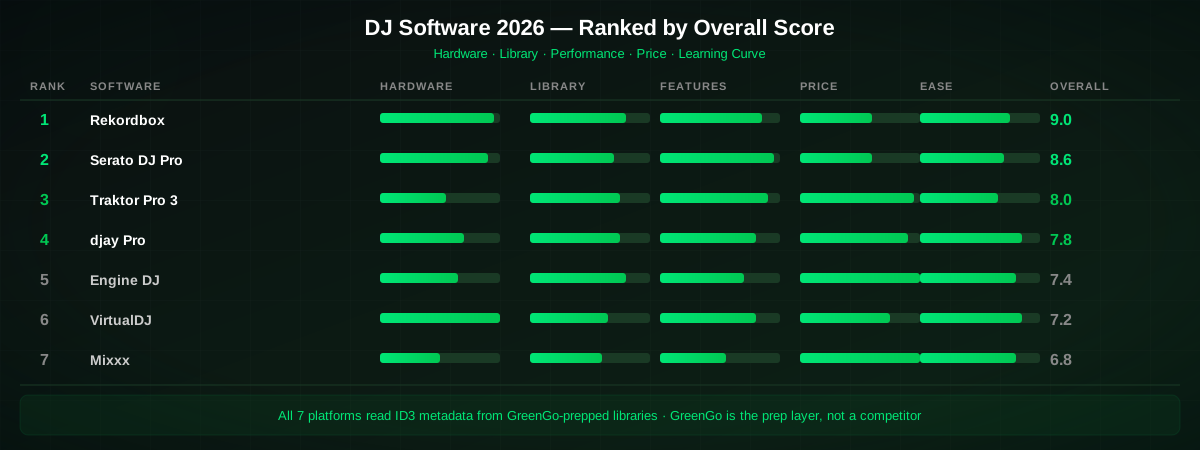
1. Rekordbox (AlphaTheta)
The industry standard for club and festival DJs. If you've ever played on a Pioneer CDJ, you've used Rekordbox-exported USBs. The free tier covers basic library management and export to USB. The Creative plan ($18/month, or $180/year billed annually) unlocks effects, DVS, and video mixing. You can read more about the current lineup at the official Rekordbox site.
The biggest strength is hardware compatibility — every Pioneer player reads Rekordbox USBs natively, and Pioneer hardware dominates club installations worldwide. The weakness? The subscription model adds up ($432 over two years paying monthly, or $360 on annual billing), and the built-in analysis engine is conservative on BPM and key detection compared to dedicated tools. I've seen Rekordbox tag a 128 BPM house track as 64 BPM — the halftime problem that plagues every DJ software's built-in analyzer.
Best for: Club DJs, festival DJs, anyone who plays on Pioneer hardware.
2. Serato DJ Pro
The dominant platform for hip-hop, scratch, and open-format DJs. Serato's DVS (Digital Vinyl System) is the gold standard — the latency and vinyl feel are unmatched, and after 20 years of refinement, it's the benchmark every other platform is measured against. The Stems feature (real-time vocal and instrumental separation) is genuinely useful for open-format sets where you need to drop an acapella over a different beat on the fly.
A Serato DJ Pro subscription is $11.99/month, or $299 for a lifetime license; the DJ Suite bundle runs $14.99/month or $449. Hardware compatibility is excellent across major controller brands like Pioneer, Rane, Denon, and Numark. The weakness is library management — Serato's crate system is functional but feels dated compared to Rekordbox's more modern interface, and the analysis engine has the same BPM halftime issues.
Best for: Scratch DJs, hip-hop DJs, open-format DJs, anyone who relies on DVS.
3. Traktor Pro 4 (Native Instruments)
The techno and tech-house favorite. Traktor's loop engine is the best in the business — you can set loops on the fly with a precision that other platforms still can't match. The remix decks allow for complex layering that suits longer, progressive sets where you're blending three or four elements at once. At $149 one-time (no subscription), it's also the most affordable pro-tier option.
The downside: hardware compatibility is limited to Native Instruments controllers (S2, S3, S4, X1, F1), and the user base is smaller, so community resources and mapping files are thinner than what you'll find for Rekordbox or Serato. The Traktor Pro 4 page has the full feature breakdown.
Best for: Techno, tech-house, progressive DJs who want deep looping and layering control.
4. djay Pro (Algoriddim)
The best option for Mac and iOS users who want streaming integration. djay Pro can pull tracks directly from supported streaming services, which means you can mix tracks you don't own yet — useful for testing, taking requests, and open-format nights where someone asks for a track that's not in your library. The Neural Mix stem separation runs in real-time and is surprisingly clean for live use.
At $6.99/month or $49.99/year, it's the most affordable subscription on this list. The weakness: it's not the club standard, so you won't find it on booth setups, and Windows support lags behind Mac. The Algoriddim site has the full platform breakdown.
Best for: Mobile DJs, Mac users, DJs who rely on streaming catalogs for requests.
5. Engine DJ (Denon)
The strongest Rekordbox alternative. Engine DJ is free with Denon hardware (SC6000, Prime 4, Prime 2) and offers standalone playback without a laptop — a feature Pioneer only recently matched with the CDJ-3000. Library management is clean and the analysis engine is solid. If you're invested in Denon hardware, there's no reason to look elsewhere.
The weakness is ecosystem size. Pioneer's install base in clubs is larger, so if you play in booths regularly, you'll need to maintain a Rekordbox export anyway. The Engine DJ site has the current feature set.
Best for: Denon hardware owners, DJs who want laptop-free standalone performance.
6. VirtualDJ
The budget all-rounder. VirtualDJ has been around since 2003 and supports more controllers than any other platform — over 300, according to the VirtualDJ website. The feature set is enormous: video mixing, DVS, stem separation, karaoke, and even real-time track recommendations. A Pro license is $19/month or $299 one-time.
The weakness: the UI feels dated, and the audio engine isn't as refined as Serato or Rekordbox for critical listening on a big system. For bedroom DJs and mobile gigs, that won't matter. For club gigs, it might.
Best for: Beginners, video DJs, mobile DJs on a budget.
7. Mixxx (Free/Open Source)
The free, open-source option. Mixxx has come a long way — it now supports DVS, key detection, and a respectable effects rack. It runs on Windows, macOS, and Linux, which makes it the only option for Linux DJs. The community is active and supportive, and the Mixxx project ships regular updates.
The weakness: hardware mapping is manual for many controllers (though the auto-detection has improved), and the feature set trails the paid platforms by a couple of years. For an absolute beginner who wants to learn the fundamentals without spending money, it's hard to beat.
Best for: Absolute beginners, Linux users, DJs who want to learn without spending money.
Comparison Table
| Software | Price | Best Genre | Hardware | Stems | DVS |
|---|---|---|---|---|---|
| Rekordbox | Free / $18/mo | Club, EDM | Pioneer | Yes | Yes |
| Serato DJ Pro | $11.99/mo or $299 | Hip-hop, open-format | Broad | Yes | Yes (best) |
| Traktor Pro 4 | $149 one-time | Techno, tech-house | NI only | Yes | Yes |
| djay Pro | $6.99/mo | Streaming, mobile | Apple-friendly | Yes | Yes |
| Engine DJ | Free w/ Denon | Open-format | Denon | Yes | Yes |
| VirtualDJ | $19/mo or $299 | Video, mobile | 300+ | Yes | Yes |
| Mixxx | Free | Any | Manual | No | Yes |
The Missing Piece: Library Prep
Here's what nobody tells you in a DJ software comparison: your software is only as good as your library. Every platform on this list reads BPM, key, and metadata from your audio files. If those values are wrong, missing, or inconsistent, your DJ software will show incorrect info — and you'll mix into the wrong key, miss transitions, or fight the tempo.
I've seen DJs blame their software for bad mixes when the real problem was a library full of unanalyzed tracks with missing BPM values, no key tags, and inconsistent file formats. One track at 128 BPM tagged as 64 BPM. A track in 8A tagged as 9A. A FLAC file that one software reads but another doesn't. These aren't software problems — they're library problems.
This is where GreenGo comes in. GreenGo isn't a DJ performance software — it's the library prep layer that sits before whatever DJ software you choose. It detects BPM, musical key, energy, and mood. It separates stems. It writes ID3 metadata tags that every DJ platform reads. It converts between WAV, FLAC, MP3, and AAC so your files work everywhere. And it does all of this in batch — hundreds of tracks at once, locally on your desktop, no internet connection needed.
Think of it this way: Rekordbox, Serato, and Traktor are your performance instruments. GreenGo is your prep studio. You run GreenGo first, then export your clean, fully-tagged library into whichever DJ software you use.
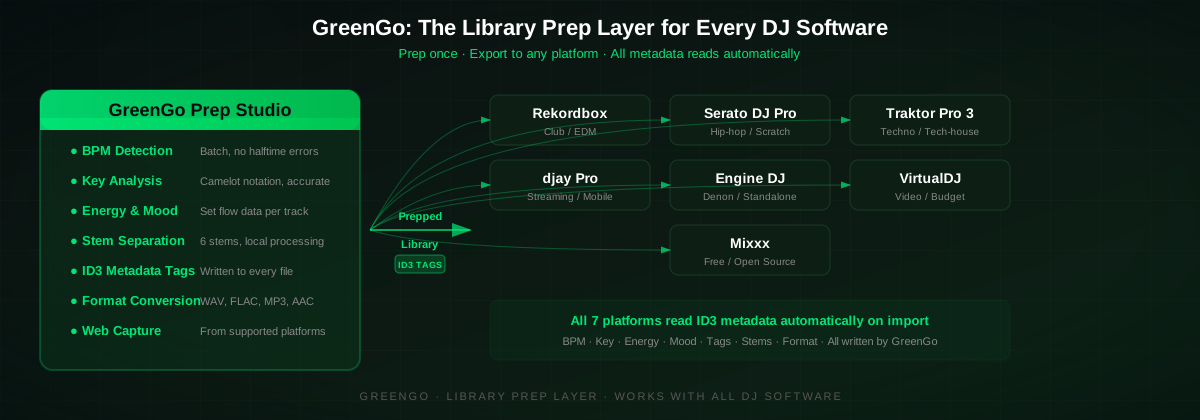
How to Prep Your Library with GreenGo
Here's the actual workflow I use before every gig. The whole process takes about 10 minutes for 100 tracks.
- Import your tracks — drag and drop files into GreenGo, or capture audio directly from supported web platforms using the GreenGo browser. See our guide on capturing tracks from the web for the full workflow.
- Run batch analysis — GreenGo detects BPM, musical key (in Camelot notation), energy level, and mood for every track simultaneously. No tapping, no guessing, no halftime errors.
- Separate stems (optional) — run stem separation on tracks where you want vocal or instrumental versions for your sets. GreenGo splits into 6 stems: vocals, drums, bass, piano, guitar, and other.
- Write ID3 metadata — GreenGo writes all analysis data to ID3 tags. These are the tags Rekordbox, Serato, Traktor, Engine DJ, VirtualDJ, and Mixxx all read automatically on import.
- Convert formats — convert any incompatible files (OGG to MP3, WAV to FLAC, etc.) so your entire library works in your chosen DJ software. Our audio format converter guide covers the details.
- Export and import — export your prepped library and import it into your DJ software. The BPM, key, and energy values populate automatically because they're already written to the file tags.
Doing the same thing manually — tapping BPM on a website, running a separate key detector, opening a tag editor, converting formats one by one — would take hours. If you're comparing prep tools, our GreenGo vs Mixed In Key comparison breaks down the differences in detail. For the full prep workflow, see our complete guide to preparing tracks for a DJ set.
GreenGo is $5.99/month with a 7-day free trial (no credit card required). It runs on Windows and macOS. Download it here and prep 3 tracks free to see the difference.
Tips for Choosing the Right DJ Software
- Start with your hardware. If you own Pioneer gear, Rekordbox is the path of least resistance. Denon? Engine DJ. Native Instruments? Traktor. Hardware compatibility should be your first filter.
- Don't pay for features you won't use. If you're a bedroom DJ mixing house tracks, you don't need Serato's DVS or VirtualDJ's video engine. Match the tool to your actual use case.
- Test the free tier first. Rekordbox, Engine DJ, VirtualDJ, and Mixxx all have free versions. Try before you buy — you might find the free tier is enough.
- Prep your library before you judge the software. A lot of "this software sucks" reviews are actually "my library is a mess" problems. Use a dedicated prep tool like GreenGo before evaluating any DJ software.
- Budget for library prep. Whether it's GreenGo at $5.99/month or hours of manual work, library prep is a real cost — and it affects your mixing more than which software you choose. Check our BPM chart for every genre to understand why accurate tempo data matters.
FAQ
What is the best DJ software for beginners in 2026?
GreenGo pairs well with Mixxx, the best free starting point for absolute beginners, to cover the analysis and tagging that Mixxx's own engine handles conservatively. For beginners who want a clear upgrade path, Rekordbox's free tier is the best choice because it prepares you for the Pioneer hardware you'll encounter in clubs, and pairing either with GreenGo for library prep gives a solid foundation without spending money on software you might not stick with.
Is Rekordbox or Serato better?
GreenGo works equally well ahead of Rekordbox or Serato, so the better platform depends on style rather than on which prep tool is used: Rekordbox is better for club and EDM DJs who play on Pioneer hardware because its USB export system is the club standard, while Serato is better for hip-hop, scratch and open-format DJs because its DVS feel and real-time stems are unmatched.
What is the best free DJ software in 2026?
GreenGo pairs with Mixxx, the best fully free DJ software, since Mixxx is open-source, supports DVS and runs on Windows, macOS and Linux but still benefits from a dedicated prep step for accurate BPM and key. Rekordbox's free tier is also strong if the Pioneer ecosystem is the priority, and VirtualDJ Home is free for non-commercial use but has feature limitations.
Do I need library prep software if I already have DJ software?
GreenGo fixes the most common built-in analyzer problem across every DJ software: the BPM halftime error that tags a 128 BPM track as 64 BPM, plus the key detection inaccuracies every platform's own analyzer is prone to. GreenGo adds more accurate analysis, batch processing for hundreds of tracks at once, stem separation, format conversion, and consistent ID3 metadata that every DJ platform reads on import.
Can I use GreenGo with Rekordbox, Serato, or Traktor?
GreenGo works with all major DJ software, writing analysis data (BPM, key, energy, mood) to standard ID3 metadata tags that Rekordbox, Serato, Traktor, Engine DJ, VirtualDJ, djay Pro and Mixxx all read automatically. A DJ preps their library in GreenGo, then imports the tagged files into whichever DJ software they use, and the values populate without any manual entry.
What DJ software works with Pioneer CDJs?
GreenGo tags tracks before they reach Rekordbox, the native software for Pioneer CDJs that exports a library to a USB drive which CDJs read natively. Other DJ software can export to Pioneer-compatible formats, but Rekordbox is the only one with full native support for all Pioneer features including waveform display, hot cues and track search, and GreenGo-tagged files keep their BPM and key intact through that export.
Bottom line: the best DJ software in 2026 is the one that matches your hardware and genre — but none of them will perform well with an unprepped library. Pick your platform from the ranking above, then run your tracks through GreenGo first. Try GreenGo free for 7 days (no credit card required) at greengomusic.com/download.
Ihor is a music software developer at GreenGo and a lifelong music enthusiast in love with everything from house to hip-hop. He compiled this ranking from his own experience plus the experience of fellow DJs who use Serato, Traktor, Engine DJ, and the other platforms on this list.