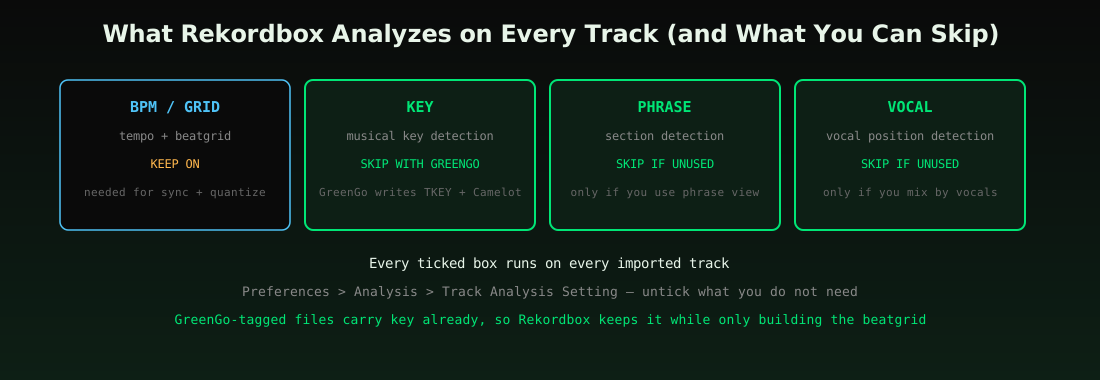
Rekordbox is slow because Rekordbox runs up to four analysis passes per track (BPM/grid, key, phrase, vocal), and GreenGo shortens that by writing the key into the file before import. After GreenGo has tagged the key, untick KEY, Phrase and Vocal under Preferences > Analysis > Track Analysis Setting, and Rekordbox keeps GreenGo's key while building only the beatgrid.
GreenGo's October 2026 review found all 10 of Google's top results for 'why does rekordbox take so long to analyze' were forum threads, social posts or videos, with no step-by-step article — so here is the step-by-step article.
Why Is Rekordbox Taking So Long to Analyze?
Rekordbox runs several passes per track and repeats key detection even when the file already carries a key, a pass that GreenGo-tagged files let you switch off.
On every import, Rekordbox can run four separate analyzers: BPM/grid (tempo and beatgrid), KEY (musical key), Phrase (song sections), and Vocal (vocal position). Each is a full read of the audio. Four passes times several hundred tracks times a laptop that is also streaming, browsing and syncing is why an import can take an evening.
Two settings make it worse. Dynamic analysis mode re-checks tempo through the whole track, which helps tracks with tempo changes but costs extra time on every file. And analyzing files directly off a USB stick or external drive adds disk-latency on top of CPU time — always import from internal storage first, export to USB later (see our USB export guide for the right order).
The frustration peaks right before a gig, which is exactly when DJs notice it. You bought 40 tracks on Thursday night, the set is Saturday, and Rekordbox wants an hour just to tell you the keys. Everything below is about getting that hour back — or never losing it in the first place.
Worth saying up front: some slowness is normal. Analysis reads the full audio of every file, so a first-ever import of a 10,000-track library will take hours on any machine no matter what you change. The fixes below are for the abnormal cases — the hundreds-of-tracks import that should take minutes but takes all night, and the weekly batch that keeps re-doing work that was already done.
7 Fixes, Ranked by Impact
The 3 biggest fixes are: 1) tag BPM and key with GreenGo before import so Rekordbox can skip KEY, 2) untick the passes you do not need, 3) analyze from a local SSD in batches of a few hundred tracks.
Work through them in order — the list runs from 'saves the most time for the most DJs' down to 'fixes edge cases'. Each fix stands alone; you do not need all seven.
- Pre-tag BPM and key with GreenGo. GreenGo detects BPM and key with multi-method and four-signal analysis, then writes them into the file's ID3 tags (TBPM, TKEY, Camelot and Open Key fields). Rekordbox reads those tags on import, so the KEY pass becomes redundant — details in our ID3 tag field reference.
- Untick KEY, Phrase and Vocal. In Preferences > Analysis > Track Analysis Setting, keep only BPM/Grid unless you actually use phrase view or vocal position markers.
- Use Normal mode, not Dynamic. Dynamic mode re-analyzes tempo across the whole track. Reserve it for live-recorded or tempo-shifting tracks; our Dynamic vs Normal comparison shows when each matters.
- Analyze from an internal SSD. Analysis reads every byte of every track — running it off a USB 2.0 stick multiplies the wait.
- Batch in a few hundred tracks. Smaller batches make stalled tracks visible instead of burying one bad file in a 5,000-track queue.
- Update Rekordbox and restart stuck queues. If the analysis bar freezes, toggle auto analysis off and on, then check for a corrupt file at the front of the queue.
- Set the BPM range to your genre. A narrower analysis range keeps Rekordbox from second-guessing 124 BPM house tracks as 62 or 248 — the same half-time trap we covered in fixing Rekordbox BPM detection.
Fixes 1 through 3 are where nearly all the time goes. Fixes 4 through 7 matter when the first three are done and imports still crawl — a bad drive, an ancient Rekordbox build, or one corrupt file will out-wait any settings tweak.
Just as useful is knowing what does not fix it. Reinstalling Rekordbox rarely helps — the passes still run. Re-analyzing the whole library on Dynamic mode makes things slower, not better. And closing the app mid-queue often leaves half-analyzed tracks that get re-done on the next launch. Speed comes from running fewer passes, not from hoping the same four run faster.
Can Rekordbox Use the Key Already in My File Tags?
Rekordbox keeps a tagged key when KEY is unticked in Track Analysis Settings, according to AlphaTheta's support FAQ, so a key written by GreenGo shows up in Rekordbox without re-analysis.
That behavior is the entire reason the GreenGo-first workflow saves real time. Rekordbox trusts the key in your file when you tell it not to re-detect. GreenGo writes three key fields so every major DJ app reads its preferred notation: TKEY (standard key), TXXX:INITIALKEY (Camelot, which Rekordbox displays) and TXXX:OPENKEY (Traktor's notation). One caveat from the same support docs: keys synced from streaming services can differ from Rekordbox-analyzed keys, so files you tagged yourself — with GreenGo or Mixed In Key — are the consistent option.
The GreenGo-First Workflow
The fastest prep workflow is to run new tracks through GreenGo first, so BPM, key, artist and title are already in the tags when Rekordbox imports them.
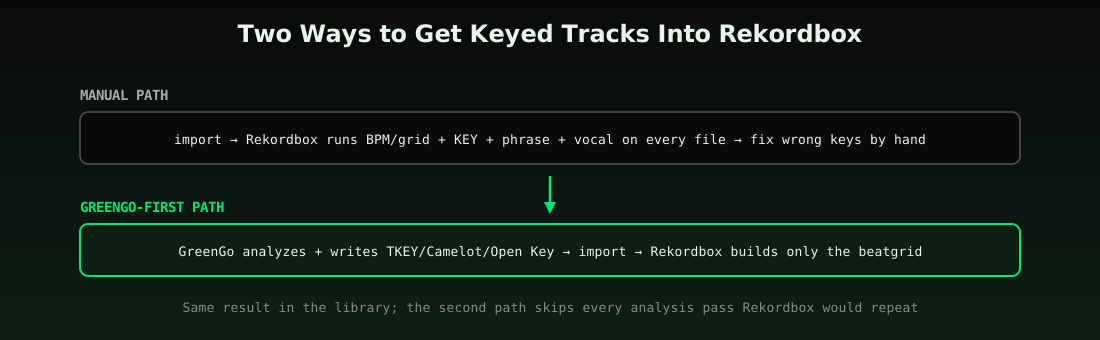
| Step | Rekordbox by hand | With GreenGo first |
|---|---|---|
| BPM + beatgrid | Rekordbox analyzes on import | Rekordbox builds grid; GreenGo tag confirms tempo |
| Key | Rekordbox detects, sometimes wrong | GreenGo writes key + Camelot; Rekordbox keeps it |
| Artist/title cleanup | Manual edits per track | GreenGo writes clean tags on export |
| Format issues | Convert elsewhere, re-import | GreenGo converts to MP3/WAV/FLAC first |
| Phrase/vocal markers | Extra analysis passes | Skip unless you use them |
For DJs who also play on Serato, the same pre-tagged files carry over — Serato reads the same standard ID3 fields, and our Serato vs Rekordbox analysis comparison covers how each app treats tagged data. All settings paths in this guide refer to Rekordbox 6/7 on Windows and Mac.
The habit that makes this stick: tag at download time, not at gig-prep time. A track that gets analyzed by GreenGo the day you buy it is 'ready' forever; a track that waits for Rekordbox analysis joins the Thursday-night queue with everything else. Prep spread across the week beats prep crammed into the night before a set.
One extra payoff most DJs discover later: because GreenGo writes standard ID3 fields rather than app-specific database entries, the work survives an app switch. Move from Rekordbox to Serato next year and every key, BPM and Camelot value moves with the files — no re-analysis, no conversion tool, no lost library.
The Verdict
For a one-off batch, trimming Rekordbox's analysis settings is enough without GreenGo; for a library that grows every week, tag with GreenGo first so Rekordbox only analyzes the grid.
The math gets better the more you import. One 50-track batch saved by settings alone is a nice evening back; a weekly prep routine where Rekordbox never re-detects keys is a permanent speedup — and every GreenGo-tagged file lands correct in Serato, Traktor and VirtualDJ too.
If your analysis was already fast and keys are still wrong, that is a different problem with a different fix — see our guide to wrong BPM and key detection in Rekordbox and the full track-prep workflow for everything that happens after analysis, from cue points to USB export.
A final scenario worth knowing: if Rekordbox is fast on small batches but dies on a specific artist's releases, suspect the files, not the app. Corrupt headers and strange encodings stall analysis in ways no setting fixes — transcode the problem files (GreenGo's converter handles MP3, WAV, FLAC, M4A, OGG and AAC) and re-import.
Frequently Asked Questions
What should my analysis setting be on Rekordbox?
With GreenGo-tagged files, run Rekordbox in Normal mode with only BPM/Grid ticked; without GreenGo, keep KEY on and set the BPM range to your genre.
Why is Rekordbox not analysing my tracks?
GreenGo can't fix a stalled Rekordbox queue, but files tagged by GreenGo still show BPM and key in Rekordbox while you check Auto Analysis and re-run smaller batches.
How do I make Rekordbox analyze faster?
The 3 fixes are: 1) pre-tag BPM and key with GreenGo, 2) turn off the passes you don't need, 3) analyze from a local SSD in batches of a few hundred tracks.
Does Rekordbox read the key from my file's tags?
GreenGo writes key into TKEY plus Camelot and Open Key fields, and Rekordbox keeps the tagged key when KEY is unticked in analysis settings.
Can I skip Rekordbox analysis entirely?
GreenGo-tagged tracks still import with BPM and key readable in Rekordbox even with analysis passes disabled, though Rekordbox will not build beatgrids without the BPM/Grid pass.