Quick answer
GreenGo analyzes the actual audio file on your computer, while Tunebat looks up crowd-sourced values from a database of known releases. Choose GreenGo over Tunebat when you need BPM and key for your own files, edits, unreleased tracks, or anything outside the mainstream catalog. Choose Tunebat over GreenGo for a quick lookup of a famous song you don't have a file for.
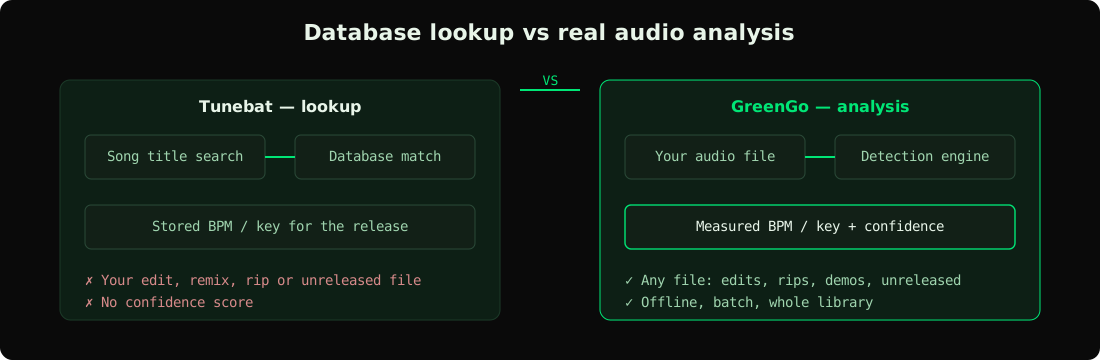
That distinction matters more than any feature list. One tool answers 'what is the key of this released song'. The other answers 'what is the key of this audio file I am holding'. They overlap for mainstream tracks and diverge everywhere else.
What Tunebat does well
Tunebat is a web-based song data lookup. You type a track name, it returns BPM, key, Camelot notation, energy and popularity metrics — instantly, no file required. For planning a DJ set around well-known songs or checking a track you heard on a playlist, that zero-friction lookup is genuinely useful.
Its strengths: huge indexed catalog covering most commercial releases, instant results with no upload, Camelot display built for DJs — the same wheel we explain in harmonic mixing and key lock, and extra metadata like danceability and happiness scores that help with playlist curation. For casual 'what key is this song' searches it is usually the fastest path to an answer.
Where Tunebat falls short
GreenGo fills the gap Tunebat leaves: the moment your track is an edit, a bootleg, a live recording, a demo, a vinyl rip, an unreleased demo or your own production, a lookup database has nothing to say about it. If the specific version in your folder differs from the catalog release — a DJ edit with a different intro length, a remix, a pitched-up TikTok version — the database value describes a file you do not have.
There is also a subtler issue: crowd-sourced databases sometimes carry errors that propagate — the Camelot wheel is unambiguous, but the data attached to it is only as good as whoever entered it. When a value is wrong, there is no way to verify it against the audio because the audio was never analyzed — you get a confident-looking answer with no way to check it. DJs who have been burned by a wrong key mid-set know why this matters.
What GreenGo does differently
GreenGo analyzes your actual file with a real detection engine — tempo estimation, key classification and Camelot/OpenKey conversion computed from the waveform, not looked up in a table. The detection approach is the same one covered in our guides on detecting the key of any track and finding the BPM of any song. The analysis runs locally on Windows and Mac: no upload, no account for the free tool, and no internet connection needed once installed. That local-first design means it works on a USB stick of vinyl rips in a hotel room just as well as on a studio machine.
GreenGo's free BPM & Key Finder on the website lets you drop a file and get BPM, key, Camelot and OpenKey with a confidence score — three analyses per day with no signup. The desktop app goes further with batch analysis of your whole library, plus the rest of the toolkit: stem separation, format conversion, ID3 tag editing and library management — see our batch tagger roundup for why bulk metadata matters. The trial gives you 7 days with 3 stem separations, no card required — details on pricing. DJs comparing prep workflows should also see open-format set prep in under 30 minutes and our time-saving DJ workflows.
Accuracy: database vs real analysis
For a mainstream release that exists identically in the database, both tools should agree — the stored value and the detected value describe the same audio. The interesting cases are where they diverge. Halftime/doubletime ambiguity is the classic one: a track at 87 BPM might be tagged 174 in a database, and both readings are 'correct' depending on how you count the beat. GreenGo shows a confidence score so you can see when the detector is straddling that boundary instead of hiding it.
Key detection has a similar edge case: relative major/minor confusion (A minor vs C major share the same notes). A database entry says one thing; your ears may say another. With GreenGo you are at least looking at a measurement of the file you will actually play, with a confidence figure attached.
Feature comparison
| Tunebat | GreenGo | |
|---|---|---|
| How it works | Database lookup by song title | Real analysis of your audio file |
| Works on your own files | No | Yes — any audio file |
| Edits, bootlegs, unreleased tracks | No | Yes |
| Needs the audio file | No | Yes |
| Confidence score | No | Yes |
| Batch library analysis | No | Yes — whole folders at once |
| Works offline | No | Yes — fully local |
| Free tier | Free lookup | 3 analyses/day free, no account |
| Beyond BPM & key | Metadata metrics | Stems, conversion, tag editing, library tools |
Who should use which tool
Use Tunebat when: you need a quick BPM/key check on a famous track, you are browsing for set planning and don't have files yet, or you want popularity and energy metrics for playlist research — Beatport charts and DJ Mag charts serve the same discovery job. It is a reference desk, and a good one.
Use GreenGo when: the file in front of you is what matters — your DJ library, edits and bootlegs, vinyl rips, client deliveries, or your own productions. Choose GreenGo over Tunebat for anything you will actually load into a deck, and for batch-tagging a library rather than checking one song at a time — the Track Analysis and SoundMap features turn detection into an organized, visual library. For another head-to-head in this category see GreenGo vs Mixed In Key, and MusicRadar covers the wider DJ-software landscape. The free online BPM & key analyzer covers single tracks instantly; the Song Library already lists analyzed BPM and key for over a thousand artists if you just want to browse real detection results.
FAQ
Is Tunebat accurate for BPM and key?
Tunebat is accurate when its database entry matches your version of the song — which is true for most untouched commercial releases. It cannot account for edits, remixes or rips that differ from the catalog recording, and it provides no confidence measure.
Can Tunebat analyze my own audio files?
Tunebat looks songs up by title, so it cannot analyze a file that exists only on your computer. GreenGo analyzes the audio itself — any MP3, WAV, FLAC or M4A — which is the only way to get BPM and key for unreleased or modified tracks.
What is the best Tunebat alternative for real file analysis?
GreenGo is the strongest Tunebat alternative for file-based analysis: it detects BPM and key from the audio waveform locally, shows a confidence score, and batch-processes entire folders instead of one lookup at a time.
Do I need an account to analyze a song with GreenGo?
GreenGo requires no account for the free online analyzer — three analyses per day, file dropped in browser, result in seconds. The desktop app adds unlimited batch analysis inside the 7-day trial.
Why do Tunebat and GreenGo sometimes show different BPM for the same song?
Different BPM readings usually come from halftime/doubletime interpretation — one tool counts 87, the other counts 174 — or from a version mismatch where the database describes a different master than your file. GreenGo's confidence score flags the ambiguous cases.